
Audio Technica AT2020 Review for 2026: Who It Suits and What to Check
Disclosure: We may earn a commission when you buy through links on this page, at no extra cost to you. As an Amazon Associate I earn from qualifying purchases. Learn more

Audio Technica AT2020 Review: a classic starter condenser microphone, how it sounds and what you need to run it.
This audio technica at2020 review looks at one of the most popular entry-level studio condenser microphones ever made. The AT2020 has been the first serious microphone for countless podcasters, singers and home recordists, and it still earns that place because it is clear, quiet and priced low enough that almost anyone can start with it.
Below you will find what the AT2020 does well, what it cannot do, how the XLR and USB versions differ and which alternatives are worth a look. The product table lists the AT2020 family and other Audio-Technica microphones that are in stock.


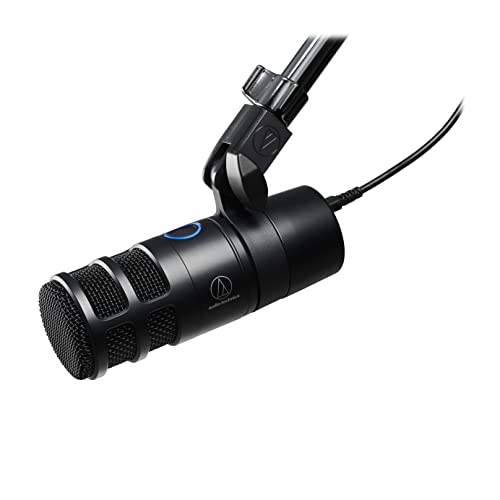

What the Audio-Technica AT2020 Is
The AT2020 is a side-address cardioid condenser microphone with an XLR output. Cardioid means it picks up sound mostly from the front and rejects much of what comes from behind it, which helps in a typical room. It needs phantom power from an audio interface or mixer, and it includes a stand mount.
There are several related models. The AT2020USB+ and AT2020USB-X put a USB output on a similar capsule so you can plug directly into a computer, and the AT2020USBXP adds processing. The plain AT2020 is the XLR version covered here.
Sound Quality
The AT2020 sounds clear and detailed, with a slight lift in the highs that suits voice and acoustic instruments. It is a large-diaphragm condenser, so it picks up fine detail, which is both a strength and a challenge: it also picks up room noise, keyboard clatter and echo.
For best results, record in a quiet room with soft furnishings and keep the microphone a hand span from your mouth. A pop filter reduces harsh plosive sounds.
Where It Works Best
It is ideal for voiceover, podcasting, vocals, acoustic guitar and streaming where you want a polished sound. It is less suited to very noisy rooms, where a dynamic microphone like the Audio-Technica AT2040 or the Shure SM7B rejects background noise better.
What You Need to Use It
- An audio interface or mixer with phantom power.
- An XLR cable.
- A desk stand or boom arm, plus a shock mount if you hear bumps.
- A pop filter for clear speech.
Many listings sell bundles with a stand, a pop filter or headphones. Compare the bundle price with the cost of buying the parts you actually need, because bundles sometimes include low-quality extras.
AT2020 vs the USB Versions
The USB models are simpler because they plug straight into the computer, and some include a built-in headphone output. The XLR AT2020 costs less for the microphone alone but needs an interface, and it gives you better long-term flexibility.
See our review of the audio technica at2020usb x review for the USB version.
Strengths and Weaknesses
- Clear, detailed sound at a low price.
- Widely available with a huge community of users.
- Picks up room noise easily.
- Requires an interface and phantom power.
Alternatives
For a dynamic microphone that is more forgiving in noisy rooms, try the AT2040 or the Samson Q2U. For simple plug-and-play USB, look at the blue yeti review or the dji mic mini review, or read the best microphone guide.
Setting Up and Positioning
Connect the microphone to the interface with an XLR cable, switch on phantom power and raise the gain until your normal speaking voice peaks comfortably below the top of the meter. Place the microphone about a hand span from your mouth, slightly off-axis so breaths and plosives miss the capsule, and point the front of the microphone at your mouth. The front is the side with the logo.
Use a boom arm so that the microphone sits at mouth height without touching the desk, and add a shock mount if you hear thumps when you type or touch the desk. Keep the microphone away from computer fans and monitor speakers to avoid hiss and feedback.
Improving Your Room
A large-diaphragm condenser rewards a quiet, dry room. Record in a room with carpet, curtains or a bed, because soft materials soak up echo. Turn off fans, close windows and put your phone on silent. A closet full of clothes is a classic budget vocal booth.
If you cannot improve the room, move the microphone closer and lower the gain. A close microphone sounds more intimate and makes background noise relatively quieter.
Troubleshooting Common Problems
If the signal is silent, check that phantom power is on and the XLR cable is firmly plugged in at both ends. If the sound is harsh on the letters p and b, add a pop filter or move slightly off-axis. If there is a constant hiss, lower the gain and move the microphone closer instead of boosting later. If the sound has a boxy echo, treat the room rather than changing the microphone.
Who Should Skip It
Skip the AT2020 if you only want plug-and-play simplicity, in which case a USB model is easier, and if you record in a loud space, where a dynamic microphone is the smarter tool. Otherwise it is one of the safest first studio microphones you can buy.
Buying Notes
Because the AT2020 is so popular, the listings are crowded with bundles and look-alike accessories. Prefer a listing that clearly names the microphone as new and sold by a reputable seller, and avoid bundles that pad the price with low-quality cables and stands. If you already own an interface and a stand, the microphone alone is usually the best value.
Keep the box and the foam clip. The microphone is built to last, and a clean, boxed unit keeps its resale value if you upgrade to a studio microphone later.
FAQ
Does the AT2020 need an interface?
The XLR version does. It needs phantom power from an audio interface or mixer.
Is the AT2020 good for streaming?
Yes, in a quiet room. It gives clear, detailed vocals, though it also picks up keyboard and room noise.
What is the difference between the AT2020 and AT2020USB?
The USB version has a built-in converter so it connects directly to a computer, while the XLR version needs an interface.
Does it come with a stand?
It comes with a stand mount, and listings often sell bundles with a stand or arm.
Final Verdict
For a first studio microphone, the AT2020 remains a very good choice. This audio technica at2020 review suggests it if you have a quiet room and an interface, and recommends a dynamic microphone if your room is noisy. Compare the models in the product table and choose between the XLR and USB versions.
Prices and availability can change, so check the product page before ordering.


