
Audioengine A2+ Review for 2026: Who It Suits and What to Check
Disclosure: We may earn a commission when you buy through links on this page, at no extra cost to you. As an Amazon Associate I earn from qualifying purchases. Learn more

Audioengine A2+ Review: compact powered desktop speakers with USB-C, Bluetooth and wood cabinets, and who they suit.
This audioengine a2+ review is about a pair of compact powered speakers that many desk users treat as the first real step up from cheap computer speakers. The A2+ is small enough to sit either side of a monitor, yet it produces a clear, balanced sound that makes music, videos and games more enjoyable.
Below you will find what the A2+ offers, how it connects, who it suits and what the alternatives are. The product table lists Audioengine speakers and similar desktop speakers in stock, so you can compare sizes and prices.


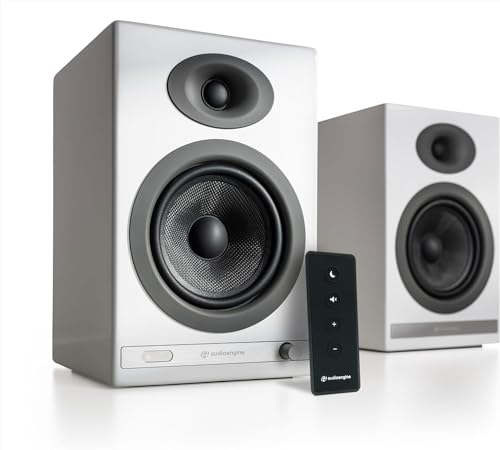
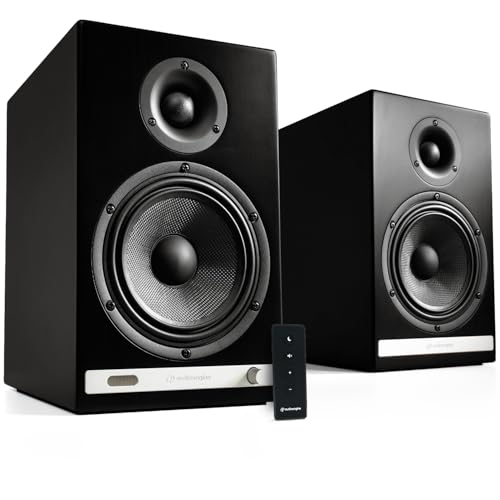
What the Audioengine A2+ Is
The A2+ is a compact powered speaker pair designed for nearfield listening, which means sitting close to the speakers at a desk. The listing describes real wood cabinets, built-in amplification, custom-tuned components, app-free setup and a three-year warranty, and it positions the A2+ as a premium alternative to the plastic computer speakers that often get replaced every few years.
Because the amplifier is built into one speaker, you only need a power outlet and a cable between the two speakers. There is no separate amplifier or receiver to buy.
Connections
The listing mentions a USB-C input with a built-in 24-bit digital to analog converter, plus RCA and 3.5 mm inputs. That means you can connect a computer over USB, a TV or a turntable with a built-in preamp, a games console or a music streamer. The current version also supports Bluetooth with adaptive and aptX HD audio for wireless streaming from a phone or tablet.
That variety of connections is the A2+'s selling point. A single pair can serve your desk, your TV and a record player without extra adapters.
Sound Quality
The A2+ is a small speaker, and it sounds like one in the best sense: clear vocals, tidy detail and a balanced presentation for its size. It will not shake the room with deep bass, since the cabinets are compact. A subwoofer, such as the Audioengine S6 or S8, adds the missing low end if you want it.
At desk distance, the A2+ images well and sounds more open than a soundbar, which is why it is popular for music and video editing.
Design and Finish
The wood cabinets come in several finishes, and the build feels better than plastic rivals. They sit well on a desk or a bookshelf, and the front-mounted headphone jack and volume control are handy. The shape is compact enough to avoid crowding a monitor.
Who Should Buy the A2+
- Desk users who want better sound than a monitor or laptop speakers.
- Small bedrooms and apartments where large speakers do not fit.
- Listeners who want one pair for PC, TV and a turntable.
- Anyone who values a long warranty and wood cabinets.
Who Should Look Elsewhere
If you want strong bass without a subwoofer, a bigger pair such as the Audioengine A5+ or an Edifier model with a larger cabinet is a better match. If you want the lowest possible price, cheap computer speakers cost less, though they sound thinner and rarely last as long.
For comparison, see our audioengine a2+ vs a5+ guide, the edifier r1280dbs review and the audioengine a2+ alternative page.
Placement and Setup
Put the speakers at ear height if you can, with the tweeters aimed at your head and about an arm's length apart. Keep them a few centimeters from the wall to reduce boom. Use the desk stands or isolation pads if the desk vibrates, and connect the computer over USB-C for the cleanest sound.
Choosing Between A2+ Versions
Audioengine has sold the A2+ in several revisions, and the listings can look alike. The newer version in the table is described as a wireless computer speaker with Bluetooth 5.4, USB-C and a 24-bit converter, while older units use a different input layout. Read the title and the first bullet carefully, check which inputs you need, and make sure the color and finish are the ones you want, since returns on speakers are a nuisance.
Related products from the maker, such as the A2 HD and the A2 AIO, use different designs and prices. They are not the same speaker, so compare them separately rather than assuming they match.
Adding a Subwoofer Later
The A2+ has a subwoofer output, so you can start with the pair and add a small subwoofer when you decide you want more bass. The Audioengine S6 mini subwoofer is compact, while the S8 is larger and fills a bigger room. Place the subwoofer near a wall, run the cable and adjust the crossover until the bass blends in instead of standing out.
That upgrade path is useful. You can begin with a modest system and grow it without replacing the speakers, which helps keep long-term costs sensible.
Looking After the Speakers
Wood cabinets are tougher than they look, but they like a stable shelf and a dry room. Dust the grilles gently, keep drinks away from the amplifier speaker and avoid putting the speakers on a surface that can vibrate loudly. Turn the power off when you travel, and keep the original box if you plan to move, so the pair travels safely.
Using the A2+ as a Desk Setup
For the best sound, angle the speakers inward so that they point toward your ears, keep them about an arm's length apart and raise them to ear height on small stands or isolation pads. Keep the USB-C cable short and plug it straight into the computer, and set the computer's output to the speakers so that the built-in converter does the work.
FAQ
Does the A2+ need an amplifier?
No. The amplifier is built into one speaker.
Does it have Bluetooth?
The current wireless version does, with adaptive and aptX HD support, and wired versions skip it. Check the listing.
Can I connect a turntable?
Yes, a turntable with a built-in preamp connects through the RCA inputs.
Do I need a subwoofer?
Not required, but a subwoofer adds bass if you want more weight.
Final Verdict
If you want compact speakers with a fuller, cleaner sound than typical computer speakers, this audioengine a2+ review says the A2+ is an easy recommendation. Add a subwoofer if you want more bass, and compare the pairs in the product table.
Prices and availability can change, so check the product page before ordering.


