
Best 1080p Graphics Cards: Memory, Fit and Power (2026)
Disclosure: We may earn a commission when you buy through links on this page, at no extra cost to you. As an Amazon Associate I earn from qualifying purchases. Learn more

PC upgraders: how to choose the best 1080p graphics cards by video memory, card name, case fit, power connectors and the monitor you play on.
A 1080p graphics card does not need to be expensive. At Full HD, mid-range and entry-level cards can reach high frame rates in most games, and the choice comes down to the games you play, the monitor you own and how long you want the card to last. The best 1080p graphics cards balance performance, video memory and power draw.
This guide explains how to read card names, how much video memory you need and which practical checks keep you from buying a card that does not fit your PC. The product table lists cards from the current and previous generations.


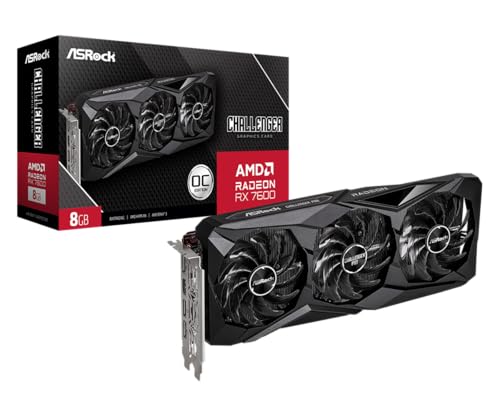


What 1080p Demands
At 1080p the graphics card renders about two million pixels per frame, far fewer than at 1440p or 4K. That frees performance for higher settings and higher frame rates. Esports titles run very fast on modest cards, while demanding single-player games benefit from a stronger one.
Ask what you want: smooth 60 frames per second at high settings, or 144 frames and above. The second goal needs a stronger card and a matching monitor.
Video Memory
Eight gigabytes is the common baseline for modern 1080p play. Four gigabytes still works for older and lighter games, but newer titles can run out of memory at high texture settings. A card with more memory lasts longer as games grow. Memory type and bus width also affect performance, but the amount is the first number to check.
Reading Card Names
- The generation: a newer generation usually brings better efficiency and features.
- The tier number: higher tiers within a generation are faster.
- Suffixes such as Ti, XT or Super mark faster versions.
- The brand on the box, such as MSI or ASUS, is the board maker, which affects cooling, noise and warranty.
NVIDIA and AMD
NVIDIA cards offer ray tracing and DLSS upscaling. AMD cards offer strong value, FSR upscaling and generous video memory at some price points. Both can run games at 1080p very well. Choose by price, features you care about and the performance in your favorite games.
Checking Your PC Before You Buy
- Case space: measure the length and thickness of the card against the available room.
- Power supply: check the wattage and the power connectors the card needs.
- Motherboard slot: modern cards use a PCIe x16 slot, which almost all desktops have.
- Processor: a very old processor can bottleneck a new card.
- Low-profile cases need a low-profile card.
Cooling and Noise
Cards with two or three fans run cooler and often quieter than single-fan designs, but they are longer. Smaller cards fit compact cases and may run louder under load. Some fans stop at idle, which keeps the PC quiet on the desktop.
New Versus Older Cards
An older card can offer good value for 1080p, but it may lack newer features and driver support may end sooner. A newer card typically uses power more efficiently and supports newer technologies. Compare the price difference with the extra life you expect.
Choosing Among the Best 1080p Graphics Cards
List your games, your monitor's refresh rate and your PC's limits, then choose the lowest tier that meets your goal. Prices vary widely, from around $185 for older entry-level models to $600 and above for newer mid-range cards. Do not overpay for performance a 1080p monitor cannot show. Check the warranty and the return policy, especially for open-box or older models.
For related reading, see best affordable graphics cards and best graphics cards for 1080p 144hz gaming.
Installing a Graphics Card
Turn off the PC, unplug it and touch a metal part of the case to discharge static. Remove the old card, insert the new one into the PCIe slot until it clicks and connect the power cables. Plug your monitor into the new card. Install the latest driver and set your refresh rate.
Upscaling and Frame Generation
Modern cards include upscaling tools that render the game at a lower resolution and sharpen it, which raises frame rates with little visual cost. At 1080p they can help demanding games run smoothly on a mid-range card. Check which technologies the card supports and whether your favorite games use them. Features differ between makers, so look at what each supports before you pay extra for a name.
Power Use and Your Electricity Bill
Efficient cards use less power, run cooler and need smaller power supplies. If you leave your PC on for long gaming sessions, the difference in running cost adds up. A card that needs only one power connector is easier to install than one that needs several. Check the recommended power supply wattage in the listing and compare it with your own.
Warranty and Used Cards
New cards carry a warranty from the maker or the seller, and the length varies. Used or open-box cards can be cheaper but may have no warranty and may have been used for mining or heavy loads. If you consider an older card, check seller reputation and the return policy carefully.
Case Fit and Cable Management
Large cards need space in the case, and thick coolers can block adjacent slots. Check the case's maximum card length and the clearance for the power cable. Plan the cable route to avoid sharp bends, and make sure the power connector clicks into place fully. If your case is compact, look at short two-fan designs.
Drivers and Settings
Install the latest driver from the maker's website after you fit the card. Set your monitor's refresh rate, turn on adaptive sync and use the in-game presets as a starting point. If a game stutters, lower shadow and effects quality before you lower texture quality.
Frequently Asked Questions
Is 8GB of video memory enough for 1080p?
For most current games, yes. Some demanding titles may need lower texture settings.
Will an old processor hold back a new card?
It can. If your processor is several generations old, check reviews for your combination.
Do I need a new power supply?
Check the card's power requirement and connectors. Many mid-range cards work with a good existing supply.
Is ray tracing worth it at 1080p?
It looks good but costs performance. Mid-range cards can use it in some games with upscaling.
Final Thoughts
Pick a card for your games and your monitor, and confirm that it fits your case and power supply. The best 1080p graphics cards give smooth play at Full HD without paying for headroom you will not use. Prices and availability can change, so check the product page before ordering.


