
Best 2x32GB RAM for 2026: 64GB Kits for Creators and Power Users
Disclosure: We may earn a commission when you buy through links on this page, at no extra cost to you. As an Amazon Associate I earn from qualifying purchases. Learn more

The best 2x32gb ram kits give you 64GB for video, virtual machines and heavy multitasking. See DDR4 and DDR5 differences, stability tips and what to check first.
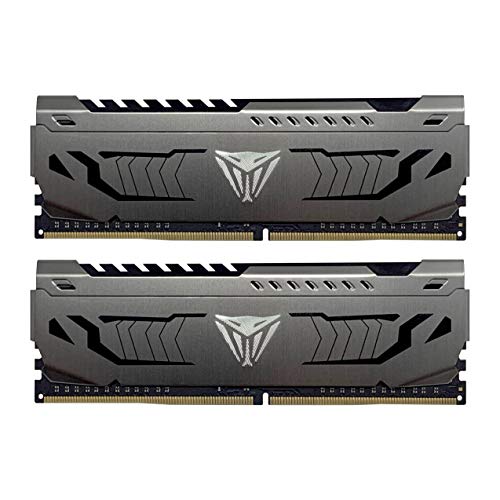
Two 32GB sticks sold as a pair give you 64GB of memory, which is a lot more than most people will ever fill. The best 2x32gb ram are aimed at video editors, 3D artists, developers running virtual machines and anyone who keeps dozens of heavy programs open at once. The product table lists DDR5 and DDR4 kits, including laptop modules.
Since 64GB costs real money, this guide helps you decide whether you need it, which generation to buy and how to avoid the stability problems that large kits can cause.


Who actually needs 64GB?
If you game, browse and use office software, 32GB is plenty and 64GB will sit mostly empty. Sixty four gigabytes pays off when your work regularly pushes memory to its limit. Long video timelines with several layers of effects, large photo stitching projects, 3D rendering scenes with heavy textures and local software development with databases or containers all benefit.
Virtual machines are a clear reason. Each machine takes its own slice of memory, so two or three of them plus the host system can use well over 32GB. If you are unsure, watch your memory use during a normal busy day. If it reaches the ceiling regularly, 64GB is worth the cost. Our 32GB vs 64GB RAM article walks through the decision.
DDR5 or DDR4 for a 64GB kit
The generation is set by your motherboard, so you cannot swap freely. DDR5 platforms are newer and support high speeds, but large DDR5 kits can be fussy about speed on some boards, especially with four sticks. DDR4 kits are older, widely supported and usually cheaper, and 64GB DDR4 remains a good upgrade for an existing system.
- DDR5 desktop kits: best for new builds on current platforms, with more bandwidth for heavy work
- DDR4 desktop kits: a cost-effective upgrade for older Intel and AMD systems
- SODIMM kits: for laptops and mini PCs, so confirm that your machine supports 32GB modules before buying
- ECC modules: only for boards and processors that support error correction, so most home PCs should skip them
Stability comes first
Large modules are denser, and the memory controller works harder to drive them. Two sticks are much easier on the controller than four, so a 2x32GB kit is generally a safer way to reach 64GB than filling four slots with smaller sticks. If you use an expo or XMP profile, it may run slower than the label suggests on some boards, and that is normal.
If the system fails to boot or crashes after installation, update the BIOS, reseat the sticks, load the profile again at a lower speed and test stability with a memory check tool. Many boards publish a list of tested kits, which is worth reading before you buy.
What to look for in the best 2x32gb ram
Speed and timings
A balanced kit with moderate speed and decent timings is a better choice than the fastest kit your platform barely supports. Creative workloads care more about capacity and stability than about the last few percent of bandwidth.
Cooling and height
Dense modules produce heat. If your case has little airflow, choose a kit with a basic heat spreader. Tall RGB heat spreaders can collide with large air coolers, so check the listing for the height.
Warranty and brand
Memory kits generally carry long warranties, sometimes for life. Choose a brand that is known to honor it, and keep the order record. Our best RAM guide covers the wider market.
Check compatibility step by step
- Look up the maximum supported memory size for your motherboard or laptop
- Confirm that it accepts 32GB modules, since older boards may top out lower
- Match the generation and the desktop or SODIMM format
- Update the BIOS to the latest version before installing
- Enable the memory profile and run a short memory test
Old boards deserve special care. Some can take 64GB only after a BIOS update, and a few cannot run 32GB sticks at all. The maker's support page lists this in the specifications section.
Power, temperatures and long sessions
Memory modules draw little power, yet large kits running at high speed do warm up. Long renders or batch exports can run for hours, and heat is one of the quiet causes of random crashes in that situation. Good case airflow across the memory slots helps, and a front-to-back fan layout usually keeps the modules comfortable.
If your workstation is already stable, avoid changing the speed profile just for a benchmark. Stability is the real goal when a job runs overnight, and a slightly slower setting that never crashes is better than a faster one that fails halfway through an export.
Reading the listing carefully
Large kits attract a lot of lookalike listings, so read the title and the bullet points. Confirm that the capacity shown is the total for the kit (2x32GB equals 64GB) and not the size of one stick. Check that the product is new, that it lists the correct format (DIMM for desktops, SODIMM for laptops) and that the voltage and timings are given. A vague listing with no stated timings is a reason to look at a different kit.
Buyer comments are useful here. Look for notes from people who run the same processor and board as you, because they will mention whether the profile worked at the advertised speed. Comments about slow shipping or packaging matter less than comments about boot problems.
Cost and value
A 64GB kit is a serious purchase, and prices vary a lot between DDR4 and DDR5 and between plain and RGB models. Compare the cost per gigabyte in the table, but also think about whether you could be well served by 32GB now and an upgrade later. If your work genuinely uses the memory, the time saved quickly justifies the spend.
FAQ
Is 64GB overkill for gaming?
Yes, for almost all games. It only makes sense if you also stream, edit or run heavy tools while playing. See best RAM for gaming for a more typical target.
Should I buy two sticks or four?
Two. A pair is easier on the memory controller and leaves slots free if you ever expand.
Will 64GB make my computer faster?
Only if you were running out of memory. If you were not, you will not notice a difference.
Can I use a DDR4 kit in a DDR5 board?
No. The generations do not fit each other's slots.
Final thoughts
The best 2x32gb ram are for people whose work really fills memory. Check your board's limit, choose the right generation and format, favor stability over extreme speed and compare current prices in the table. If 32GB already covers your work, save the money.
Prices and availability can change, so check the product page before ordering.


