
Best 32GB RAM for 2026: Is 32GB the Right Amount, and Which Kit to Buy
Disclosure: We may earn a commission when you buy through links on this page, at no extra cost to you. As an Amazon Associate I earn from qualifying purchases. Learn more

The best 32gb ram is a sweet spot for gamers and creators. See when 32GB beats 16GB, how kits differ and how to avoid buying the wrong generation.
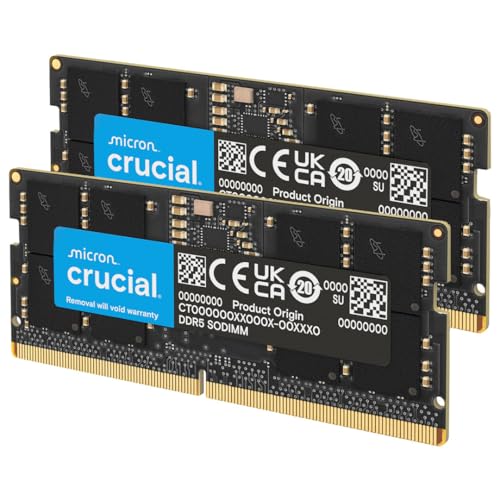
Thirty-two gigabytes has become the comfortable amount of memory for a modern PC. It gives games room to breathe alongside a browser and chat apps, lets creative software hold large projects and means you rarely have to close a program to free memory. The best 32gb ram come as kits of two sticks, and the product table lists a mix of DDR5 desktop kits, older DDR4 kits and laptop modules.
This guide answers the first question, whether 32GB is right for you, and then explains how to choose a kit without paying for specs that do not matter.


Is 32GB the right amount?
Sixteen gigabytes still handles everyday computing and many games. Thirty-two gigabytes is for people who push their PC. Heavy multitasking, photo editing with large files, light video editing, streaming while gaming and virtual machines all fill 16GB quickly, and then the system starts using the drive as slow overflow memory.
- 16GB is enough for web, office work and most games on their own
- 32GB is better for gaming plus streaming, editing, large browser sessions and several programs open together
- 64GB or more is for professional editing, rendering and virtual machine work
- Future use: new games and software tend to ask for more memory over time, so 32GB gives headroom for years
Our comparison of 16GB vs 32GB RAM goes through typical use cases and shows when the step is worth it.
Kit types and what they mean
Memory is sold in kits of matching sticks. A 2x16GB kit gives 32GB in dual channel, which is the common choice, while a single 32GB stick leaves room to add another later but runs in single channel. Four small sticks fill all slots and are harder on the memory controller.
Dual channel nearly always beats single channel for speed, especially for systems that use integrated graphics. For most buyers, a matched two-stick kit is the simple, reliable path.
Generation and platform
DDR4 and DDR5 are not interchangeable, and your motherboard decides which one you need. DDR5 is the newer standard on current platforms and offers higher speeds. DDR4 remains common in older systems and costs less. For laptops, you need SODIMM modules of the right generation, and many thin laptops have soldered memory that cannot be upgraded. See DDR4 vs DDR5 for a longer explanation.
Speed, latency and heat spreaders
Faster memory helps a little in many games and more in some creative tasks, but the gains are modest. Latency, written as CL followed by a number, matters as well. A balanced kit with a moderate speed and low latency often beats a faster kit with loose timings. Heat spreaders look nice and help fast kits, though plain sticks work fine at normal speeds.
Enable the memory profile (XMP on Intel or EXPO on AMD) in the BIOS, or the kit runs at a slower default speed.
Choosing among the best 32gb ram kits
Gaming
A mainstream speed with good timings is enough. Our best RAM for gaming guide covers the faster options.
Creative work
Capacity and stability matter more than the last bit of speed. Use a plain kit, and check for a longer warranty.
Budget builds
A basic DDR4 kit is a cost-effective upgrade for an older PC, and a basic DDR5 kit suits a new budget build.
Laptops and mini PCs
Find your model's memory spec, buy matching SODIMM modules and check the maximum supported size.
Prices and market swings
Memory prices move with supply and demand, and they can change quickly. If you wonder why costs rise and fall, read why RAM is so expensive. Compare current prices in the table, and avoid buying in a rush at a spike if you can wait a few weeks. Buying a kit from a known brand with a long warranty is a safe choice.
Installation tips
- Turn off the PC and unplug it
- Open the case and find the memory slots, often the second and fourth from the processor
- Press the clips down and align the notch on the stick with the slot
- Push firmly until both clips click
- Boot, enter the BIOS and enable the profile
- Check the memory amount in the operating system
If the PC does not boot, reseat the sticks, try one stick at a time and update the BIOS.
Single stick or kit?
A single 32GB stick is tempting because it leaves three slots empty for later expansion, and on a board with only two slots it is a path to 64GB with one more stick. The cost is single channel operation, which lowers bandwidth. For games that depend on memory speed, and for integrated graphics, the loss can be noticeable. If you plan to stay at 32GB for years, a 2x16GB kit is the better pick. If you expect to grow, a pair of 32GB sticks later may be the cleaner jump than adding to an odd setup.
Checking that the memory runs as advertised
After installing, open the system information or a monitoring tool and compare the reported speed with the kit label. If it shows a lower figure, the profile is not on. Enable it in the BIOS and restart. If the system becomes unstable, lower the speed one step or raise the voltage slightly only if the maker recommends it. A short memory test overnight confirms stability. Stable at a slightly lower speed beats fast and crashing.
What about RGB and extras
RGB lighting adds cost and height. It looks good in a case with a window, but it does nothing for performance. Some kits include a light controller or sync with the motherboard software, which can add background programs. If you do not care about lighting, a plain kit is cheaper, shorter and just as fast. Check the module height against your cooler.
Mistakes to avoid
The usual mistakes are buying the wrong generation, forgetting that laptops use smaller modules and mixing unmatched sticks. Some people also pay a lot for RGB and extreme speeds that their processor cannot use. Check the motherboard's memory support list and buy accordingly. For an overview of the whole market, see our best RAM page.
FAQ
Is 32GB overkill?
For basic use, yes. For heavy work and future games, it is comfortable.
Do I need two sticks?
Two sticks give dual channel, which is usually faster.
Will 32GB make games faster?
Only if you were running out of memory. Otherwise the gain is small.
Can I mix brands?
It can work, but a matched kit is safer.
Final thoughts
The best 32gb ram are a sensible target for most enthusiasts and creators. Check your board for the generation, buy a matched kit with a sensible speed and compare the kits in the product table.
Prices and availability can change, so check the product page before ordering.


