
Best External Hard Disk Drives at Every Price: What Your Money Really Gets You
Disclosure: We may earn a commission when you buy through links on this page, at no extra cost to you. As an Amazon Associate I earn from qualifying purchases. Learn more

One pick per price tier for the best external hard disk drives and how to back up properly.
Photos, game libraries, school projects and work files pile up fast, and a single laptop drive failure can wipe out years of memories. An external hard disk drive is the simplest and cheapest way to back up everything or expand storage for a laptop, PC or console. Prices for portable 2TB drives cluster around $130 to $150, but the differences show up in durability, warranty, backup software and encryption. The best external hard disk drives offer reliable capacity at a fair price per terabyte, work with your devices and include the protection you need.
This guide gives one pick at each price tier, explains what each tier delivers, which features are worth paying for, long term costs and how to keep your data safe.


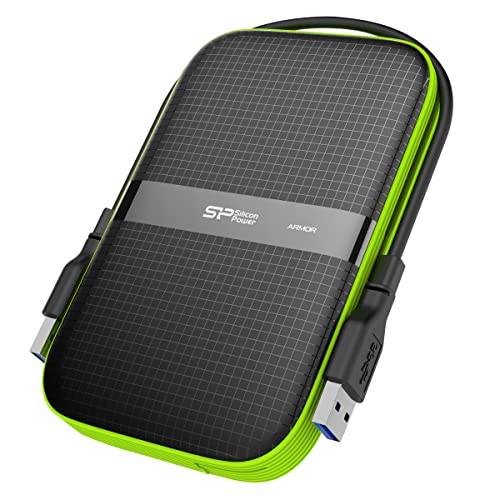
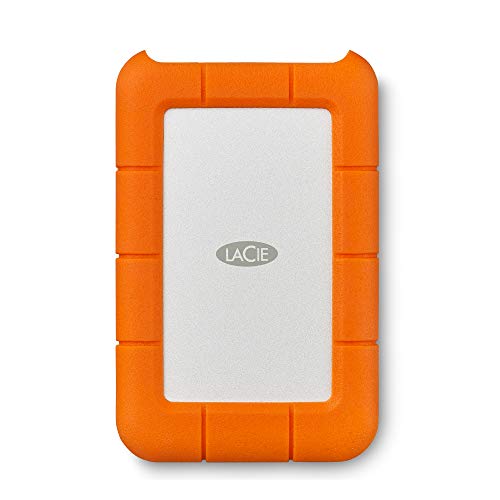

Top 3 Picks by Budget
The Toshiba Canvio Basics 2TB is the best budget external hard disk drive for simple plug and play storage, the WD My Passport 2TB is the best midrange pick with backup software, password protection and hardware encryption, and the LaCie Rugged USB-C 2TB is the best premium choice for travel and fieldwork. Check the product table above for current prices.
| Tier | Product | Key Spec | Best For |
|---|---|---|---|
| Best Budget Pick | Toshiba Canvio Basics 2TB | Portable USB 3.0, plug and play | Basic backups and extra storage |
| Best Midrange Pick | WD My Passport 2TB | Backup software, password protection, hardware encryption, 3 year warranty | Secure everyday backups |
| Best Premium Pick | LaCie Rugged USB-C 2TB | Drop, shock, dust and rain resistant, USB C | Travel, photographers and fieldwork |
Best Budget Pick: Toshiba Canvio Basics 2TB
The Toshiba Canvio Basics 2TB is the best budget external hard disk drive, at around $134. It is a simple, portable USB 3.0 drive for everyday backups.
- Why it stands out: a straightforward plug and play portable design gives you 2TB of extra storage for photos, documents and media without extra software.
- Portable: it is compact enough to carry in a laptop bag and powers from the USB port.
- Trade off: it skips extras like hardware encryption and bundled backup software.
Best for: students and home users who want simple extra storage. Skip it if you need encryption.

Best Midrange Pick: WD My Passport 2TB
The WD My Passport 2TB is the best midrange external hard disk drive, at around $133. It adds security and backup tools to a slim portable design.
- Why it stands out: included device management software backs up files with defense against ransomware, and password protection with hardware encryption helps secure sensitive data.
- Peace of mind: a slim, durable design and a 3 year limited warranty; capacities go up to 6TB in the same line.
- Trade off: like most portable hard drives, it is slower than an SSD for large file transfers.
Best for: anyone backing up personal or work files who wants encryption. Skip it if speed is your top priority.

Best Premium Pick: LaCie Rugged USB-C 2TB
The LaCie Rugged USB-C 2TB is the best premium external hard disk drive, at around $150. Its rugged shell is built for life on the road.
- Why it stands out: LaCie designs it to resist drops, shocks, dust and rain, protecting data on job sites, shoots and trips.
- Modern connection: it uses USB C while remaining compatible with USB 3.0, and it works with Mac and PC.
- Trade off: you pay more per terabyte for the rugged design.
Best for: photographers, videographers, travelers and outdoor workers. Skip it if the drive never leaves your desk.

What Your Money Gets You at Each Price Tier
Budget Tier: What to Expect
Around $100 to $135 buys a 2TB portable USB 3.0 hard drive from brands like Toshiba, WD and Seagate. You get reliable bulk storage with plug and play setup. Expect plastic enclosures, basic warranties and few extras.
Midrange Tier: The Sweet Spot for Most Buyers
Around $130 to $170 adds backup software, password protection, hardware encryption and longer warranties, plus higher capacities like 4TB and 5TB at a better price per terabyte. For most people, this tier balances cost and protection.
Premium Tier: When Spending More Pays Off
Around $150 and up buys rugged drives with shock, dust and water resistance, USB C connections and bundled data recovery services. Spending more pays off if you travel, work outdoors or carry irreplaceable files.
Features Worth Paying For (and Ones to Skip)
Capacity and Price per Terabyte
Divide the price by capacity to compare value. Larger portable drives, such as 4TB and 5TB, usually cost less per terabyte than 1TB or 2TB models. Buy at least twice the space you need today.
Build Quality and Durability
Hard drives have spinning platters that can be damaged by drops while running. Rugged enclosures with bumpers improve survival. For desk use, a standard enclosure is fine.
Speed and Connection
Most portable hard drives transfer around 100 to 140 MB per second over USB 3.0, regardless of USB C or USB A connectors. If you need faster transfers for video editing, choose an external SSD instead.
Durability and Warranty
Warranties range from one to three years or more. Longer warranties and data recovery plans add peace of mind for important files.
Compatibility: PC, Mac and Console
Most drives come formatted for Windows and work on Mac after reformatting or with exFAT. Many work with PlayStation and Xbox consoles for storing games; check console requirements for capacity and USB speed.
Security: Encryption and Backup Software
Hardware encryption and password protection keep data safe if the drive is lost. Automatic backup software makes regular backups easier.
Features to Skip
Fancy colors and bundled trial software rarely add real value. Focus on capacity, reliability and warranty.
External Hard Drive vs External SSD
An external hard drive offers far more storage per dollar, making it ideal for backups, photo archives and game libraries. An external SSD is several times faster, lighter and more shock resistant because it has no moving parts, but it costs more per terabyte. Many people use a large hard drive for backups and a smaller SSD for fast working files.
How to Back Up Your Files the Right Way
- Use the 3 2 1 rule: keep three copies of important data on two different types of storage, with one copy off site or in the cloud.
- Automate backups: use Windows File History, Mac Time Machine or the drive's backup software.
- Back up regularly: schedule weekly or daily backups for active files.
- Verify backups: occasionally open files from the backup to confirm they work.
- Eject safely: always eject the drive before unplugging to avoid corruption.
Desktop vs Portable External Hard Disk Drives
Among the best external hard disk drives, portable models draw power from USB and fit in a pocket or bag, while desktop models use a separate power adapter and offer much larger capacities at a lower price per terabyte.
- Portable drives: 1 to 6TB, bus powered, easy to carry; ideal for laptops, travel and console storage.
- Desktop drives: 4 to 24TB or more, need wall power, stay on a desk; ideal for whole computer backups, media libraries and video archives.
- Network attached storage (NAS): multi drive systems that share files across your home network and can protect data with redundancy.
How to Format an External Hard Drive
Choose a file system based on where you will use the drive. NTFS works best for Windows only use, APFS or Mac OS Extended for Mac only use and exFAT for drives shared between Windows and Mac. Consoles format drives themselves during setup, which erases existing data. Back up anything on the drive before formatting, and use the operating system's disk utility rather than third party tools.
Signs an External Drive Is Failing
- Clicking or grinding noises: stop using the drive and copy important files immediately.
- Frequent disconnects: try a different cable and port; if it continues, the drive may be failing.
- Very slow transfers or freezing: check health with the manufacturer's diagnostic tool.
- Files that will not open: may indicate bad sectors or corruption.
If a drive with irreplaceable data fails, stop using it and contact a professional data recovery service rather than running repeated repair attempts.
Best External Drive Uses by Person
- Students: a 1 to 2TB portable drive backs up coursework, photos and projects; choose encryption if you share computers.
- Photographers and videographers: rugged USB C drives for the field plus larger desktop drives for archives.
- Gamers: 2 to 5TB portable drives for storing console game libraries.
- Families: a large desktop drive or NAS for automatic backups of every computer in the house.
- Remote workers: encrypted drives that meet company data rules, plus cloud backup.
Long Term Costs to Factor In
External hard drives have no ongoing fees, but plan to replace them every three to five years, since mechanical drives wear out. Data recovery services can cost hundreds of dollars if a drive fails without a backup, which is why a second backup or cloud plan is worth budgeting for. Protective cases cost around $10 to $20.
Using an External Drive With Game Consoles
External hard drives are a cheap way to expand storage on PlayStation and Xbox consoles. On current consoles, you can store and play older generation games from an external hard drive, while the newest games often must run from internal or expansion SSD storage. A 2TB or larger drive holds dozens of games you can move back when you want to play them.
Care and Handling Tips
- Do not move the drive while it is spinning or transferring files.
- Keep it away from heat, magnets and moisture.
- Store it in a padded case when traveling.
- Use a short, quality cable and avoid tugging on connectors.
- Check drive health with manufacturer tools periodically.
FAQs
How long do external hard drives last?
Most external hard drives last about three to five years with normal use. Because mechanical drives can fail without warning, always keep a second backup of important files.
Does an external hard drive work with Mac and consoles?
Yes, most do. Mac users may need to reformat the drive to APFS or exFAT, and consoles format drives during setup. Check compatibility notes for specific consoles.
What capacity external hard drive do I need?
For photo and document backups, 1 to 2TB is usually enough. For full computer backups, game libraries or video, choose 4TB or more.
Is hardware encryption worth it?
Yes, if you store personal, financial or work data that would be harmful if the drive were lost or stolen. Encryption with password protection keeps files private.
HDD or SSD: which is better for backups?
Hard drives are better for large, inexpensive backups. SSDs are better for speed and portability but cost more per terabyte.
Can I leave an external hard drive plugged in all the time?
Yes, for automatic backups, and drives spin down when idle. However, a drive that is always connected can be affected by malware or power surges, so consider a second backup that you disconnect or store off site.
Is cloud storage better than an external hard drive?
Cloud storage protects against fire, theft and local disasters and is accessible anywhere, but it costs a monthly fee and depends on internet speed. An external drive is a one time cost with fast local restores. Using both gives the best protection.
Why is my 2TB drive showing less space?
Drive makers count 1TB as 1,000 gigabytes, while operating systems count in binary units, so a 2TB drive typically shows about 1.8TB of usable space. Preinstalled backup software also uses a little room.
Wrapping Up
Choose an external hard disk drive by capacity, security and where you will use it. The Toshiba Canvio Basics is the budget pick for simple storage, the WD My Passport adds encryption and backup software and the LaCie Rugged USB-C protects data on the go. Follow the 3 2 1 backup rule, and the best external hard disk drives will keep your files safe. Check the product table above for current prices.


