Best Looking PC Cases: Every Type Explained Side by Side
Disclosure: We may earn a commission when you buy through links on this page, at no extra cost to you. As an Amazon Associate I earn from qualifying purchases. Learn more

Showcase, minimalist, dual chamber and compact PC cases compared side by side.
A PC case is the one component you look at every day. It sets the style of your whole setup, from minimalist wood and mesh designs that blend into a living room to panoramic glass showcases lit with RGB. But looks are only half the story: a good looking case still needs to keep components cool, fit your graphics card and make building easy. The best looking PC cases combine striking design with solid airflow, clean cable management and room for the hardware you plan to install.
This guide compares the main styles of good looking PC cases side by side, explains how to choose by size, airflow, cooling and build quality, and shares tips for building a clean, attractive PC that lasts.




Types of Good Looking PC Cases Compared
Panoramic glass showcase cases highlight RGB components, minimalist wood and mesh cases blend into home decor, dual chamber cases hide cables for the cleanest look, and compact cases suit small desks.
| Style | Best For | Pros | Cons | Typical Price |
|---|---|---|---|---|
| Panoramic glass showcase | RGB builds, showing off parts | Stunning display, wide views of components | Shows dust and messy cables | Around $130 to $200 |
| Wood and mesh minimalist | Living rooms, offices | Elegant, airflow friendly, subtle | Less RGB focus | Around $130 to $160 |
| Dual chamber | Clean cable management, liquid cooling | Hidden cables and PSU, many fan slots | Larger footprint | Around $200 to $330 |
| Compact and mini tower | Small desks, LAN parties | Saves space | Tighter building, limited GPU length | Around $80 to $200 |
Panoramic Glass Showcase Cases
Showcase cases use tempered glass on the front and side with few corner pillars, giving a wide view of the motherboard, GPU and RGB fans. The CORSAIR iCUE Link 3500X, for example, offers panoramic tempered glass and support for reverse connection motherboards that move cables to the back for a cleaner look.
They are perfect for builds with RGB lighting and vertical GPUs, but they require tidy cable management and regular dusting, since everything is on display.
Wood and Mesh Minimalist Cases
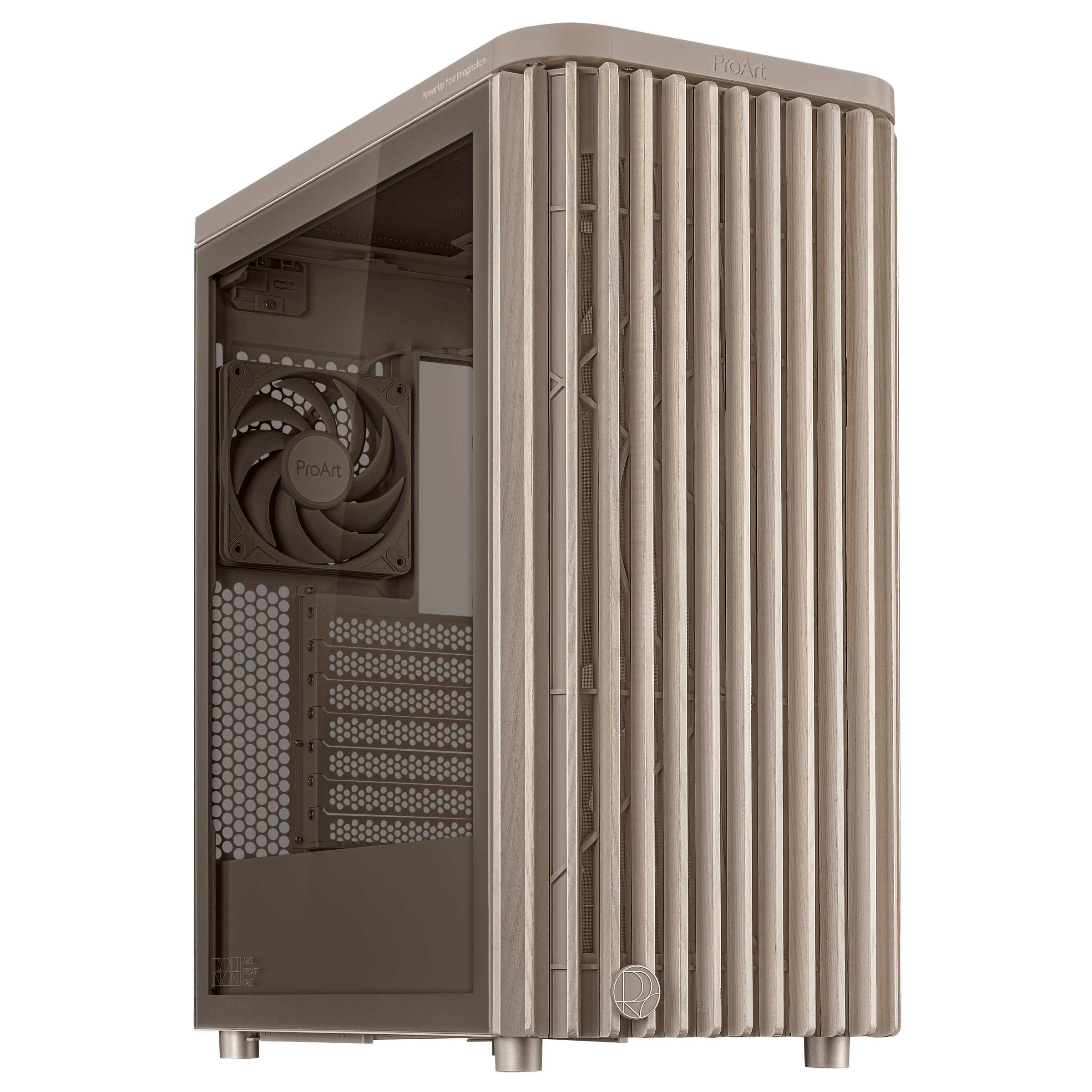
Cases like the Fractal Design North, with a genuine walnut or oak wood front, a tempered glass side panel and two 140mm fans, and the ASUS ProArt PA401 Wood Edition bring furniture inspired design to PCs. Mesh panels let air flow freely.
These cases look at home in living rooms and offices. They can still host RGB inside, but their style is understated.
Dual Chamber Cases
Dual chamber cases split the interior: the motherboard and GPU sit in the front chamber while the power supply, drives and cables hide behind. The HAVN HS 420, for instance, offers 11 140mm fan slots and room for three 420mm radiators, plus a vertical GPU kit on some versions.
They create the cleanest visible builds and excel with liquid cooling, but they are wide and expensive.
Compact and Mini Tower Cases
Smaller micro ATX and mini ITX cases save desk space and look sleek. They require careful planning for GPU length, cooler height and cable routing, and they can run warmer.
Showcase Glass vs Minimalist Mesh: Which Should You Choose?
Choose a panoramic glass case if you want to show off RGB components and enjoy a display piece, and choose a wood or mesh minimalist case if you want a clean, understated look that blends into your room with strong airflow.
- Look: glass highlights components; wood and mesh blend into decor.
- Airflow: mesh fronts typically breathe better than glass fronts.
- Maintenance: glass shows dust and fingerprints more.
- Cable management: showcase cases demand extra tidiness.
- Price: both styles range widely; premium dual chamber glass cases cost most.
How to Choose the Right PC Case
Case Size, Airflow and Aesthetics
Match case size to your motherboard: ATX for most builds, micro ATX for smaller towers and mini ITX for compact systems. E-ATX cases like the Lian Li LANCOOL III offer extra room. Front mesh panels, multiple fan mounts and dust filters improve airflow.
GPU Length and Cooler Clearance
Check maximum GPU length and CPU cooler height. High end graphics cards can exceed 330mm, and tall air coolers need around 160mm or more of clearance. Radiator support matters for liquid cooling.
Cooling and Thermals
Look for support for 120mm and 140mm fans, radiator mounts up to 360mm or 420mm and included fans. Positive pressure, with more intake than exhaust, reduces dust buildup.
Build Quality and Materials
Steel frames, thick tempered glass, tool free panels and sturdy feet improve longevity and ease of building. Wood accents add style but need gentle care.
Cable Management
Rear cable channels, tie down points, rubber grommets and PSU shrouds hide cables. Reverse connector motherboard support creates the cleanest showcase builds.
Front Panel Ports
Front USB C, USB A and audio ports make plugging in drives and headsets easy. Check that the motherboard supports the front USB C header.
Warranty and Support
Established brands like Fractal Design, Lian Li, Corsair, ASUS and HAVN offer warranties and replacement parts such as glass panels and filters.
Picking the Right PC Cases for Different Uses
Best Clean Looking PC Cases: Which Type Works Best
The best clean looking PC cases are dual chamber designs or cases with excellent cable management and PSU shrouds. Pair them with reverse connector motherboards and sleeved cables for a showroom look.
Best Cases for Living Rooms
Wood and fabric accented cases with muted colors and soft lighting blend into living rooms, especially near TVs.
Best White PC Cases
White cases with white components create a bright, modern look, and many popular models come in white editions.
PC Case Form Factors Explained
| Case Size | Motherboards Supported | Best For |
|---|---|---|
| Full tower | E-ATX, ATX, micro ATX | Workstations, custom water cooling, many drives |
| Mid tower | ATX, micro ATX, mini ITX | Most gaming and creator builds |
| Mini tower | Micro ATX, mini ITX | Smaller desks with moderate hardware |
| Small form factor | Mini ITX | Living rooms, LAN parties, compact setups |
Building a Showcase PC Step by Step
- Pick a theme: choose a color scheme such as all white, black and wood or a single accent color.
- Measure clearances: confirm GPU length, cooler height and radiator sizes fit the case.
- Install the power supply and route cables first so they run behind the motherboard tray.
- Mount the motherboard, CPU cooler and RAM, then connect front panel headers.
- Install fans in a consistent orientation with intake at the front or bottom and exhaust at the top and rear.
- Add the GPU last, using a support bracket for heavy cards.
- Tidy cables with ties and channels before closing the glass panels.
- Sync RGB lighting with the manufacturer's software for a coordinated effect.
RGB Lighting Tips
RGB lighting looks best when it is coordinated rather than random. Stick to one ecosystem, such as Corsair iCUE or a motherboard's ARGB software, so fans, strips and RAM sync together. Soft, single color or slow gradient effects often look more refined than rainbow cycling, and lighting angled toward the components highlights them without glare. Consider turning lights off at night with scheduled profiles.
Common PC Case Mistakes to Avoid
- Buying a glass front case with no intake path: components can run hot.
- Ignoring GPU length: large modern cards can exceed small case limits.
- Skipping dust filters: glass cases show dust inside quickly.
- Forgetting the front USB C header: the case port will not work without motherboard support.
- Overcrowding with fans: more fans add noise without always improving temperatures.
Fan Setup for Good Airflow and Looks
A balanced fan setup keeps components cool while looking tidy. In most mid towers, mount two or three intake fans at the front or side and one or two exhaust fans at the rear and top. Aim for slightly more intake than exhaust to create positive pressure, which keeps dust from entering through gaps. Use 140mm fans where possible; they move more air at lower speeds and are quieter. In glass front cases, side or bottom intake fans help compensate for limited front airflow.
Vertical GPU Mounts: Worth It?
Vertical GPU mounts display the graphics card's shroud and backplate through the side glass, creating a dramatic look. They require a riser cable, which must support PCIe 4.0 or 5.0 for current cards, and enough clearance between the card and the glass so it can breathe. In tight cases, vertical mounting can raise GPU temperatures, so check the case's design and leave a gap of at least an inch.
Noise Considerations
Good looking cases are not always quiet. Mesh panels let fan noise escape, while solid panels with sound dampening reduce noise but may run warmer. Choose larger, slower fans, set fan curves in the BIOS and pick a case with rubber mounts for drives and fans if you want a quieter system near your desk or TV.
How Much to Spend on the Best Looking PC Cases
- Under $130: mesh airflow cases with RGB fans and basic glass panels.
- Around $130 to $220: premium designs like the Fractal North, Corsair 3500X and Lian Li LANCOOL III.
- Around $220 to $330: dual chamber flagship cases with extensive radiator support.
Tips for a Better Looking Build
- Plan cable routing before installing components.
- Use matching fan and RGB ecosystems for coordinated lighting.
- Consider a vertical GPU mount to show off the graphics card, ensuring enough airflow.
- Choose sleeved or custom cables for visible areas.
- Keep color themes consistent across components.
How to Make Your PC Case Last Longer
- Clean dust filters monthly and blow out dust every few months.
- Wipe tempered glass with a microfiber cloth and screen cleaner.
- Avoid placing the PC on carpet, which blocks bottom intakes.
- Handle glass panels carefully and store screws during maintenance.
- Treat wood panels gently and keep them away from moisture.
FAQs
How much RAM do I need for gaming?
16GB is the minimum for modern gaming, while 32GB is recommended for high end builds, streaming and multitasking. Case choice does not affect RAM, but RGB memory can enhance a showcase build.
Air or liquid cooling: which is better for a good looking build?
Liquid cooling with an AIO or custom loop creates a clean, premium look and frees space around the CPU. High end air coolers are quieter, simpler and very reliable. Both work well with good case airflow.
Do glass cases run hotter?
Glass front cases can restrict intake airflow compared with mesh fronts. Choose cases with side or bottom intakes, or mesh fronts, and add enough fans to keep temperatures in check.
What GPU do I need for 1440p gaming?
A current midrange to upper midrange graphics card handles 1440p well in most games. Check your case's GPU length limit before buying a large card.
Is it cheaper to build or buy a prebuilt PC?
Building often saves money and lets you choose a case you love, while prebuilts save time and include warranties on the whole system. Prices vary with component deals.
Can I use an older power supply in a new case?
Usually yes, as long as it fits the case's PSU bay and length limit and has the right connectors for your graphics card. Modular power supplies make cable management much easier in showcase cases.
How many fans does a PC case need?
Most builds do well with three to five fans: two or three intakes and one or two exhausts. High end GPUs and CPUs may benefit from more airflow or a radiator.
Do wood PC cases affect cooling?
Wood accents are mostly decorative. Cases like the Fractal North pair wood fronts with ventilated openings or mesh, so airflow remains good when fans are set up correctly.
Is a full tower case worth it?
Only for large custom water cooling loops, many drives or E-ATX motherboards. Most gaming and creator builds fit comfortably in a mid tower, which takes less space and costs less.
Should I choose a white or black case?
It comes down to taste and room decor. White cases look bright and modern but show dust and yellowing over time; black cases hide dust and suit darker setups.
Our Verdict
Choose a PC case by style, size and airflow. Panoramic glass cases like the Corsair 3500X suit RGB showcase builds, wood and mesh designs like the Fractal North suit minimalist setups and dual chamber cases like the HAVN HS 420 suit clean, liquid cooled builds. Plan cables carefully and keep it clean, and the best looking PC cases will make your setup the centerpiece of the room. Check the product table above for current models and prices.