
Best Wireless Gaming Headsets PC: Every Type Explained Side by Side
Disclosure: We may earn a commission when you buy through links on this page, at no extra cost to you. As an Amazon Associate I earn from qualifying purchases. Learn more

Wireless gaming headsets compared with wired, noise cancelling and home listening headphones, plus who should buy one and how to choose.
Shopping for a PC headset means choosing between wireless gaming headsets, wired models, noise cancelling headphones and home listening cans, and each type promises something different. The labels on the box rarely explain the real tradeoffs in latency, battery, mic quality and comfort. This guide to the best wireless gaming headsets pc players can buy compares each type side by side, so you know which style fits the way you play.
The short answer: most PC gamers should choose a wireless gaming headset that connects through a 2.4GHz USB dongle for low latency, offers at least 40 hours of battery, a detachable or flip mic with noise reduction and comfortable memory foam pads, typically around $80 to $170, such as the Razer BlackShark V3 X HyperSpeed or HyperX Cloud Alpha Wireless; competitive players who want active noise cancellation can step up to premium models like the Razer BlackShark V3 Pro around $250.


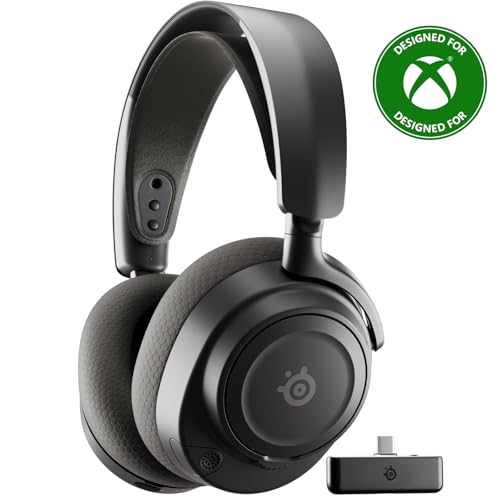
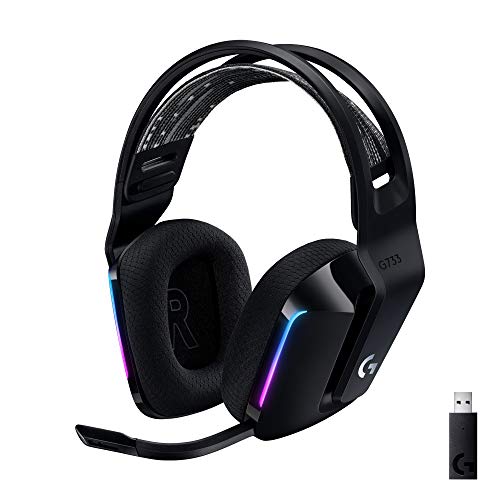


Three Wireless Headsets Worth a Look
These three models from the product table above represent the main price levels. We explain the reasoning in the comparisons below rather than reviewing each one in detail.


How Wireless Gaming Headsets Compare to Other Options
Here is a quick overview of the four main headset types PC users consider.
| Type | Best For | Pros | Cons | Typical Price |
|---|---|---|---|---|
| Wireless gaming headsets | PC gamers who want freedom from cables | Low latency 2.4GHz, built in mic, long battery, spatial audio | Need charging, dongle uses a USB port | Around $50 to $250 |
| Wired gaming headsets | Budget and competitive players | Zero latency, no charging, lower price | Cable clutter, limited movement | Around $30 to $150 |
| Noise cancelling headphones | Travel, commuting, offices | Strong ANC, great music sound | Bluetooth lag, weaker mic for gaming | Around $100 to $400 |
| Home and studio headphones | Music, mixing, audiophile listening | Excellent sound quality, wide soundstage | No mic, often need an amp | Around $80 to $400 |
Wireless Gaming Headsets vs Home/Bookshelf Models
Home listening and studio headphones focus purely on sound quality. Open back audiophile models offer a wide, natural soundstage that some gamers love for positional audio, and studio monitors provide accurate tuning for music production. However, they rarely include a microphone, and many high impedance models need a headphone amplifier.
Wireless gaming headsets bundle everything into one package: a tuned driver, a mic for Discord and team chat, spatial audio software and wireless freedom. Choose home headphones plus a separate USB mic if music quality matters most and you sit at a desk. Choose a wireless gaming headset if you want a single, convenient device for gaming and chat.
Wireless Gaming Headsets vs Wired Models
Wired gaming headsets connect through USB or a 3.5 millimeter jack, delivering zero latency and no battery to charge. They cost less for the same sound quality and suit players who rarely leave their desk. The downside is cable clutter, snagging on chair wheels and limited movement when you stand up or stretch.
Modern wireless headsets using 2.4GHz dongles, like Razer HyperSpeed or Logitech Lightspeed, achieve latency low enough that most players cannot tell the difference from wired. Choose wired for the lowest price or tournament style setups, and wireless if you value comfort, freedom and a tidy desk.
Wireless Gaming Headsets vs Noise Cancelling Models
Noise cancelling headphones from audio brands excel at blocking airplane and office noise and sound great for music. They connect through Bluetooth, which adds noticeable delay for gaming, and their built in mics are designed for calls rather than clear team chat.
Some premium wireless gaming headsets, such as the Razer BlackShark V3 Pro, now add hybrid ANC alongside a 2.4GHz connection and a broadcast quality mic, combining both worlds at a higher price. Choose noise cancelling headphones for travel and commuting, and a gaming headset with ANC if you game in a noisy home and want one device.
Types of Wireless Gaming Headsets
Wireless gaming headsets themselves come in several styles. Understanding these helps narrow your options.
- 2.4GHz dongle headsets: the standard choice for PC, with low latency and stable connections, like the HyperX Cloud Alpha Wireless.
- Dual wireless headsets: combine 2.4GHz with Bluetooth, so you can hear game audio and phone calls at the same time, like the SteelSeries Arctis Nova 7X Gen 2.
- Multiplatform headsets: support PC plus PlayStation, Xbox or Switch through switchable dongles, like the Turtle Beach Stealth 600.
- Base station headsets: premium models with a dock that charges the headset and handles audio mixing.
Who Should Choose Wireless Gaming Headsets PC Players Use?
Wireless gaming headsets suit most PC players. They are ideal for gamers who move around while playing, stream from a couch PC setup or simply hate cable clutter. They also suit people who game for long sessions and want to grab a drink or answer the door without removing the headset. Players who switch between PC, console and phone benefit from multiplatform and Bluetooth models that handle every device.
Some people should choose another type. Budget buyers under about $50 get better sound from wired models at that price. Esports players who want absolute zero latency or never want to charge a battery may prefer wired headsets. Audiophiles who mostly listen to music should consider studio or open back headphones with a separate mic. Travelers who mainly want silence on flights should buy dedicated noise cancelling headphones.
How to Choose the Right Wireless Gaming Headset
Once you decide wireless is right for you, these factors separate the best wireless gaming headsets pc users can buy from the rest.
Comfort, Fit, and Weight
Gaming sessions can last hours, so comfort matters as much as sound. Look for headsets around 300 grams or lighter, such as the 270 gram Razer BlackShark V3 X, to reduce neck and head fatigue. Memory foam ear cushions conform to your head, while breathable fabric or velour pads stay cooler than leatherette. Suspension headbands, like the one on the Logitech G733, spread pressure evenly. Glasses wearers should look for soft, deep cushions and moderate clamping force.
Durability and Build Quality
Gaming headsets rarely carry IP water resistance ratings, because they are designed for indoor use. Instead, focus on build materials. Aluminum or steel frames, like those on the HyperX Cloud Alpha Wireless and SteelSeries Arctis Nova 7X, resist cracking far better than all plastic designs. Replaceable ear pads and detachable mics extend the headset's life. Avoid sweaty workouts and rain with gaming headsets; buy IPX4 rated sport headphones for those situations instead.
Sound Quality and Tuning
Most wireless gaming headsets use 40 to 50 millimeter drivers. Larger drivers, like Razer's TriForce 50 millimeter units, deliver full bass and clear footsteps. Frequency response around 20Hz to 20kHz covers everything you can hear. Gaming tuning often boosts bass for explosions and treble for footsteps, while neutral tuning suits music. Spatial audio technologies like DTS Headphone:X, THX Spatial Audio and Windows Sonic help pinpoint enemies in shooters. Companion apps with EQ presets let you tune the sound for each game.
Microphone Quality
The mic determines how your teammates and Discord friends hear you. Detachable or flip to mute boom mics provide the clearest voice. Cardioid and full band mics, such as Razer's HyperClear, capture more voice and less background noise. Noise rejection features, like SteelSeries ClearCast Gen 2 or Logitech Blue VO!CE, filter keyboard clicks and fans. Streamers may still prefer a separate USB microphone for the best broadcast quality.
Battery Life and Charging
Battery life varies enormously. Some headsets last around 30 hours, while the HyperX Cloud Alpha Wireless claims up to 300 hours. Aim for at least 40 hours so you charge once a week or less. Look for USB C fast charging and the ability to play while charging. Features like RGB lighting and ANC reduce battery life, so check the rated hours with those features turned on.
Connectivity and Latency
Always choose a headset with a 2.4GHz USB dongle for PC gaming, since it offers far lower latency than Bluetooth. Razer quotes 10 milliseconds for its HyperSpeed connection. Dual wireless models let you mix game audio with Bluetooth music or calls. USB C dongles work with laptops and handhelds, and some include USB A adapters. If you also play on consoles, check that the dongle supports PlayStation or Xbox, since Xbox requires specific models.
Common Mistakes When Buying a Wireless Gaming Headset
- Relying on Bluetooth for gaming: Bluetooth adds delay. Use the 2.4GHz dongle for games.
- Ignoring Xbox compatibility: many PC headsets do not work wirelessly with Xbox. Buy an Xbox specific version if needed.
- Choosing by RGB lighting: lights look nice but cut battery life. Prioritize comfort, mic and sound.
- Skipping the companion app: software unlocks EQ, mic filters and firmware updates that improve performance.
Care and Maintenance Tips
- Keep firmware updated: manufacturers release updates through apps like Razer Synapse, Logitech G HUB and SteelSeries GG that fix connection drops and improve audio.
- Store on a stand or in a case: this protects drivers, hinges and the mic boom from damage and keeps the dongle from getting lost.
- Clean ear pads regularly: wipe pads with a slightly damp cloth, and replace them when the foam flattens.
- Charge smartly: avoid draining the battery to zero repeatedly, and unplug once fully charged to slow battery wear.
- Keep the dongle close: use a USB extension to place the dongle near your desk, away from WiFi routers, for a stronger signal.
Frequently Asked Questions
How long does the battery last?
How long does the battery last? Most wireless gaming headsets last 30 to 70 hours per charge, with some models reaching far longer. The HyperX Cloud Alpha Wireless claims up to 300 hours, while the Razer BlackShark V3 X and V3 Pro offer around 70 hours. RGB lighting, ANC and high volume reduce runtime. Fast charging can add hours of play in just minutes, and most headsets can be used while charging.
What IP rating do I need for outdoor use?
What IP rating do I need for outdoor use? For outdoor use, look for at least IPX4, which resists sweat and splashes. However, most gaming headsets have no IP rating, because they are built for indoor desks. If you plan to wear headphones outside or during workouts, choose sport earbuds or headphones with IPX4 or higher and keep your gaming headset indoors.
Is ANC worth the extra cost?
Is ANC worth the extra cost? ANC is worth the extra cost if you game in a noisy home, near loud fans or in a shared room. It blocks constant background noise so you hear footsteps and team calls more clearly. In quiet rooms, closed back ear cups already isolate well, so you can save money by skipping ANC and spending on comfort or mic quality.
Do I need a special codec?
Do I need a special codec? No, you do not need a special codec for PC gaming with a 2.4GHz dongle, because the dongle uses its own low latency connection. Codecs like aptX and LDAC matter only for Bluetooth listening. Some Bluetooth codecs reduce lag, but even the best still trail 2.4GHz dongles for gaming. Use Bluetooth for music and calls.
Wired or wireless: which sounds better?
Wired or wireless: which sounds better? Wired headsets can sound slightly better at the same price, because wireless models spend part of their budget on batteries and radios. In practice, the best pc gaming headsets in wireless form sound excellent, and most gamers will not notice a difference. Wired still wins for zero latency and never needing a charge, while wireless wins for comfort and freedom.
Can I use one headset with PC and console?
Can I use one headset with PC and console? Yes, many wireless gaming headsets work with both PC and PlayStation through the same USB dongle, and many also work with Nintendo Switch. Xbox uses a different wireless protocol, so you need a headset labeled for Xbox, such as an Xbox version of the Stealth 600 or Arctis Nova 7X.
The Bottom Line
Wireless gaming headsets are the best choice for most PC gamers, combining low latency 2.4GHz connections, built in mics and long battery life in one comfortable package. Wired models suit tight budgets and players who never want to charge, while noise cancelling headphones and studio headphones serve travel and music better. When choosing, focus on comfort for long sessions, a clear noise rejecting mic and battery life of 40 hours or more. Compare the best wireless gaming headsets pc options in the product table above to find the right fit for your setup.


