ASUS
ASUS SFF-Ready Prime NVIDIA GeForce RTX 5070 Ti 16GB GDDR7 OC Edition 16GB GDDR7 Graphics Card (PCIe 5.0, HDMI/DP 2.1, 2.5-Slot, Axial-tech Fans, Dual BIOS), 3 Year Warranty
Disclosure: We may earn a commission when you buy through links on this page, at no extra cost to you. As an Amazon Associate I earn from qualifying purchases. Learn more
Highlights
- Powered by the NVIDIA Blackwell architecture and DLSS 4. System Requirements: Minimum 750W PSU with 16-pin 12V-2x6 (12VHPWR) connector required. Verify before purchasing. OC mode: 2527MHz/ Default mode: 2497MHz (Boost Clock)
- SFF-Ready enthusiast GeForce card compatible with small-form-factor builds. Compatibility: 306mm (12") length, 2.5 slots, 4 lbs. Confirm case clearance and slot spacing. GPU bracket included.
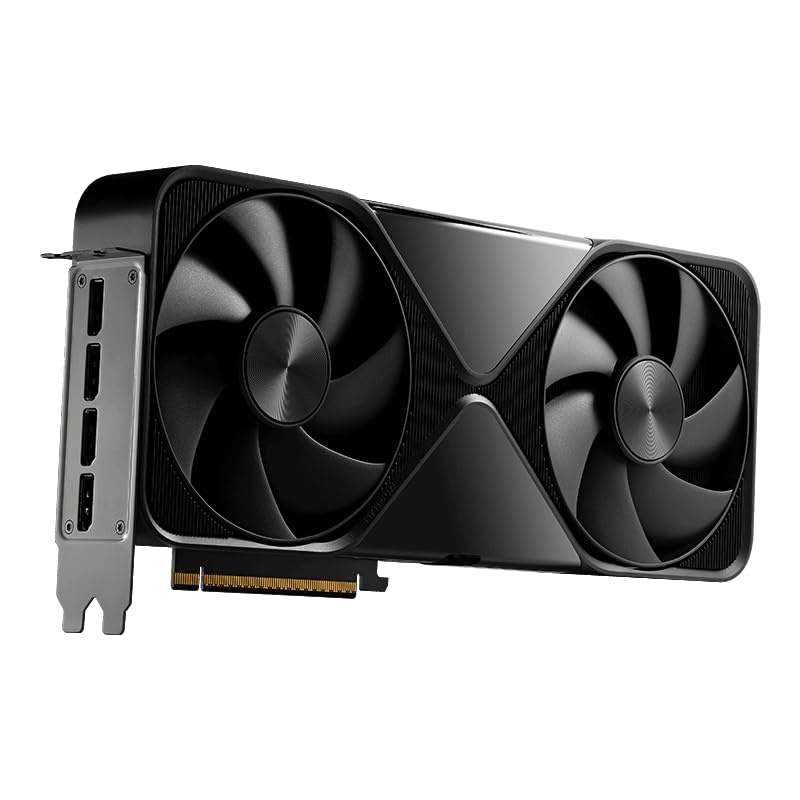
- Axial-tech fans feature a smaller fan hub that facilitates longer blades and a barrier ring that increases downward air pressure
- Phase-change GPU thermal pad helps ensure optimal heat transfer, lowering GPU temperatures for enhanced performance and reliability
- 2.5-slot design allows for greater build compatibility while maintaining cooling performance
- Dual-ball fan bearings last up to twice as long as standard sleeve bearings
- 0dB technology lets you enjoy light gaming in relative silence
- Dual BIOS switch lets you toggle between Quiet and Performance BIOS profiles
- Auto-Extreme manufacturing process for precision and reliability
- GPU Tweak III software provides intuitive performance tweaking, advanced thermal control, and system monitoring
Why You'll Love It
- Fits small-form-factor desktop cases with a compact 2.5-slot profile and 306mm length
- Delivers fast memory performance via NVIDIA Blackwell architecture with 16GB GDDR7 memory
- Maintains cooling pressure using phase-change thermal pads and high-pressure Axial-tech fans
- Extends fan lifespan with dual-ball bearings that endure twice as long as sleeve options
- Enables silent operation during lighter workloads using integrated 0dB fan technology
- Offers easy performance tuning through a physical Dual BIOS switch and GPU Tweak III software
Pros
- +Fits small-form-factor PC builds
- +Quiet 0dB mode during light tasks
- +Dual BIOS hardware toggle built in
- +Includes bundled GPU support bracket
- +Three-year manufacturer warranty coverage
Cons
- -Requires 750W PSU and 16-pin connector
- -Measures 12 inches long and weighs 4 pounds
Detailed Review
The ASUS SFF-Ready Prime NVIDIA GeForce RTX 5070 Ti 16GB GDDR7 OC Edition graphics card is designed for builders who want high-tier graphics hardware inside compact desktop enclosures. Built around the NVIDIA Blackwell architecture with DLSS 4 support, it provides 16GB of GDDR7 video memory on a modern PCIe 5.0 interface. It addresses the common challenge of placing high-performance GPU hardware into tighter PC cases without sacrificing thermal management or board stability.
Physical design and thermal construction play a key role in this card's footprint. It features a 2.5-slot profile, measures 306mm (12 inches) in length, and weighs 4 pounds. Heat transfer is managed by a phase-change GPU thermal pad combined with Axial-tech cooling fans. These fans use a smaller hub to fit longer blades and a barrier ring that increases downward air pressure. The fan assembly utilizes dual-ball bearings engineered to last up to twice as long as standard sleeve bearings. For everyday casual use, built-in 0dB technology stops fan movement completely during light gaming to maintain quiet operation.
Hardware customization and control are straightforward. An onboard Dual BIOS switch lets users toggle between Performance and Quiet profiles directly on the card. Clock speeds reach up to 2497MHz in Default mode and 2527MHz in OC mode. Further adjustments are available through GPU Tweak III software, which allows monitoring of system thermals, fan speeds, and clock parameters. ASUS uses its automated Auto-Extreme manufacturing process to build the card for consistent component precision and assembly quality.
Prospective buyers should review their current build specifications before purchasing. The card requires a minimum 750W power supply equipped with a 16-pin 12V-2x6 (12VHPWR) power cable connector. While it is classified as SFF-Ready, its 12-inch length and 4-pound weight still require adequate internal case space and physical support. ASUS includes a GPU bracket in the package to assist with supporting the card's weight inside the expansion slot.
Verdict: This graphics card is a strong match for enthusiasts constructing compact PC builds who want SFF compatibility paired with HDMI 2.1 and DisplayPort 2.1 connectivity. Provided your system includes a 750W power supply with the required 16-pin connector, it delivers dependable thermal features, silent low-load operation, and a 3-year manufacturer warranty.
Specifications
- Architecture: NVIDIA Blackwell with DLSS 4
- Memory: 16GB GDDR7
- Interface: PCIe 5.0
- Boost Clock: 2497 MHz (Default mode), 2527 MHz (OC mode)
- Card Dimensions: 306 mm (12 inches) length, 2.5-slot width
- Weight: 4 lbs
- Display Connections: HDMI 2.1, DisplayPort 2.1
- Power Requirement: Minimum 750W PSU with 16-pin 12V-2x6 (12VHPWR) connector
- Cooling Features: Axial-tech fans, phase-change thermal pad, dual-ball bearings
- Control Features: Hardware Dual BIOS switch, GPU Tweak III software
- Included Accessories: GPU support bracket
- Warranty: 3-year warranty
Who Should Buy It
A great fit if you:
- Are building or upgrading a small-form-factor PC chassis that accepts expansion cards up to 306mm long and 2.5 slots wide.
- Already have or intend to install a power supply delivering at least 750W with a native 16-pin 12V-2x6 connector.
- Value quiet desktop operation during light workloads using 0dB fan technology and hardware Dual BIOS switches.
Consider something else if you:
- Own an ultra-compact PC case that cannot accommodate a 12-inch long, 4-pound graphics card.
- Use an existing power supply rated below 750W or one that lacks the specified 16-pin 12V-2x6 power connection.
Before You Buy
Confirm on the listing:
- Measure your PC case interior to verify it accommodates a card length of 306mm (12 inches) and a 2.5-slot depth.
- Check your power supply unit to ensure it meets the 750W minimum requirement and provides a 16-pin 12V-2x6 connector.
- Confirm that your motherboard has an available PCIe 5.0 slot and physical clearance for the included GPU support bracket.
How to compare your options: Focus on card physical dimensions, power connector types, and thermal construction when evaluating graphics cards. Compact desktop builds require strict verification of card length and slot clearance to ensure proper fitment. Models equipped with phase-change thermal pads, dual-ball fan bearings, and physical Dual BIOS switches provide distinct advantages in thermal dissipation and fan longevity over standard single-BIOS cards.
Getting the Most From It
If installing this graphics card into a tight enclosure, install the bundled GPU support bracket during setup to help support its 4-pound weight and reduce stress on the PCIe slot.
Ensure the required 16-pin 12V-2x6 power connector is firmly seated into the card's power socket before powering on your computer system.
Use the physical Dual BIOS toggle on the side of the card to switch between Performance mode for higher cooling focus and Quiet mode for reduced acoustic output without needing to configure software.
Download ASUS GPU Tweak III software to monitor real-time GPU thermals, adjust fan speed profiles, or switch clock frequencies between Default mode (2497MHz) and OC mode (2527MHz).
Keep computer case intake vents and dust filters clean as part of routine system maintenance to help the Axial-tech fans maintain unobstructed airflow.
FAQ
What power supply is required for this card?
The card requires a minimum 750W power supply equipped with a 16-pin 12V-2x6 (12VHPWR) connector. Check your current power supply specifications before purchasing.
Will this graphics card fit in a small-form-factor case?
It is SFF-Ready, featuring a 2.5-slot profile and a length of 306mm (12 inches). Always measure your case interior to verify slot spacing and length clearance.
What does the Dual BIOS switch do?
The physical Dual BIOS switch allows you to toggle the card between Quiet mode and Performance mode directly on the hardware without using software controls.
How does 0dB technology work?
The 0dB feature completely stops the Axial-tech cooling fans during light workload sessions, allowing the card to run quietly until GPU temperatures rise during heavier tasks.
What display connections does this card provide?
The product features HDMI 2.1 and DisplayPort 2.1 outputs. The product listing does not state the exact total number of output ports, so confirm port counts on the retailer page if setup requires multiple displays.
Product Details
| Brand | ASUS |
| ASIN | B0DS6V7L5M |