Logitech
Logitech K480 Wireless Multi-Device Keyboard for Windows, macOS, iPadOS, Android or Chrome OS, Bluetooth, Compact, Compatible with PC, Mac, Laptop, Smartphone, Tablet - Black
Disclosure: We may earn a commission when you buy through links on this page, at no extra cost to you. As an Amazon Associate I earn from qualifying purchases. Learn more
Highlights
- Type on Any Device: A new type of wireless computer keyboard for your desk that also works with your tablet and smartphone; connect with any Bluetooth-enabled device with external keyboard support. Wireless range: > 10m wireless range
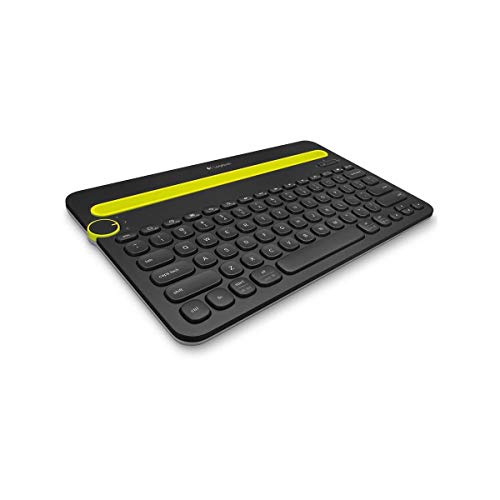
- Easy-Switch Dial: Simply turn the dial of the Logitech K480 keyboard to switch typing between 3 connected Bluetooth wireless devices, you can work with Windows, macOS, Chrome OS, Android, and iPadOS
- Familiar Keyboard Layout: Find all the shortcut keys you use the most, but in a space-saving design that lets you place your mouse close to you, for less arm reaching and better posture
- Integrated Cradle: A cradle to hold your phone or tablet at just the right angle for you to read while you type; fits most phones and tablets up to 0.4 inches thick and 10 inches wide
- Reliable Power: This portable, wireless Bluetooth keyboard comes with 2 pre-installed AAA batteries which can last up to 24 months (2) and is compatible with wired, wireless or Bluetooth mice. Battery indicator light
- Durable and Spill-resistant: The wireless and compact keyboard K480 is also spill-resistant (1) to survive small accidents; it’s a reliable and durable partner for your desk at home, or at work
- Upgrade to Logitech K780 Keyboard: For more productivity and comfort, try the K780 keyboard with number pad for efficient data inputs, Bluetooth/USB, scooped keys, and cradle to hold your phone
- Multi-device Keyboard: Unique computer keyboard that also works with your Bluetooth tablet and smartphone
- Easy switching between devices: Turn a single dial to switch between typing on three wireless Bluetooth devices
- Easy switching between devices: Turn a single dial to switch between typing on three wireless Bluetooth devices
- Smartphone/tablet cradle: Built-in cradle holds your devices at the ideal angle for typing
- Familiar layout: Designed for easy and comfortable typing, including shortcut keys for Windows and Mac
Why You'll Love It
- Switch between three connected Bluetooth devices with a single dial instead of reconnecting for every change
- Use one keyboard across compatible Windows, macOS, Chrome OS, Android and iPadOS devices
- Keep a phone or tablet upright in the integrated cradle while typing
- Make room for a nearby mouse with a compact layout and familiar shortcut keys
- Start with two included AAA batteries, with a stated potential lifespan of up to 24 months
- Type with added peace of mind from a spill resistant design intended to handle small accidents
Pros
- +Three device connections with dial switching
- +Integrated phone and tablet cradle
- +Compatibility across five operating system families
- +Two preinstalled AAA batteries
- +Spill resistant construction
Cons
- -Cradle has specific device size limits
- -Switching between devices requires turning a physical dial
Detailed Review
The Logitech K480 is a Bluetooth keyboard for people who want to type across a computer, smartphone and tablet without keeping a separate keyboard for each device. Its defining feature is the dial that switches between three connected devices, making it a practical choice for someone who regularly moves between different screens. Rather than treating a phone or tablet as something to use separately, the design gives it a place alongside a conventional computer setup.
The three device connections are the main reason to consider this model. It supports Windows, macOS, Chrome OS, Android and iPadOS, provided the device has Bluetooth and supports an external keyboard. Once compatible devices are connected, turning the Easy Switch dial selects which one receives your typing. That arrangement can suit someone who writes on a computer, replies to messages on a phone and uses a tablet for other tasks. The advertised wireless range is greater than 10 meters, giving the connection some flexibility around a desk or workspace.
The integrated cradle makes the keyboard especially relevant to phone and tablet users. It holds a compatible device at an angle intended to make reading while typing convenient, so the screen can remain in view as you work. The cradle accommodates most phones and tablets up to 0.4 inches thick and 10 inches wide, making physical fit an important part of the buying decision. The keyboard also has familiar shortcut keys for Windows and Mac, while its space saving layout is designed to let a mouse sit closer to the user.
Power and everyday care are straightforward parts of the proposition. Two AAA batteries come preinstalled, and Logitech states that they can last up to 24 months. A battery indicator light provides a visual reminder related to power, while the spill resistant construction is intended to withstand small accidents. The keyboard is also compatible with wired, wireless or Bluetooth mice, so it can be considered as part of a broader desk setup rather than as a standalone accessory.
The main trade offs are tied to its particular design. The integrated cradle is useful only when the device fits its stated dimensions, and switching among connected devices involves turning a physical dial. Shoppers who prioritize a number pad or features aimed at efficient numerical data entry may prefer to consider a larger keyboard configuration. Verdict: Choose the Logitech K480 if you want one Bluetooth keyboard for three compatible devices and value an integrated phone or tablet cradle. If your priority is frequent numerical data entry or a different keyboard layout, compare alternatives that better match those needs.
Specifications
- Keyboard type: Wireless Bluetooth keyboard
- Compatible operating systems: Windows, macOS, Chrome OS, Android and iPadOS
- Connected devices: Up to three Bluetooth devices
- Wireless range: Greater than 10 meters
- Cradle fit: Most phones and tablets up to 0.4 inches thick and 10 inches wide
- Power: Two preinstalled AAA batteries
- Stated battery life: Up to 24 months
- Care related feature: Spill resistant construction for small accidents
- Mouse compatibility: Wired, wireless or Bluetooth mice
Who Should Buy It
A great fit if you:
- You regularly type on a computer and a smartphone or tablet and want one keyboard to serve all three.
- You prefer selecting a connected device with a physical dial rather than managing separate keyboards for different screens.
- You read from a phone or tablet while writing and would appreciate having the screen supported in an integrated cradle.
- Your devices run compatible operating systems and support external keyboards over Bluetooth.
- You want a compact desk keyboard that leaves room for a mouse close to your typing position.
Consider something else if you:
- You frequently enter numerical data and would benefit more from a keyboard with a dedicated number pad.
- Your phone or tablet exceeds the cradle's stated dimensions, making a keyboard with a separate adjustable device stand a better fit.
Before You Buy
Confirm on the listing:
- Check that each intended device supports Bluetooth and external keyboards, and verify its operating system is compatible with the K480.
- Measure your phone or tablet and confirm it fits within the cradle's stated maximum thickness and width.
- Review the current package contents if you need to confirm that the two preinstalled AAA batteries are included with your particular purchase.
- Check the product listing for any additional layout or configuration details that matter to your workspace before ordering.
How to compare your options: Start with the number of devices you want to use, their operating systems and the ease of switching between them. The K480 is designed around three Bluetooth connections and a dial, so those features matter most if you frequently alternate between screens. Next, compare the cradle dimensions with your actual devices and consider whether the compact layout suits your typing and mouse arrangement. If numerical data entry is a regular task, weigh that need against the alternative of a keyboard with a number pad. Finally, consider the included batteries, stated battery life and spill resistant design as part of your everyday setup requirements.
Getting the Most From It
Begin by checking Bluetooth and external keyboard support on each device you intend to connect. Follow the keyboard's supplied instructions for pairing, and identify which dial position corresponds to each connected device so switching becomes a deliberate part of your routine.
Place your phone or tablet in the integrated cradle only after checking that its dimensions fit the stated limits. Position the keyboard so the screen remains comfortable for you to read while typing, and leave room for your mouse if you use one alongside it.
Make use of the shortcut keys appropriate to your computer's operating system. If you switch between Windows, Mac and mobile devices, take time to become familiar with the shortcuts relevant to each one rather than assuming every command will behave identically.
Keep an eye on the battery indicator light and follow the manufacturer's instructions when caring for the keyboard. Although its construction is spill resistant, the stated protection is intended for small accidents, so follow the supplied care guidance rather than treating it as fully waterproof. Review the instructions for cleaning and battery replacement if either becomes necessary.
FAQ
What comes with the Logitech K480?
It comes with two preinstalled AAA batteries. Check the current listing if you need to confirm any other package contents.
Can I connect it to my phone and computer?
Yes, provided both devices support Bluetooth and external keyboards. The dial lets you switch typing between three connected Bluetooth devices.
Will the cradle fit my tablet?
It fits most phones and tablets up to 0.4 inches thick and 10 inches wide. Check your device's dimensions before relying on the built in cradle.
How long do the batteries last?
The stated battery life is up to 24 months with the two AAA batteries. Actual use may differ, so the battery indicator light is worth monitoring.
Is the Logitech K480 spill proof?
No, it is described as spill resistant, not fully waterproof. Its stated protection is intended to help with small accidents, and care instructions should still be followed.
Product Details
| Brand | Logitech |
| ASIN | B00MUTWLW4 |