Logitech
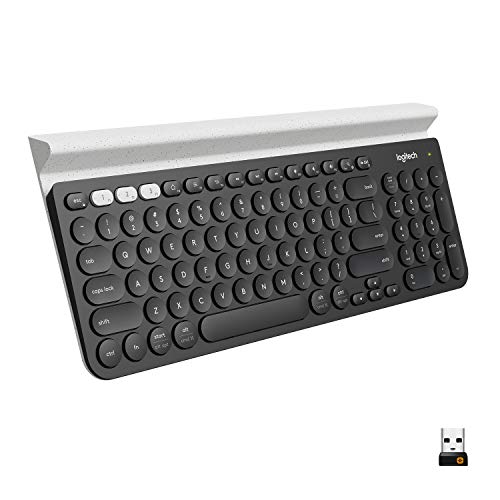
Logitech K780 Multi-Device Wireless Keyboard with Built-in Cradle, Speckles | Compact keyboard, Bluetooth or USB connect, type on 3 paired devices, cradle can hold a smartphone and large tablet together
Disclosure: We may earn a commission when you buy through links on this page, at no extra cost to you. As an Amazon Associate I earn from qualifying purchases. Learn more
Highlights
- Multi-device wireless keyboard: beautiful type-on-everything keyboard for any computer, tablet and smartphone via USB or Bluetooth smart wireless connection
- Type and switch between devices: Type on up to three devices and switch between them at the touch of an easy-switch button
- Comfortable typing: full size, fully equipped keyboard with large, quiet keys and convenient Number pad
- Integrated phone and tablet stand: Holds your devices at the perfect angle to Type and read
- Wide compatibility: works with Windows, Mac, Chrome OS, iOS and Android devices
- In case of wireless keyboard or combo (keyboard and mouse), the USB receiver is usually provided either inside the mouse (under the battery cover) or attached within the product packaging
Why You'll Love It
- Move between a computer, phone, and tablet without switching to a separate keyboard for each
- Switch among three paired devices with dedicated easy-switch controls
- Use Bluetooth or the included USB connection option to suit your setup
- Keep a phone and large tablet together in the integrated viewing cradle
- Enjoy a full keyboard layout with a number pad and large, quiet keys
- Connect across Windows, Mac, Chrome OS, iOS, and Android devices
Pros
- +Three device pairing with quick switching
- +Built in phone and tablet cradle
- +Full keyboard with number pad
- +Bluetooth or USB connectivity
- +Broad operating system compatibility
Cons
- -Built in cradle takes up desk space
- -Three device switching may be unnecessary for single device users
Detailed Review
The Logitech K780 wireless keyboard is designed for people who regularly type across a computer, smartphone, and tablet and want one place to manage that work. Its standout advantage is the combination of multi-device switching and a built-in cradle, bringing typing and device viewing together in one setup. Rather than treating each screen as a separate workspace with its own keyboard, you can pair up to three devices and move between them using the easy-switch buttons. That makes it particularly appealing to households, students, and anyone who divides everyday tasks among different screens.
The layout is another important part of its appeal. Logitech describes the K780 as a full-size, fully equipped keyboard with large, quiet keys and a convenient number pad. That combination suits people who enter numbers, write longer messages, or move between different kinds of typing tasks. The number pad is useful to consider if your regular work involves numerical entry, while the full layout provides a familiar arrangement for general computer use. The listed quiet keys may also appeal to buyers who prefer a less prominent typing sound, although individual preferences can vary.
Connectivity gives you some flexibility in how you build your setup. The keyboard supports Bluetooth wireless connection and USB connection, and its compatibility list covers Windows, Mac, Chrome OS, iOS, and Android. The practical benefit is that the keyboard is intended to serve a range of computers, phones, and tablets rather than being limited to a single operating system. Before buying, match the connection option and compatibility information to the devices you actually plan to use, especially if you expect to switch between different platforms.
The integrated cradle is the feature that makes this design more than a keyboard with wireless connectivity. It holds a smartphone and a large tablet together at an angle intended for typing and reading. That arrangement can help keep a mobile screen visible while you enter text, respond to messages, or work between devices. The trade-off is that a keyboard with a built-in cradle combines two functions in one physical footprint, so the cradle's placement should suit your available desk space and preferred screen positions.
Verdict: Choose the Logitech K780 if you want a full keyboard with a number pad, quick switching among three devices, and a built-in place for a phone and tablet. It is especially suited to people who use several compatible screens throughout the day. If you mainly type on one device or prefer a keyboard without an integrated cradle, a simpler keyboard design may fit your needs better.
Who Should Buy It
A great fit if you:
- Regularly move between a computer, smartphone, and tablet and want to type across them using one keyboard.
- Enter numbers as part of your everyday work and prefer a full keyboard layout with a dedicated number pad.
- Like keeping a mobile screen visible while typing and would use a built-in cradle for reading or responding.
- Use devices across different operating systems and want a keyboard designed for broad platform compatibility.
Consider something else if you:
- Usually work on one device and would rather choose a simpler keyboard without multi-device switching features.
- Prefer to position your phone or tablet separately, making a keyboard without a built-in cradle a better match.
Before You Buy
Confirm on the listing:
- Check the keyboard's exact dimensions and compare them with your available desk space, including room for the built-in cradle.
- Verify that your specific computer, phone, and tablet support a listed operating system and a connection method offered by the keyboard.
- Review the package contents and confirm whether the USB receiver is included and where it is packed. The seller notes that receivers may be inside a mouse or attached within the packaging for wireless keyboard or combo products.
- Check the connection instructions and any device specific requirements before deciding whether Bluetooth or USB best suits your setup.
How to compare your options: Start with the number of devices you use, the keyboard layout you prefer, and whether an integrated cradle would be useful. The K780 brings together three device pairing, Bluetooth or USB connectivity, a number pad, and a phone and tablet stand. Compare those features against your actual routine rather than paying attention only to the number of functions offered. If you rarely switch screens, a simpler option may be more appropriate. If you regularly work across mobile and desktop devices, prioritize compatible connections and convenient switching.
Getting the Most From It
Start by identifying the devices you want to use with the keyboard. Check their operating systems and available connection options, then follow the supplied instructions for pairing or connecting each device. Decide which three devices matter most to your routine so the easy-switch controls serve a clear purpose.
Make the cradle part of your workspace deliberately. Position the keyboard and supported devices where you can comfortably see the screens and reach the keys, and check that the phone and large tablet fit together as intended. If your preferred screen arrangement does not work with the cradle, reconsider whether this integrated design suits your workspace.
Use the switching feature to organize different activities across your devices. For example, you might keep a computer available for longer typing tasks while using a paired phone or tablet for messages and reading. The benefit comes from having a single keyboard ready for multiple screens, rather than repeatedly moving between separate typing setups.
For ongoing care, follow any care instructions supplied with the product. Keep the keyboard and cradle arranged so the keys remain accessible and the devices are properly positioned. If you change devices later, review compatibility and connection instructions again instead of assuming every new device will work in the same way.
FAQ
Can the Logitech K780 connect to more than one device?
Yes, it supports pairing with up to three devices. Use the easy-switch buttons to move between the paired devices instead of dedicating a separate keyboard to each one.
Does it work with Windows, Mac, Android, and iPhone?
Yes, the listed compatibility includes Windows, Mac, Chrome OS, iOS, and Android. Check your particular device's connection support before purchasing.
Can I connect it through Bluetooth or USB?
Yes, the keyboard supports Bluetooth wireless connectivity and USB connection. Confirm the package contents and connection instructions to determine the appropriate setup for your devices.
Does the cradle hold a phone and tablet at the same time?
Yes, the integrated cradle is described as holding a smartphone and large tablet together. Check the dimensions and fit information on the listing if you have particular devices in mind.
What comes in the box, and how do I set it up?
The seller describes the keyboard and notes that a USB receiver is usually provided with wireless keyboard products, sometimes inside a mouse or attached within the packaging. Check the specific package contents and supplied instructions before setup, as the exact included items are not fully detailed here.
Product Details
| Brand | Logitech |
| ASIN | B01LZTBKBG |