TECKNET
TECKNET Foldable Bluetooth Keyboard with Touchpad & Numpad
Disclosure: We may earn a commission when you buy through links on this page, at no extra cost to you. As an Amazon Associate I earn from qualifying purchases. Learn more
Highlights
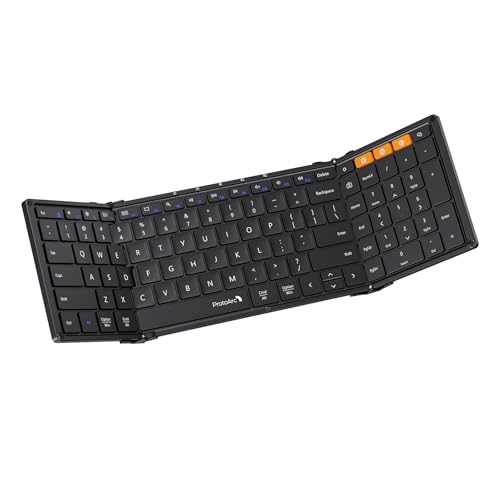
- [Compact & Portable Design] The tri-folding keyboard with a 64-key layout folds down into a compact size of just 7.15 × 4.22 × 0.63 inches, reducing its footprint by over 50% compared to a full‑size keyboard. It fits easily into backpacks and handbags. Ideal for working on the go, business trips, coffee shops, or flights
- [Multi-Mode Touchpad] This bluetooth keyboard for ipad features a built-in precision touchpad for effortless navigation, scrolling, and clicking. It also switchs between Touchpad Mode, Numeric Keypad Mode, and Touch-Off Mode, allowing full control, fast number entry, or accidental-touch prevention
- [Multi Device Switching] This TECKNET foldable keyboard supports Bluetooth connections and connects up to 3 devices. Switch between laptop, smartphone, and tablet in under 1 second without re-pairing. It is perfect for multi-device users, remote workers, and anyone who hot‑desks
- [Wide Compatibility] This portable keyboard is fully compatible with iOS, Windows, Android and macOS. By pressing Fn+Q/W/E/R to switch between iOS/Windows/Android/macOS. It also includes 12 multimedia shortcut keys (Fn+F1 to F12) and supports a stable wireless connection range of up to 10m (33 feet).
- [Long‑Lasting Rechargeable Battery] The travel keyboard features USB-C fast charging and an auto-sleep function that extends standby time to 300 days and wakes instantly with any key press. When the battery level drops below 20%, the indicator light in the top-right corner turns red to indicate it's time to recharge
- [What's in the box] The package includes a foldable bluetooth keyboard, a foldable stand, a USB-C charging cable(not for connecting), a storage pouch, and a user manual. TECKNET provides 36 months hassle-free support. If you experience any key or connection issues within 3 years, please contact us for prompt assistance
Why You'll Love It
- Folds into a compact 7.15 × 4.22 × 0.63 inch package for carrying between workspaces
- Switches between touchpad, numeric keypad, and touch-off modes for flexible navigation and number entry
- Connects with up to three devices, letting you switch between your tablet, phone, and laptop without pairing again
- Supports iOS, Windows, Android, and macOS with dedicated function key combinations for changing systems
- Recharges through USB-C and uses auto-sleep to extend standby time between work sessions
- Includes a folding stand, storage pouch, charging cable, and three years of manufacturer support
Pros
- +Compact tri-folding design
- +Built-in touchpad and numeric keypad modes
- +Three-device Bluetooth switching
- +Compatibility with four operating systems
- +USB-C rechargeable battery
Cons
- -64-key layout requires adjusting to a compact keyboard
- -Touchpad and numeric keypad share selectable modes
- -USB-C cable is for charging, not connecting
Detailed Review
The TECKNET foldable Bluetooth keyboard is designed for people who want to type across multiple devices without carrying a full-size keyboard. Its tri-folding design packs a 64-key layout into a folded footprint of 7.15 × 4.22 × 0.63 inches, making it easier to slip into a backpack or handbag. The appeal is straightforward: you get a physical keyboard, a built-in touchpad, and selectable numeric keypad functionality in one portable accessory. It makes the most sense for people who move between workspaces or regularly type on a tablet or smartphone.
Its built-in touchpad gives you a way to navigate, scroll, and click without relying entirely on a separate pointing device. Three selectable modes let you use the touchpad, switch to numeric keypad functionality, or turn touch input off to prevent accidental touches. That flexibility can be useful when your tasks change throughout the day. However, the modes serve different purposes, so buyers should consider how often they need navigation versus dedicated number entry and whether switching between them suits their routine.
Bluetooth connectivity supports up to three paired devices, with switching advertised as taking less than a second without requiring re-pairing. That is useful if you alternate between a laptop, tablet, and phone instead of working from a single device. Compatibility covers iOS, Windows, Android, and macOS, with Fn key combinations for selecting the appropriate system. Twelve multimedia shortcuts, accessed through Fn and the function keys, add another layer of convenience. The stated wireless range reaches 10 meters, giving you some flexibility in where you position a connected device.
Power and portability round out the design. The keyboard recharges through USB-C, enters auto-sleep to extend standby time to a stated 300 days, and wakes when you press a key. A red indicator in the top-right corner signals when the battery drops below 20 percent. The package also includes a folding stand, a storage pouch, a charging cable, and a manual. Keep in mind that the cable is for charging rather than a wired keyboard connection.
The main trade-off is the compact 64-key arrangement. Folding the keyboard down makes it easier to carry, but the layout is a deliberate alternative to a full-size keyboard, so buyers should decide whether that smaller arrangement suits their typing habits. The touchpad and numeric keypad also share selectable modes rather than operating as separate functions at all times. Verdict: This foldable Bluetooth keyboard is a strong fit for mobile workers, tablet users, and people who switch between several operating systems or devices. If you need a full-size layout or prefer separate, always-available navigation and number-entry controls, a larger keyboard with dedicated controls may be a better match.
Specifications
- Product type: Foldable Bluetooth keyboard with touchpad and numeric keypad modes
- Layout: 64 keys
- Folded dimensions: 7.15 × 4.22 × 0.63 inches
- Connectivity: Bluetooth
- Device capacity: Up to 3 devices
- Wireless range: Up to 10 meters (33 feet)
- Compatible operating systems: iOS, Windows, Android, and macOS
- Multimedia shortcuts: 12, accessed through Fn and F1 to F12
- Charging connection: USB-C
- Standby claim: Up to 300 days with auto-sleep
- Battery indicator: Red light below 20 percent battery
- Included accessories: Folding stand, USB-C charging cable, storage pouch, and user manual
- Manufacturer support: 36 months of support
Who Should Buy It
A great fit if you:
- You regularly type on a tablet or phone and want a physical keyboard that folds away when work is finished.
- You move between a personal laptop, a mobile device, and another computer and want to switch between three Bluetooth connections.
- You enter numbers for work and would appreciate selecting a numeric keypad mode instead of carrying another input accessory.
- You prefer navigating and scrolling from the keyboard rather than relying entirely on your connected device's touchscreen.
- You use iOS, Windows, Android, or macOS devices and want one keyboard that supports your operating systems.
Consider something else if you:
- You spend most of your day typing and want a larger keyboard layout, making a full-size keyboard a more suitable alternative.
- You need independent touchpad and numeric keypad controls available simultaneously, making a keyboard with separate dedicated controls a better choice.
Before You Buy
Confirm on the listing:
- Check the folded dimensions against the space in your bag and measure your intended work area to decide whether the compact layout suits it.
- Confirm that your specific phone, tablet, or computer supports the required Bluetooth connection and identify the correct operating system setting.
- Review the included accessories to ensure the folding stand, storage pouch, USB-C charging cable, and manual meet your needs.
- Check your charging arrangements and whether you are comfortable with wireless operation, since the supplied cable is intended for charging rather than a wired keyboard connection.
How to compare your options: Start with the layout, portability, and input controls you need most. This model combines folding storage, a touchpad, and a selectable numeric keypad in a 64-key design. Next, compare how many devices you need to connect, which operating systems you use, and whether switching between stored Bluetooth connections matters in your routine. Finally, consider charging convenience, standby behavior, and included accessories rather than choosing on compact size alone. A larger keyboard may better suit extended typing, while a portable model is more appropriate when storage space and moving between devices take priority.
Getting the Most From It
Start by reading the included manual before connecting the keyboard. Use the specified Fn key combinations to select the operating system that matches your connected device, then follow the pairing instructions for your Bluetooth connection. Setting the correct system mode is a useful first step before relying on the function keys and shortcuts.
If you regularly alternate between devices, pair the keyboard with the devices you intend to use and learn its switching procedure. Keeping those connections organized around your normal routine can make moving from a laptop to a tablet or phone more straightforward without repeatedly starting the pairing process.
Choose the touchpad, numeric keypad, or touch-off mode according to the task at hand. Use the touchpad mode when navigation and scrolling matter, the numeric keypad mode when entering numbers, and touch-off mode when you want to prevent accidental touch input. Familiarizing yourself with these choices helps you get more value from the integrated controls.
Recharge through the supplied USB-C cable when needed, and pay attention to the red low-battery indicator. Store the folded keyboard in its included pouch when carrying it, and keep the manual available for operating instructions. If you need cleaning or care guidance, follow the manufacturer's instructions rather than assuming a particular method is suitable.
FAQ
What comes with the TECKNET foldable keyboard?
The package includes the keyboard, a folding stand, a USB-C charging cable, a storage pouch, and a user manual. The cable is for charging, not for connecting the keyboard as a wired device.
Will it work with an iPad, Android tablet, or laptop?
Yes, it supports iOS, Android, Windows, and macOS through Bluetooth. Use the appropriate Fn key combination to select the operating system, and confirm compatibility with your specific device before buying.
Can I connect it to more than one device?
Yes, it supports up to three devices and advertises switching between them without re-pairing. This is useful if you alternate between a laptop, smartphone, and tablet.
Does it have a numeric keypad and touchpad?
Yes, both functions are built in, with selectable touchpad, numeric keypad, and touch-off modes. The selected mode determines which touch-related function you use.
How do I charge it, and how long does standby last?
It charges through USB-C and uses auto-sleep to extend standby time to a stated 300 days. The indicator turns red below 20 percent battery, and the keyboard wakes when you press a key. The listing does not give a typical active-use battery duration, so check the current product details if that is important to your purchase.
Product Details
| Brand | TECKNET |
| ASIN | B0FKGMD6RW |