
2230 vs 2280: Which Is Better in 2026?
Disclosure: We may earn a commission when you buy through links on this page, at no extra cost to you. As an Amazon Associate I earn from qualifying purchases. Learn more

2230 vs 2280 M.2 SSDs: how the two lengths differ, which handhelds and laptops need the short one, and what to check before buying.
The difference between 2230 vs 2280 is simply length: both are M.2 solid state drives, but a 2230 is 30 millimeters long and a 2280 is 80 millimeters long, with the same 22 millimeter width. That small difference decides whether a drive fits your handheld, ultrabook or desktop. The product table right after this introduction shows drives in both sizes.
Below you will see which devices need each size, what you trade in capacity and cooling, and how to confirm fit before you buy.
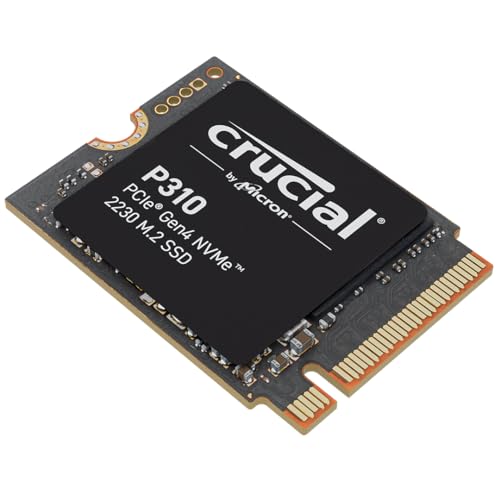


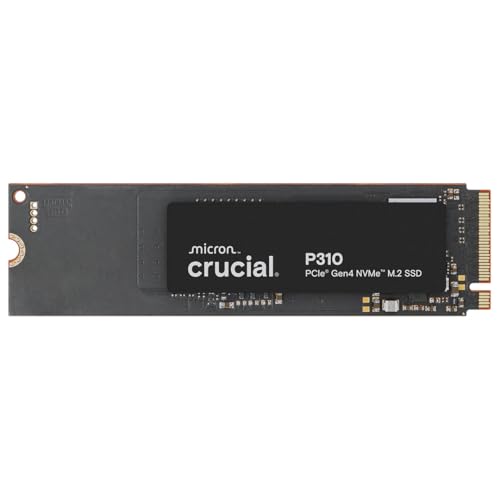
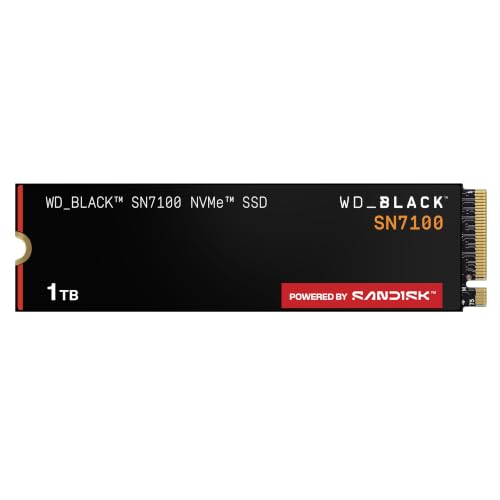
What the Numbers Mean
The four digits describe the module size. The first two give the width in millimeters, and the last two give the length. So 2230 is 22 by 30 millimeters and 2280 is 22 by 80 millimeters. There are other lengths, such as 2242 and 22110, but 2280 is the standard for desktops and most laptops, and 2230 is the short size chosen for compact devices.
The connector is the same on both, and both can use the same NVMe protocol over PCIe. That means a 2230 drive can be just as fast as a 2280 drive in principle. The difference lies in how much room there is for chips and cooling.
Which Devices Use 2230
Handheld gaming PCs and compact tablets are the main users of 2230 drives. Several popular handhelds ship with a short drive and have a mounting point only for that length. Some thin laptops and small-form-factor machines use 2230 too, to save space for a battery or cooling.
Replacing the drive in such a device is the most common reason people shop for a 2230 model. A short drive gives you more space for games, and many are sold in sizes that fit those devices exactly. Look at the maker's support pages to confirm which length your device accepts.
- 2230: handhelds, some compact laptops, tablets and mini PCs.
- 2280: desktop motherboards, most laptops, and many consoles that accept M.2 drives with heatsinks.
Capacity and Choice
Because a 2230 board is short, there is less space for memory chips, so top capacities arrive later than on 2280 drives. Today you can find 2230 drives in the 1TB and 2TB range, while 2280 models stretch to 4TB and beyond. There are also fewer 2230 models overall, so you have fewer brands and designs to choose from.
That can mean a price premium. A 2230 drive of a given capacity often costs more than a 2280 of the same size, because it is a smaller market and packs the memory tighter. Compare the price per terabyte before you assume a bargain either way.
Speed and Heat
Performance varies by model rather than by length, but compact drives have to handle heat in a small space. In a handheld there is little airflow, and a drive can slow itself down when it overheats. Thin drives without a heatsink are often a good fit, since many handhelds have no room for a thick one.
Desktop 2280 drives usually fit a heatsink or sit under a motherboard shield. Many high-end models run hot under sustained writes, and a heatsink or airflow keeps them at full speed. For model comparisons, see our best SSD guide.
Using a 2230 in a 2280 Slot
You can often fit a 2230 drive into a slot built for 2280, but only with a small adapter or bracket that holds the short drive at the correct length. These adapters are inexpensive and let you reuse a drive from a handheld in a desktop or laptop, for example. Make sure the adapter and the drive suit each other, and that the screw sits at the right position.
The opposite does not work. A 2280 drive is too long for a device with a short mounting point, so there is no workaround for fitting one into a handheld.
Installing a Short Drive Safely
Swapping a drive in a handheld or thin laptop is simple but needs care. Power the device off completely, unplug it, and open the case using the right screwdriver, since the screws are often tiny. Many devices have a metal shield over the drive that you must lift gently, and some have thermal pads that should go back in place.
Handle the new drive by its edges, line up the notch with the slot, press it in at a slight angle and then secure it with the small screw. After closing the device, you will need to reinstall the operating system or restore it from a backup, since the new drive will be empty. Most makers publish a recovery image and clear instructions, which are worth reading first.
Cloning and Moving Data
If you want to keep your current setup, cloning software can copy the old drive to the new one. This usually needs an external enclosure or an adapter to connect the second drive during the process. Short drives need enclosures made for them, because a standard 2280 enclosure may not hold a 2230 drive firmly.
When cloning to a larger drive, the partitions may need resizing so the extra space becomes usable. Most tools do this for you. Keep the old drive untouched for a few days after the move, in case you find a file you missed.
2230 vs 2280: Which Should You Choose?
Take whichever size your device accepts. If it has a 2230 slot only, you have no choice. If it supports both, a 2280 drive gives you more models, larger capacities and often lower prices. For desktops and most laptops, 2280 is the natural pick, and for handhelds the 2230 is the right tool.
Quick checks before you buy
- Read your device's manual or support page for the supported length.
- Look at the physical mounting point if you can open the device.
- Check for single-sided drives if clearance is tight.
- Confirm the drive's interface and generation match your device.
Our reviews of the Samsung 990 Pro and Crucial P310 cover popular drives that come in common sizes.
FAQ
Is a 2230 SSD slower than a 2280?
Not by design. Speed depends on the model and the controller, and short drives can match long ones.
Will a 2280 SSD fit a Steam Deck?
No, the device has a short mounting point that needs a 2230 drive, unless you use a different approach with external storage.
Can I use a 2230 drive in my desktop?
Yes, with an adapter bracket that holds it in a 2280 slot.
Why are 2230 drives more expensive?
They are a smaller market and pack chips into a tighter layout, so prices per terabyte run higher.
The takeaway on 2230 vs 2280 is that length decides fit: choose the short drive only when your handheld or compact laptop needs it, and the longer drive for everything else.


