
B850 vs X870: Which Is Better in 2026?
Disclosure: We may earn a commission when you buy through links on this page, at no extra cost to you. As an Amazon Associate I earn from qualifying purchases. Learn more

B850 vs X870: what the premium AM5 chipset adds in USB4 and expansion, and who needs it.
The b850 vs x870 question is a choice between AMD's upper mainstream chipset and its premium one for the AM5 socket. B850 gives most gamers everything they need for less money, while X870 adds extra connectivity and expansion for enthusiasts who use fast external devices, multiple drives and several expansion cards.
This guide explains what the premium chipset adds, whether you will use it and how to pick between boards. The product table lists B850 and X870 boards that are in stock so you can compare real prices.




B850 vs X870: The Core Difference
Both chipsets support AM5 processors and DDR5 memory, so the processor and memory choice is the same. X870 is the higher tier, built for boards with more USB4, more PCIe lanes and more premium extras. B850 is the mainstream tier, built for the many buyers who want strong specifications without paying for features they will not use.
In practice, the cost gap comes mostly from the board design rather than the chipset: X870 boards are built to be feature-rich and tend to have bigger heatsinks, more ports and premium audio and networking.
Connectivity: USB4 and Ports
X870 boards typically include USB4, a fast connection for external drives, docks and displays, while B850 boards offer it only on some models. If you use a fast external storage device or a Thunderbolt-style dock, X870 is the easier fit. If you use ordinary USB drives, a B850 board is fine.
The ASUS ROG Strix X870E-E Gaming WiFi in the table lists Wi-Fi 7, five M.2 slots, PCIe 5.0 and USB4, which shows how much more a premium board packs in.
PCIe Lanes and Storage
X870 boards generally offer more PCIe lanes and more M.2 slots, which helps if you install several fast drives or a capture card or network card in addition to a graphics card. A B850 board gives you a PCIe 5.0 graphics slot and a fast M.2 slot, which is enough for a single graphics card and a couple of drives.
Power Delivery and Overclocking
Higher-end boards use stronger power delivery and bigger heatsinks, which helps sustained loads on a top Ryzen chip. A good B850 board, however, can drive even high-end processors comfortably, so unless you plan serious overclocking, the power delivery on B850 is plenty.
Price and Value
B850 boards cost noticeably less than X870 boards at similar quality. The price gap often buys you a better graphics card instead, which improves gaming more than a premium chipset does. Choose X870 only when you will use USB4, the extra slots or the premium extras.
Which Should You Choose
- Choose B850 for a gaming PC with one graphics card and a few drives.
- Choose X870 if you want USB4, many M.2 drives and top-tier extras.
- Choose a board by features and price, not only the chipset name.
For related help, see our b650 vs b850 guide, the best motherboard page, the msi mag x870 tomahawk wifi review, the gigabyte b850 aorus elite wifi7 review and the asus rog crosshair x870e hero review.
Who Really Needs the Premium Chipset
Think about what you plug in beyond the graphics card. Video editors with fast external drives, streamers with a capture card and an extra network card, and people who run a home server on the same machine all benefit from the extra lanes and ports. Anyone who builds a gaming PC with one graphics card, one or two solid state drives and a pair of USB peripherals will see no difference in daily use between a good B850 board and an X870 board.
Reading a Motherboard Listing
Ignore the marketing adjectives and look for four things. First, the number and generation of M.2 slots. Second, the rear ports, including how many are USB-C and whether any is USB4. Third, the wireless and wired network chips, since Wi-Fi 7 and 2.5G Ethernet are common and 10G is rare. Fourth, the power stage description, which tells you how robust the voltage regulation is. These facts decide what the board can do, and boards on either chipset differ widely.
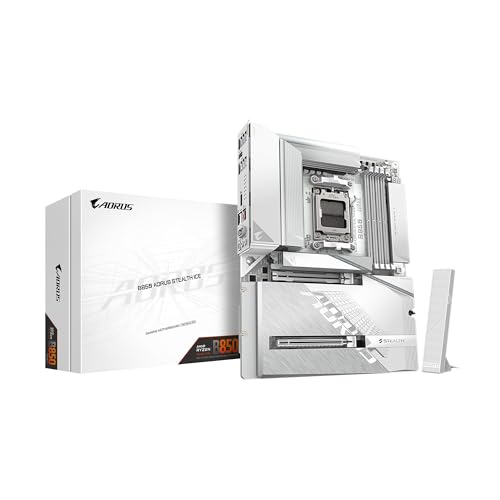
Listings such as the ASUS ROG Strix B850-F and the Gigabyte B850 AORUS Stealth ICE show how feature-rich a B850 board can be, which is why many buyers never need to step up.
Future-Proofing Without Overspending
The AM5 socket is designed to support several processor generations, so a board bought now will usually accept a newer chip later. That makes a good B850 board a long-lived purchase, and you can always upgrade the processor in a few years. Spending extra on X870 for future needs only pays off if you already know that you will use the extra features, since new technology tends to become cheaper over time.
Cooling and Case Fit
Both chipsets sit on boards in ATX, micro ATX and mini-ITX sizes, so confirm that the board size matches your case. Enthusiast X870 boards are usually ATX with large heatsinks, which need good case airflow. Compact B850 boards suit small builds, and the ROG Strix B850-I and the Strix B850-G in the table are examples of smaller sizes.
Warranty and Support
Motherboards usually carry a three-year warranty, and the major brands have clear support pages. Register the board after purchase, keep the invoice and update the BIOS from the maker's site when a stability fix appears. A board that is well supported gets better with time, and that support matters more than a small difference in features.
FAQ
Is X870 faster than B850?
Not for gaming. The processor and graphics card decide speed, and the chipset affects connectivity and expansion.
Do I need USB4?
Only if you use fast external storage or docks. Most gamers do not.
Can I overclock on B850?
Yes. B850 supports processor and memory overclocking, and the board's power design sets the limit.
Are X870 boards worth the price?
For enthusiasts who use the extra features, yes. Others get better value from B850.
Final Verdict
For most builders, B850 is the better value, and the b850 vs x870 decision only favors X870 if you need USB4, many drives or premium extras. Compare the boards in the product table and put the savings into the graphics card.
Prices and availability can change, so check the product page before ordering.


