
Best Affordable Gaming Laptops: Budget, Midrange, and Premium Picks
Disclosure: We may earn a commission when you buy through links on this page, at no extra cost to you. As an Amazon Associate I earn from qualifying purchases. Learn more

Budget, midrange and premium picks for the best affordable gaming laptops, with price tiers, key features and upgrade tips.
A gaming laptop used to mean spending $2,000 or more, but today's entry level graphics chips run modern games smoothly at 1080p for well under that. The trick is knowing where budget laptops cut corners and where they should not: a fast graphics chip paired with too little memory, a dim screen or a cooling system that throttles under load can make a cheap laptop feel slow. The best affordable gaming laptops put most of their budget into the GPU and cooling, include a fast refresh display and leave room to upgrade memory and storage later.
Below are our picks at three budgets, followed by what each price tier gets you, which features are worth paying for and the long term costs to plan for.


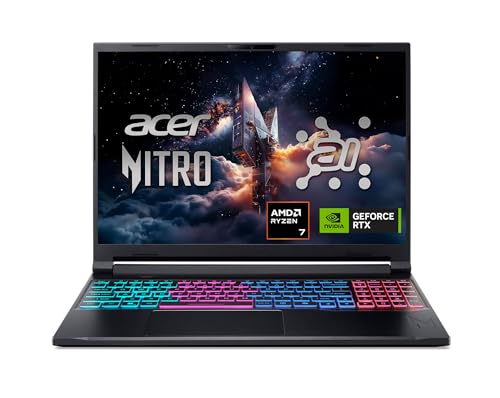


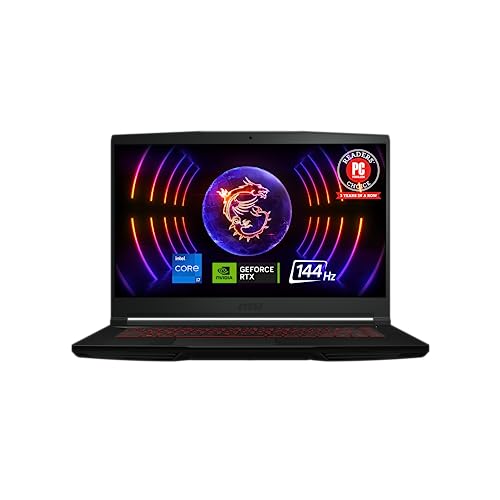


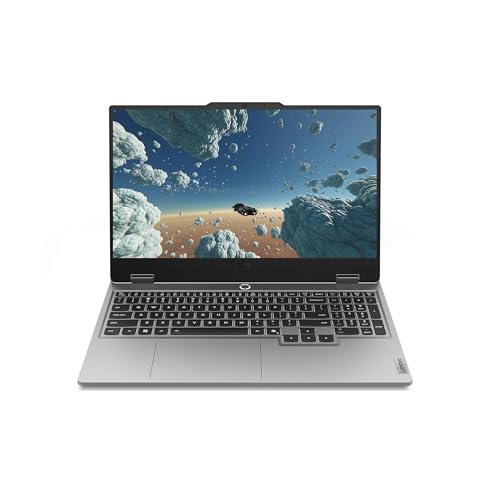

Top 3 Picks by Budget
The Acer Nitro V 15 with RTX 5050 is the best budget gaming laptop, the ASUS TUF Gaming A16 is the best midrange pick for a larger screen and solid build, and the Acer Nitro V 16S AI with RTX 5060 is the best premium affordable choice for higher frame rates. Check the product table above for current prices.
| Budget | Product | Key Spec | Best For |
|---|---|---|---|
| Best Budget Pick | Acer Nitro V 15 (RTX 5050) | Core i5-13420H, 8GB GDDR7 GPU, 15.6 inch 165Hz | 1080p gaming on a tight budget |
| Best Midrange Pick | ASUS TUF Gaming A16 | Ryzen 7 7445HS, RTX 4050, 16 inch 144Hz, 16GB DDR5 | Students and all round use |
| Best Premium Pick | Acer Nitro V 16S AI (RTX 5060) | Ryzen 7 260, 32GB DDR5, 1TB SSD, 16 inch 180Hz | High frame rate 1080p and light 1440p |
Best Budget Pick: Acer Nitro V 15 with RTX 5050
The Acer Nitro V 15 with an RTX 5050 is the best budget gaming laptop, at around $949. It brings a current generation graphics chip and a fast display to an entry level price.
- Why it stands out: the GeForce RTX 5050 Laptop GPU has 8GB of GDDR7 video memory and supports DLSS, paired with an 8 core, 12 thread Intel Core i5-13420H that boosts to 4.6 GHz.
- Display and storage: a 15.6 inch Full HD IPS panel at 165 Hz, 16GB of RAM and a 512GB PCIe Gen 4 SSD.
- Connectivity: a USB Type-C port with DisplayPort output and Thunderbolt 4 support, according to the listing.
- Trade off: the 512GB SSD fills quickly with modern games and it uses DDR4 memory; plan to add storage.
Best for: students and first time PC gamers who want solid 1080p performance for the least money.

Best Midrange Pick: ASUS TUF Gaming A16
The ASUS TUF Gaming A16 is the best midrange affordable gaming laptop, at around $1,190. It pairs a capable AMD processor with a roomier 16 inch screen.
- Why it stands out: an AMD Ryzen 7 7445HS processor and NVIDIA GeForce RTX 4050 graphics handle 1080p gaming well, with 16GB of DDR5 RAM for smooth multitasking.
- Display: a 16 inch Full HD+ panel at up to 145 Hz gives more screen space for games, schoolwork and streaming.
- Build: ASUS's TUF line is known for durable chassis designs, and the backlit keyboard helps in dim rooms.
- Trade off: the 512GB SSD is small for a game library, and the RTX 4050 is a step behind newer RTX 50 series chips.
Best for: students and casual gamers who want a bigger screen and dependable build quality.

Best Premium Pick: Acer Nitro V 16S AI with RTX 5060
The Acer Nitro V 16S AI is the best premium affordable gaming laptop, at around $1,400. It offers more graphics power, double the memory and twice the storage of most budget models.
- Why it stands out: the GeForce RTX 5060 Laptop GPU supports DLSS 4 with Multi Frame Generation for higher frame rates, powered by an AMD Ryzen 7 260 processor.
- Display and memory: a 16 inch WUXGA (1920 x 1200) IPS panel at 180 Hz with 100% sRGB coverage, 32GB of DDR5 5600 memory and a 1TB PCIe Gen 4 SSD with a free M.2 slot.
- Trade off: at around $1,400 it sits at the top of the affordable range, and memory is capped at 32GB.
Best for: gamers who want higher frame rates, content creators and anyone who wants a laptop that stays capable for years.

What Your Money Gets You at Each Price Tier
Affordable gaming laptops fall into three practical tiers, and each one changes what you can expect from performance, screens and build.
Budget Tier: What to Expect
Between about $700 and $1,000, expect an RTX 3050, RTX 4050 or RTX 5050 class GPU, a 6 to 8 core CPU, a 15.6 inch 1080p screen at 120 to 165 Hz, 8 to 16GB of RAM and a 512GB SSD. These laptops play esports titles at high frame rates and most AAA games at medium to high settings at 1080p, especially with DLSS. Compromises usually include plastic builds, dimmer screens with limited color, shorter battery life and smaller SSDs. Avoid models with only 8GB of RAM unless you can upgrade it.
Midrange Tier: The Sweet Spot for Most Buyers
Between about $1,000 and $1,400, you get stronger GPUs like the RTX 4060, RTX 5050 or RTX 5060, 16GB or 32GB of DDR5, faster and brighter 144 to 180 Hz screens, larger 16 inch displays and better cooling. This tier delivers the best balance of performance and price, handling modern AAA games at high settings at 1080p and many at 1440p with upscaling.
Premium Tier: When Spending More Pays Off
Above about $1,500, gaming laptops add RTX 5070 class and higher GPUs, QHD or OLED displays, metal chassis and advanced cooling. Spending more pays off if you want high refresh 1440p gaming, plan to stream or edit video, or want a thinner, more premium design. For 1080p gaming, the midrange tier gives most of the experience for less.
Features Worth Paying For (and Ones to Skip)
Some features directly improve gaming and longevity, while others add cost without much benefit.
Processor and Performance Tier
The GPU matters most for gaming, so put your money there first. Look at the GPU's power limit (TGP), since the same chip can perform very differently in thin and thick laptops. A modern 6 to 8 core CPU such as an Intel Core i5 or i7 H series, or AMD Ryzen 5 or Ryzen 7 HS series, is plenty for gaming. Skip paying extra for a top tier CPU paired with an entry GPU.
Display Size, Resolution and Brightness
A 144 Hz or faster refresh rate is worth paying for, since it makes games feel much smoother. At this price, 1080p or 1920 x 1200 resolution is ideal because entry GPUs can drive high frame rates at that resolution. Look for at least 300 nits of brightness and around 100% sRGB if you also edit photos. 16 inch 16:10 screens give more vertical space for work.
RAM and Storage
16GB of RAM is the minimum for modern gaming, and dual channel memory (two sticks) performs better than single channel. A 1TB SSD is ideal; if you buy 512GB, check for a free M.2 slot so you can add a second drive cheaply. Upgradable RAM slots are a big plus over soldered memory.
Ports and Connectivity
Look for HDMI 2.1 for connecting to TVs and high refresh monitors, a USB-C port with DisplayPort output and charging, several USB-A ports for accessories, Ethernet for lag free online play and WiFi 6 or newer. Thunderbolt or USB4 support is a nice bonus for docks and external storage.
Battery Life in Real World Use
Gaming laptops typically last about four to seven hours for web browsing and video, and around one to two hours while gaming on battery, with lower performance. Plan to game while plugged in. Features like MUX switches or advanced optimus help battery life by switching to integrated graphics for everyday tasks.
What You Can Realistically Get on a Budget
Around $900 to $1,000, expect smooth 1080p gaming at medium to high settings, a fast refresh display and a basic but functional build. You will usually give up premium materials, bright color accurate screens, long battery life, large storage and quiet fans under load. Do not compromise on dual channel 16GB RAM, adequate cooling and a GPU with at least 8GB of video memory.
Features to Skip
Heavy RGB lighting, premium speaker branding, 4K screens on entry GPUs and very thin designs that throttle under load add cost without improving gaming on a budget. Optical drives are rare today, so do not let them limit your choice.
Affordable Gaming Laptops for Specific Needs
A few common needs call for specific features.
Best Affordable Gaming Laptops with CD Drives: Where Your Money Goes
Almost no current gaming laptops include a built in CD or DVD drive, since games are now downloaded digitally. If you need to play discs, install old software or rip music, add an external USB DVD drive for about $20 to $40. That keeps your budget focused on the GPU and display while still supporting discs when needed.
Best Affordable Gaming Laptops for Students
Students should prioritize a reliable build, a comfortable keyboard, decent battery life and a 16 inch screen for schoolwork, with enough GPU power for gaming after class. A midrange model with 16GB of RAM handles both well.
Best Affordable Gaming Laptops for Esports
Esports titles favor high refresh rates over raw graphics power. A 165 to 180 Hz screen with an entry RTX GPU delivers high frame rates in competitive games at a lower cost.
Gaming Laptop vs Gaming Desktop on a Budget
A gaming laptop is the right budget choice if you need portability for school, work or travel, or have limited space. A gaming desktop is the better value if you will always play at the same desk.
For the same money, a desktop usually delivers more performance, runs cooler and quieter, and is far easier to upgrade, since you can swap the graphics card later. Laptops bundle the screen, keyboard, speakers and battery, which adds convenience but limits upgrades to memory and storage. Many students choose a laptop for its flexibility and connect it to an external monitor, keyboard and mouse at home, getting a desktop like setup without a second computer.
How to Spot a Good Deal on a Gaming Laptop
- Compare GPU and TGP first: a cheaper laptop with a stronger, higher wattage GPU often beats a pricier one with a weaker chip.
- Check memory configuration: dual channel 16GB is worth more than a single 16GB stick.
- Look at storage upgrade paths: a free M.2 slot makes a small SSD easy to fix.
- Watch seasonal sales: back to school and holiday events often bring the biggest discounts on last year's models.
- Consider previous generation models: an RTX 4060 laptop on sale can outperform a new RTX 5050 model at the same price.
- Read the return policy: check for screen issues, fan noise and coil whine in the first days.
Long Term Costs to Factor In
Budget for a few extras beyond the laptop price. An additional 1TB SSD costs about $60 to $100 and is often the first upgrade. A cooling pad, a wired gaming mouse and a headset add $50 to $150. Games and subscriptions add ongoing costs, and an extended warranty may be worth it for students. Keeping vents clean and replacing thermal paste after a few years helps maintain performance, and a quality surge protector protects the charger and laptop.
Tips to Get the Most From Your Gaming Laptop
- Plug in while gaming and choose the maker's performance mode.
- Update the GPU driver and BIOS after setup.
- Use DLSS or FSR upscaling to boost frame rates.
- Raise the back of the laptop or use a cooling stand for better airflow.
- Connect to an external monitor through the port wired directly to the GPU when possible.
- Clean vents with compressed air every few months.
- Install games on the fastest SSD and keep at least 15% of the drive free for smooth performance.
FAQs
How long should a gaming laptop last?
A gaming laptop typically lasts four to six years before it struggles with new games at reasonable settings. Choosing a strong GPU, 16GB or more of RAM and keeping the cooling system clean helps it stay useful longer. Upgrading storage and memory can extend its life.
Should I buy a laptop or a tablet?
Buy a gaming laptop if you want to play PC games, run demanding software or need a full keyboard for school and work. Tablets are better for streaming, reading and mobile games but cannot run most PC games or replace a laptop for heavy tasks.
How much RAM do I need?
16GB of RAM is the sweet spot for gaming laptops today, running most games and multitasking smoothly. 32GB helps for streaming, video editing and future games. Avoid 8GB unless the laptop lets you upgrade easily.
Is a dedicated GPU worth it?
Yes, for gaming a dedicated GPU is essential. Integrated graphics can handle older and lighter games, but a dedicated NVIDIA RTX or AMD Radeon GPU delivers far higher frame rates and supports features like DLSS, ray tracing and smoother 3D performance.
Is a Chromebook enough for school?
For many schools, a Chromebook is enough for browsing, documents and online classes, and it is cheaper with long battery life. It cannot run most PC games or specialized Windows software, so students who want to game or need specific programs should choose a Windows gaming laptop.
The Bottom Line
The Acer Nitro V 15 with RTX 5050 is the best way to get modern 1080p gaming on a budget, the ASUS TUF Gaming A16 offers a bigger screen and dependable build for all round use, and the Acer Nitro V 16S AI delivers more graphics power, 32GB of RAM and a 1TB SSD at the top of the affordable range. Prioritize the GPU, a 144 Hz or faster screen and upgradable memory, and the best affordable gaming laptops will deliver smooth gaming without overspending. See our best gaming laptops guide for higher end options.


