Best Computer Desks: Matching the Right Model to Your Routine
Disclosure: We may earn a commission when you buy through links on this page, at no extra cost to you. As an Amazon Associate I earn from qualifying purchases. Learn more

Computer desks matched to value seekers, first time buyers, power users and laptop users, with features to compare and mistakes to avoid.
A computer desk shapes how comfortable and productive your workday feels, yet many people buy whatever looks nice without thinking about size, storage or ergonomics. There is no single desk that suits everyone; a student in a small bedroom, a remote worker with two monitors and a gamer with a full battle station need very different setups. This guide to the best computer desks matches desk types and features to real routines, so you get the right fit the first time.
The short answer: most people should choose a desk at least 48 inches wide and about 24 inches deep, with a sturdy steel frame, a weight capacity above 100 pounds and built in cable management, such as the SHW Mission 48 inch desk around $90 for value or the Bestier 55 inch desk with a keyboard tray, drawers and power outlet around $230; those who want to alternate sitting and standing should pick an electric desk like the FEZIBO 48 inch standing desk around $100.
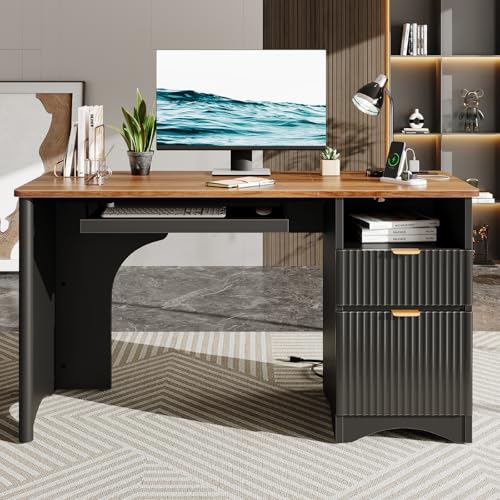

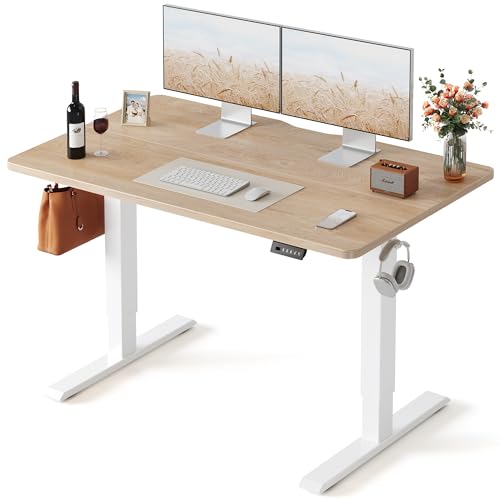

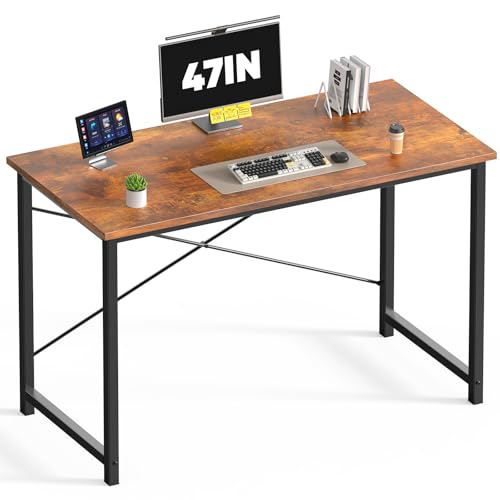


Three Desks Worth a Look
These three desks from the product table above cover the most common needs. We explain who each type suits below rather than reviewing them in detail.


Who Should Buy Which Computer Desks?
For Value Seekers
Value seekers want a sturdy, good looking desk without paying for extras they will not use. Prioritize a steel frame, a 48 inch wide surface and a solid weight rating. Simple writing style desks like the SHW Mission 48 inch desk, with a powder coated steel frame, 110 pound capacity and 5 year limited warranty, deliver lasting quality for under $100. Skip built in lights and gimmicks; add a monitor arm or drawer unit later if needed.
For First Time Buyers
First time buyers, such as students or new remote workers, need a desk that is simple to assemble, fits their room and handles a laptop or single monitor. Compact desks around 32 to 40 inches wide, like the DUMOS 32 inch desk, fit bedrooms and dorms. Look for clear instructions, labeled hardware and reinforced frames that prevent wobble. Desks with a drawer or shelf keep supplies organized without taking extra floor space.
For Remote Workers and Organizers
People who work from home all day benefit from storage and ergonomics. Desks with file drawers, keyboard trays and built in power outlets, like the Bestier 55 inch desk and Tribesigns desk with 5 drawers, keep paperwork and devices organized. A keyboard tray lets you type at a lower, more comfortable height, while integrated outlets reduce cable clutter.
For People Who Want the Best Performance
Power users with multiple monitors, gaming rigs or long workdays should consider larger L shaped desks or electric standing desks. L shaped models like the AODK 66 inch desk provide two work zones, a monitor shelf and room for two people when configured straight. Electric standing desks like the FEZIBO add height adjustment with memory presets, letting you switch between sitting and standing to reduce stiffness. Premium options are worth it when you spend eight or more hours at your desk.
Best Computer Desks for Specific Needs
Best Laptop Computer Desks: What to Prioritize
The best laptop computer desks are compact and help you work comfortably without a large monitor. Prioritize three things: a depth of at least 20 inches to keep the laptop at a comfortable distance, room for an external keyboard and a laptop stand to raise the screen to eye level, and a footprint that fits small spaces. The DUMOS 32 inch desk is a budget friendly example for bedrooms and dorms.
Desks for Gamers
Gamers need wide surfaces for keyboards, large mouse pads and multiple monitors, plus cable management for PCs and consoles. L shaped gaming desks with hutches and shelves, like the SEDETA L shaped corner desk, provide space for displays, speakers and accessories.
Key Features to Compare
Assembly and Delivery
Most computer desks ship flat packed and require assembly. Simple desks take around 30 to 60 minutes, while L shaped desks with drawers can take two to three hours. Look for clearly labeled parts, included tools and video guides; Bestier says its desk assembles in about an hour, and FEZIBO ships many standing desk components pre assembled. Check package weight and delivery options, since large desks can exceed 80 pounds.
Ergonomics and Adjustability
Desk height matters for comfort. Standard desks are about 28 to 30 inches tall, which suits people around 5 feet 6 inches to 6 feet when paired with an adjustable chair. Shorter users benefit from keyboard trays, and taller users benefit from height adjustable desks. Electric standing desks like the FEZIBO adjust from about 28.3 to 46.5 inches with memory presets. Place your monitor at arm's length with the top at eye level.
Materials and Build Quality
Desktops are usually engineered wood such as particle board or MDF, laminated for scratch and moisture resistance; thicker P2 grade boards, used by Bestier, resist deformation. Solid wood desks look beautiful but cost more and weigh more. Steel frames, especially with X bracing or thick square tube legs like the DUMOS, provide stability. Avoid thin tubular legs if you type vigorously or use heavy monitors.
Storage and Cable Management
Storage keeps your workspace clear. Choose drawers or file cabinets for paperwork, shelves for printers and books and monitor shelves to free surface space. Cable management features, like grommet holes, trays and built in power strips with USB ports, keep wires organized and devices charged. The AODK L shaped desk includes 3 AC outlets and 2 USB ports.
Size, Dimensions, and Weight Capacity
Measure your room, including door swing and walkways, before buying. A 48 inch width fits a laptop plus monitor; 55 to 63 inches fits two monitors; L shaped desks need corner space around 60 by 60 inches or more. Depth of 24 inches or more keeps monitors at a healthy distance. Check weight capacity, aiming for at least 100 pounds for multi monitor setups.
Desk Types Compared
- Writing desks: simple, open designs with a flat top and minimal storage, ideal for laptops, small rooms and budget buyers.
- Desks with drawers: add file drawers, shelves or cabinets for paperwork and supplies, suited to home offices.
- L shaped desks: use corner space to create two work areas, great for multi monitor setups, gaming or shared use.
- Standing desks: electric or manual height adjustment lets you alternate sitting and standing throughout the day.
- Gaming desks: wide surfaces, cup holders, headphone hooks and monitor shelves for battle stations.
How Much Should You Spend?
Under around $50, compact desks like the DUMOS 32 inch model suit bedrooms, dorms and laptop users. Between $90 and $180, you get wider, sturdier desks with steel frames, drawers or entry electric height adjustment, like the SHW Mission and FEZIBO standing desk. From $180 to $250, L shaped desks and fully featured office desks add storage, power outlets and two work zones. Electric L shaped standing desks cost $250 and up. Most home offices get the best value in the $90 to $230 range.
Common Mistakes to Avoid When Buying Computer Desks
- Only looking at price: very cheap desks often wobble and sag. Prioritize frame quality.
- Ignoring assembly and delivery: large desks are heavy and time consuming to build; plan for help.
- Buying too big or too small: measure your space and your equipment first.
- Forgetting cable management: tangled cables make even beautiful desks look messy.
- Not checking warranty: look for at least one year, and longer for steel frames.
Setting Up an Ergonomic Workspace
Once your desk arrives, adjust your setup for comfort. Sit with your feet flat and knees at about 90 degrees, then raise or lower your chair until your elbows rest at desk or keyboard tray height. Position the monitor about an arm's length away with the top of the screen at or slightly below eye level. Keep frequently used items within easy reach to avoid twisting. If you use a standing desk, alternate between sitting and standing every 30 to 60 minutes.
How to Make Your Computer Desk Last Longer
- Adjust your chair so feet rest flat: proper posture reduces leaning that stresses desk joints.
- Tighten bolts every few months: frames loosen over time, causing wobble.
- Wipe the surface regularly: use a damp cloth and avoid harsh chemicals that damage laminate.
- Use coasters and a desk mat: protect against water rings, heat and scratches.
- Stay within weight limits: overloading causes sagging and frame damage.
FAQs
How long should a good computer desk last?
How long should a good computer desk last? A good computer desk should last 5 to 10 years or more. Steel frames and thick laminated tops resist wear, while cheap particle board can sag within a few years. Electric standing desks have motors rated for thousands of cycles; FEZIBO rates its motor for up to 50,000 lift cycles.
Is an expensive computer desk worth it?
Is an expensive computer desk worth it? An expensive desk is worth it if you work long hours, need lots of storage or want height adjustment. Higher prices bring sturdier frames, better materials and features like drawers, outlets and motors. For casual use, a well built desk under $100 serves most people perfectly.
How do I choose the right size?
How do I choose the right size? Choose a size based on your equipment and space. A laptop needs about 32 to 40 inches of width, a single monitor setup about 48 inches and dual monitors 55 inches or more. Aim for at least 24 inches of depth, and leave walking space around the desk.
What features matter most for long hours?
What features matter most for long hours? Correct height, stability and space matter most. A keyboard tray or height adjustable desk keeps wrists neutral, a sturdy frame prevents distracting wobble and enough depth keeps monitors at a healthy distance. Pair the desk with a supportive, adjustable chair.
Final Thoughts
Choosing a computer desk comes down to three things: the right size for your room and equipment, a sturdy frame that stays stable and features that match your routine, like storage, keyboard trays or height adjustment. The Bestier 55 inch desk is a great all round choice, the SHW Mission desk offers excellent value and the FEZIBO electric desk adds sit stand flexibility. Compare the best computer desks in the product table above to find the right fit for your workspace.