
Best Mid Range Headsets for 2026: Wireless Audio, Boom Mics, and Buyer Guide
Disclosure: We may earn a commission when you buy through links on this page, at no extra cost to you. As an Amazon Associate I earn from qualifying purchases. Learn more

Gamers and remote workers can use this best mid range headsets guide to compare low latency wireless, boom mics and comfortable earpads for all day wear.
Budget $35 headsets pinch your ears with stiff plastic headbands, muffle footsteps in muddy bass, and broadcast every keyboard click to your teammates or coworkers. Yet spending $350 on a flagship headset often buys base stations and luxury trim rather than noticeably better drivers. In the $80 to $175 bracket, the best mid range headsets typically offer low latency 2.4GHz wireless audio, Bluetooth as a second connection, a proper boom microphone, and battery life that runs well past a full work week. Check the comparison table to see the picks side by side.
A versatile mid range headset pulls double duty across a desktop computer, a living room console, and a phone. Spending in the middle of the price range usually buys the features that matter, such as a clear mic and a comfortable fit, without flagship prices.






Who Should Buy Which Mid Range Headset?
Competitive PC and Console Gamers
Competitive players need accurate directional audio and no noticeable wireless delay. Choose a closed back or open back headset with a dedicated 2.4GHz USB C dongle (ideally under 20 milliseconds of delay), 40mm to 50mm drivers or planar magnetic drivers, and a flip to mute or detachable boom microphone.
Tactical shooters and battle royales reward the ability to tell whether footsteps are one floor above you or around a left corner. Drivers with a clean midrange and controlled bass help far more than extra bass boost, which tends to mask those small cues.
Remote Workers, Call Center Pros, and Hybrid Users
Remote workers should put microphone voice isolation and light weight comfort first. If you spend four to six hours a day on Zoom, Microsoft Teams, or Slack huddles in a noisy home or open office, look for a wireless headset under about 280 grams with a noise rejecting boom microphone, breathable fabric earpads, and multipoint Bluetooth that pairs to both your work laptop and your phone.
A microphone with software noise reduction can strip out dog barks, air conditioners, and mechanical keyboard clatter. A mute indicator you can see at a glance saves plenty of awkward moments.
Audiophile Gamers and Single Player Immersive Fans
Listeners who care about fidelity for orchestral game soundtracks, lossless music, and late night movies benefit from wired open back studio headsets or wireless planar magnetic models. Open back earcups let sound expand outside the shell, which creates a wider, more three dimensional soundstage.
The tradeoff is leakage: open back designs let room noise in and sound out, so they suit a quiet room best.
Key Features to Compare in Mid Range Headsets
2.4GHz Wireless vs Bluetooth vs Wired 3.5mm
For gaming, 2.4GHz wireless or a wired cable beats Bluetooth alone. Standard Bluetooth compresses audio and can add 100 to 200 milliseconds of latency, and on Windows it often drops to a low quality mono "hands free" mode whenever the microphone is active.
A plug and play 2.4GHz USB C dongle typically keeps latency around 15 to 20 milliseconds and preserves stereo sound during mic chat. Even better, look for dual wireless models that hold 2.4GHz game audio and Bluetooth phone audio at the same time.
Driver Architecture: Dynamic vs Planar Magnetic vs Open Back
Most mid range headsets use 40mm or 50mm dynamic drivers, which deliver punchy bass and high sensitivity at a fair price. Some upper mid range models use planar magnetic drivers, a thin flat diaphragm between magnet arrays that responds quickly to fine detail and keeps distortion low.
You also need to choose between closed back cups, which block room noise and strengthen bass, and open back cups, which run cooler and sound more spacious in a quiet room.
Boom Microphone Quality and Sidetone Monitoring
A boom arm places the microphone capsule about an inch from the corner of your mouth, which captures fuller voice than the tiny pinholes on earcups. Check the stated sampling rate (wideband or super wideband voice sounds less nasal) and look for adjustable sidetone.
Sidetone feeds a little of your own voice back into the earcups, so you do not shout by accident when closed back pads muffle what you hear.
Clamping Force, Weight, and Earpad Materials
Comfort decides whether you keep wearing a headset, so look for a total weight between roughly 240 and 320 grams. A headset that sounds great for fifteen minutes can become tiring by hour three if it is heavy or presses glasses frames into your temples.
A steel or aluminum frame with an elastic suspension headband spreads weight across the crown of your head. Breathable fabric or gel infused memory foam keeps ears cooler in summer, while leatherette seals better for bass and passive isolation.
Battery Life and Console Compatibility
Many mid range wireless headsets claim 40 to 70 hours per charge, and some offer a quick charge that gives several hours from a short plug in. Confirm the stated figure applies with lighting or Bluetooth on, since these features can shorten runtime.
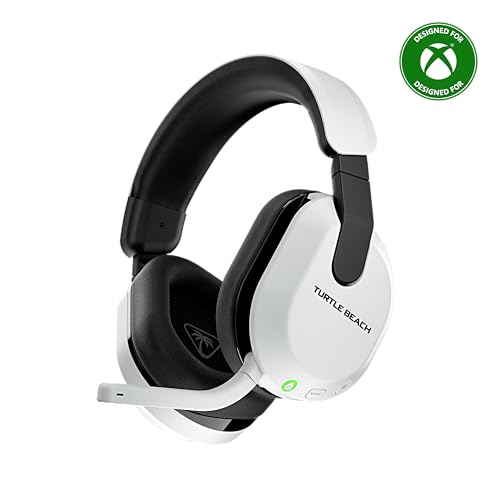
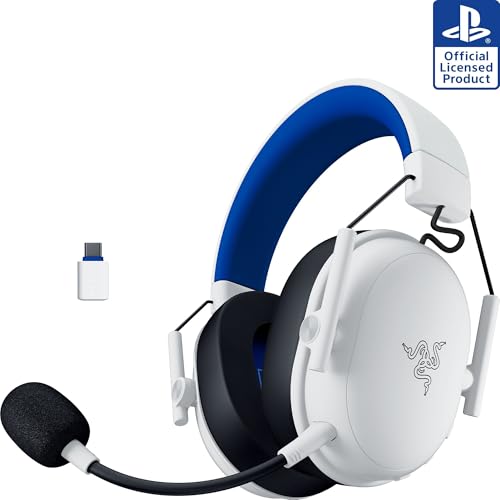
Before ordering for a console, verify compatibility. PlayStation, Nintendo Switch, PC, and Mac generally accept standard USB dongles, but Xbox Series X/S needs a headset licensed for Xbox.
Comparing Mid Range Headset Categories Side by Side
Matching the enclosure and connectivity to your room prevents buyer's remorse.
| Headset Type | Wireless Latency | Noise Isolation | Soundstage & Imaging | Best Buyer Match |
|---|---|---|---|---|
| Dual Wireless Closed Back (2.4GHz + BT) | Ultra low (< 20 ms) | High passive seal | Punchy bass; precise footsteps | All around PC, PS5, and mobile gaming |
| Wired Open Back Audiophile Headset | Zero (analog cable) | None (leaks sound) | Widest, most natural 3D stage | Quiet rooms, competitive FPS, music |
| Planar Magnetic Wireless Headset | Ultra low (2.4GHz dongle) | High passive seal | Studio grade detail & separation | Immersive RPGs and lossless audio fans |
| ANC Office & Call Boom Headset | Low (USB dongle + BT) | Active Noise Canceling | Tuned for vocal clarity | Remote work, Zoom calls, open offices |
Price Tiers: What Your Budget Gets You
Entry Mid Range Wired and Basic 2.4GHz Wireless (Around $65 to $95)
At around $65 to $95 you can choose a wired aluminum frame headset with studio tuned drivers or an entry level 2.4GHz wireless model under about 250 grams. Wired headsets give better raw microphone and speaker quality per dollar because none of the budget goes to batteries or radio chips.
Core Dual Wireless Sweet Spot (Around $95 to $145)
At around $95 to $145 you reach the sweet spot of the wireless market. Expect 2.4GHz plus Bluetooth connectivity, detachable or retractable boom mics, steel headbands with suspension straps, long battery life, and companion EQ software with game presets.
Upper Mid Range Open Back, Planar, and ANC Hybrids (Around $145 to $200)
Between around $145 and $200 you find open back audiophile headsets, wireless planar magnetic models, and hybrid active noise canceling headsets. Many in this tier also have swappable earpads and USB C base hubs that switch between devices.
Common Mistakes to Avoid When Buying a Headset
- Ordering a PlayStation/PC wireless headset for an Xbox console: Standard USB dongles will not work on Xbox Series X/S unless the headset is labeled "Designed for Xbox."
- Turning on virtual surround in Windows and in the game at the same time: Double processing turns crisp footsteps into a hollow echo; use one spatial audio engine and switch the duplicate off.
- Buying an open back headset for a loud living room or shared bedroom: Open cups let TV and fan noise in and broadcast your audio to anyone nearby; choose closed back cups for shared spaces.
- Leaving the boom microphone directly in front of your lips and nostrils: Position the capsule just off the corner of your mouth so "P" and "B" pops pass by the windscreen.
- Buying a headset with non replaceable glued earpads: Foam and faux leather wear out after a year or two of skin oil and sweat; check that replacement pads snap or twist off easily.
Care, Earpad Cleaning, and Battery Maintenance Tips
Earpad care is the biggest factor in keeping a headset clean and comfortable over years of daily wear. For fabric or mesh pads, unclip them every two months, hand wash gently in lukewarm water with a drop of mild detergent, press out excess water between towels, and air dry them completely for a day before snapping them back on. For leatherette pads, wipe skin oils away weekly with a slightly damp microfiber cloth so sweat salts do not make the surface flake.
To preserve the lithium polymer battery in a wireless headset, recharge it when it drops to around 15 to 20 percent rather than running it flat every time. Unplug the USB C cable once it is full instead of leaving it charging for weeks, and store the headset away from hot windowsills or cars.
Frequently Asked Questions
Are wired or wireless headsets better in the mid range tier?
Wireless is the better choice for most gamers and remote workers, because good 2.4GHz models have largely closed the latency gap with cables. A wired audiophile headset around $130 can still give a wider open back soundstage and a clean analog microphone, since the whole budget goes into acoustic hardware.
What is the difference between headphones and a headset?
A headset adds a microphone, while headphones are built for listening. Headphones may have only tiny pinhole mics for phone calls, whereas a headset has a boom microphone near your mouth and often low latency wireless designed for two way voice chat.
Why does my Bluetooth headset sound terrible on a Discord or Zoom call on PC?
Bluetooth has limited bandwidth, so Windows switches from high quality stereo playback to a low bitrate mono call profile once the microphone turns on. A headset with a dedicated 2.4GHz USB dongle avoids this and keeps stereo audio and clear mic chat together.
What headset earpads are best if I wear eyeglasses?
Soft fabric, velour, or gel memory foam pads with moderate clamping force suit glasses best. They conform around thin frame temples without squeaking against metal or breaking the bass seal.
Do I need a separate DAC or amplifier for a mid range wired headset?
Usually no, because most mid range wired gaming headsets have low impedance (around 28 to 38 ohms) and high sensitivity. They get plenty loud from a console controller or laptop jack, and only higher impedance studio headsets (80 to 250 ohms) benefit from a small USB C DAC/amp.
Final Thoughts
Choosing the best mid range headsets comes down to matching connectivity and earcup design to your environment. For freedom across PC, PlayStation, Switch, and phone calls, pick a lightweight closed back headset with a 2.4GHz USB C dongle, Bluetooth, a comfortable headband, and a noise rejecting boom mic. If you listen in a quiet room and want maximum spatial realism, a wired open back headset is the better fit. Compare the picks in the table above to find the one that suits your desk.


