
Best Portable Computer Monitors of 2026: Complete Buying Guide
Disclosure: We may earn a commission when you buy through links on this page, at no extra cost to you. As an Amazon Associate I earn from qualifying purchases. Learn more

Portable monitors compared for travel, study, gaming and creative work, with three picks and setup tips.
A portable monitor adds a second screen to your laptop anywhere: a hotel desk, a coffee shop, a client office or the kitchen table. Most are thinner than a notebook, connect with a single USB C cable and fold into a protective cover, so they slip into a laptop bag alongside your computer. Gamers use them with consoles and handhelds, and some even pair with phones for a bigger screen. This guide to the best portable computer monitors covers our top picks, the features that matter, the main types and how to keep a portable screen in good shape.
The short answer: most people should choose a 15.6 or 16 inch IPS portable monitor that runs on a single USB C cable with a sturdy stand; budget buyers can get a capable Full HD screen for under $60, and gamers or creators should step up to a 16 inch 2.5K model with a high refresh rate.



Our Top 3 Picks at a Glance
The ASUS ZenScreen MB16ACV is our best overall pick, the MNN 15.6 inch Portable Monitor is the best value and the cocopar 16 inch 2.5K is the best premium pick.
Best Overall: ASUS ZenScreen MB16ACV
The ASUS ZenScreen MB16ACV suits business travelers, students and remote workers who want a reliable second screen from a major brand. At around $149, it offers a 15.6 inch Full HD anti glare IPS display in an ultraslim design.
Its two standout strengths are hybrid signal connectivity that works with laptops that have USB C or USB A ports, and USB C power delivery for single cable setup. A kickstand supports portrait or landscape use, flicker free and low blue light technology ease long sessions and ASUS backs it with a three year warranty. The limitation is a standard 60Hz refresh rate, so it is aimed at productivity rather than fast gaming.

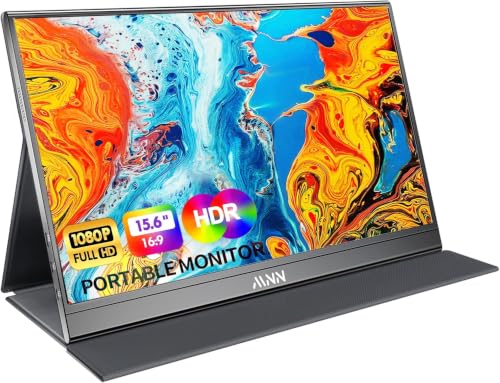
Best Value: MNN 15.6 Inch Portable Monitor
The MNN 15.6 inch Portable Monitor suits budget buyers and students who want a simple second screen. At around $47, it delivers a Full HD IPS panel with wide viewing angles.
Its strengths are two full function USB C ports plus HDMI, multiple display modes including extended and portrait, and a smart cover that doubles as a stand. It works with laptops, phones and consoles. The limitation is a glossy screen that can reflect bright lights, and build quality is simpler than premium models.

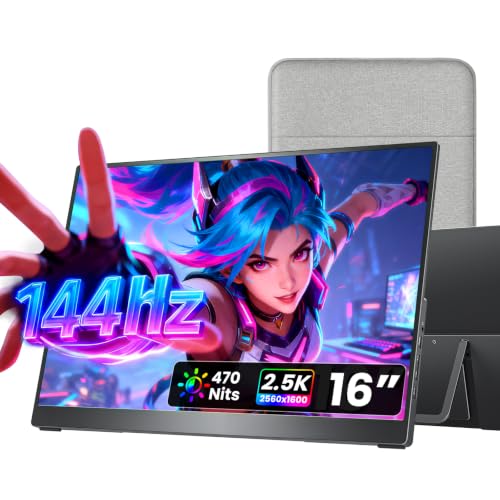
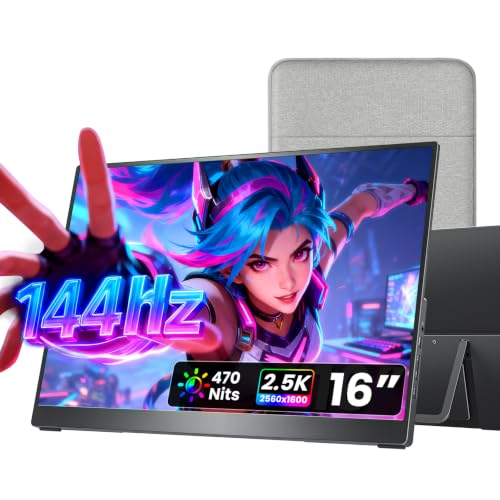
Best Premium Pick: cocopar 16 Inch 2.5K
The cocopar 16 inch 2.5K portable monitor suits creators, programmers and gamers who want more sharpness and speed. At around $180, it offers a 2560 by 1600 16:10 display with a 144Hz refresh rate over USB C and 120Hz over HDMI.
Its strengths are the extra vertical space of 16:10, which suits documents and code, a full metal chassis weighing about 1.5 pounds and a metal adjustable stand, VESA mounting and built in speakers. The limitation is that higher refresh rates and brightness draw more power, so some laptops may need the monitor plugged into a charger.
How to Choose the Best Portable Computer Monitors: Buying Guide
These features decide how useful a portable monitor is on the road.
Measuring for Size and Portability
Match the monitor to your laptop size: a 14 to 16 inch portable screen pairs well with 13 to 16 inch laptops and fits in the same bag. Check weight, often 1.5 to 2.5 pounds, and thickness. Larger 17 to 18 inch models offer more space but are bulkier to carry.
Panel Technology
IPS panels offer accurate colors and wide viewing angles, the best choice for most people. OLED portable monitors deliver perfect blacks and vivid colors but cost more and can be prone to burn in with static content. Matte screens reduce reflections in bright rooms; glossy screens look punchy but reflect lights.
Resolution and Screen Size
Full HD is sharp enough at 15.6 inches for most tasks. 2.5K or QHD resolutions add crispness and workspace on 16 inch screens, useful for spreadsheets, code and photo editing. 4K portable monitors exist but use more power.
Brightness and HDR
Around 300 nits is typical and fine indoors. Higher brightness helps near windows or outdoors. HDR labels on portable monitors usually offer limited real HDR impact.
Refresh Rate and Response Time
60Hz is fine for office work. 120Hz to 144Hz makes scrolling and gaming smoother, especially with consoles, gaming laptops and handheld PCs.
Connectivity and Ports
Full function USB C with DisplayPort Alt Mode lets one cable carry video and power. Check that your laptop's USB C port supports video output. HDMI ports let you connect consoles, older laptops and cameras. A second USB C port allows pass through charging.
Stand and Speakers
Sturdy kickstands or metal stands are more stable than folding covers. Built in speakers are convenient for calls and videos but sound thin; headphones are better for movies and games.
Types of Portable Computer Monitors
Portable monitors come in a few distinct styles.
Standard 15.6 Inch Monitors
The most common type, offering Full HD, USB C and HDMI at affordable prices. They suit most laptop users and travelers.
Larger 17 to 18 Inch Monitors
Bigger portable screens give more room for multitasking and gaming but weigh more. They suit people who travel by car or use them as semi permanent second screens at home.
OLED Portable Monitors
OLED models offer deep blacks and rich colors, ideal for photo editing and movies, at a higher price.
Gaming Portable Monitors
High refresh rate portable monitors pair with consoles, handheld PCs and gaming laptops for smooth gameplay on the go.
Dual Screen and Laptop Attached Monitors
Some monitors stack two screens or clip onto the back of a laptop lid, creating a triple screen setup for heavy multitaskers.
Portable Monitor vs Regular Desktop Monitor
Portable monitors win on weight, size and single cable convenience, making them ideal for travel and small spaces. Desktop monitors offer bigger screens, higher brightness, better ergonomics and lower cost per inch for permanent setups. Many remote workers use a desktop monitor at home and a portable monitor when traveling.
Best Portable Computer Monitors for Different Uses
The best portable computer monitors vary depending on what you do with them.
For Business Travel
Lightweight 15.6 inch IPS monitors with USB C power delivery, a protective cover and a matte screen are ideal for hotel desks and client offices.
For Students
Affordable Full HD portable monitors help students keep notes on one screen and research on another in libraries and dorms.
For Gaming
Choose 120Hz to 144Hz models with HDMI for consoles and USB C for handheld PCs like Steam Deck style devices.
For Presentations and Sales Meetings
Sales teams and consultants can face a portable monitor toward a client across the table while keeping notes on the laptop. A screen that rotates or a stand that flips helps, and a matte finish keeps the picture visible under conference room lights.
For Creators and Coders
16 inch 2.5K or OLED portable monitors with good color coverage give more detail and vertical space for editing and code.
How to Set Up a Portable Monitor
- Connect with a full function USB C cable, or use HDMI plus a USB power cable.
- On Windows, press Windows plus P or open Display settings to choose Extend or Duplicate.
- On Mac, open Displays in System Settings and arrange the screens.
- Position the monitor at eye level beside your laptop, using a stand or stack of books if needed.
- Adjust brightness and scaling so text sizes match between screens.
Power and Battery Considerations
Most portable monitors draw power from your laptop over USB C, which is convenient but drains the laptop battery faster, especially at high brightness or refresh rates. If you work unplugged for long periods, lower the monitor brightness or connect a charger to the monitor's second USB C port so it powers both devices. Some laptops limit the power they provide to accessories, which can cause the monitor to flicker or dim; plugging in external power solves this. A few portable monitors include built in batteries for use with phones and consoles, at the cost of extra weight.
Ergonomics on the Go
Laptop screens sit low, and adding a portable monitor beside them can mean looking down and sideways all day. A small adjustable laptop stand plus a portable monitor at the same height helps your neck, and an external keyboard and mouse complete a comfortable mobile setup. Placing the monitor directly above the laptop with a vertical stand keeps your gaze centered, while side by side placement suits wide desks.
What Your Budget Buys
Under about $70, expect basic 15.6 inch Full HD IPS monitors with USB C and HDMI, often with glossy screens and simple covers. Between about $120 and $250, you get better build quality, matte screens, sturdier stands, 2.5K resolutions or 144Hz refresh rates and longer warranties. Above about $300, expect OLED panels, dual screen setups, wireless connectivity or larger 17 to 18 inch screens.
Common Mistakes to Avoid
- Assuming any USB C port carries video; some laptop ports only charge or transfer data.
- Using a charging only cable that does not support video.
- Choosing a glossy screen for bright offices and trains.
- Ignoring stand stability, since flimsy covers tip over easily.
- Forgetting power needs for consoles and phones, which cannot power the monitor.
How to Make Your Portable Computer Monitor Last Longer
Keep the monitor in its cover or a padded sleeve when traveling, and avoid pressing on the screen when packing. Clean it with a dry microfiber cloth. Do not leave it in hot cars, and coil cables loosely to prevent damage. For OLED models, use screen savers and avoid leaving static images on screen for long periods.
FAQs
These are the questions buyers ask most.
Will a portable monitor work with my laptop?
If your laptop has a USB C port with DisplayPort Alt Mode or Thunderbolt, one cable usually works. Otherwise, use HDMI and a separate power cable, or a monitor with DisplayLink support for USB A.
Does refresh rate matter for non gamers?
Not much. 60Hz is fine for documents and browsing, though higher refresh rates make scrolling smoother.
IPS vs OLED: which is better?
IPS is affordable, bright enough and worry free. OLED offers better contrast and color but costs more and needs care with static content.
How long do portable monitors last?
With care, many years. Cables and covers wear first and are easy to replace.
Is 4K worth it on a portable monitor?
At 15 to 16 inches, 4K looks very sharp but uses more power and can make text tiny without scaling. 1080p or 2.5K is a better balance for most people.
What size portable monitor should I get?
Match it to your laptop: 14 to 16 inch portable screens pair well with most laptops and fit in the same bag. Choose 17 inches or larger only if portability matters less than screen space.
Can I use a portable monitor with my phone or console?
Yes. Many phones with USB C video output and consoles via HDMI work with portable monitors, though consoles need external power.
Taking the time to confirm your laptop's USB C video support and how you will carry the screen narrows the best portable computer monitors down to the one that fits your routine.
Final Thoughts
The three things that matter most are a size that fits your bag, a reliable single cable USB C connection and a stable stand. Most people will be happiest with a 15.6 inch IPS monitor from a trusted brand, budget buyers can save with simple Full HD models and gamers or creators should choose a 16 inch 2.5K high refresh screen. Use this guide to choose the best portable computer monitors, then check the product table above for current prices. For desk setups, see the best CPU monitors.


