ASUS
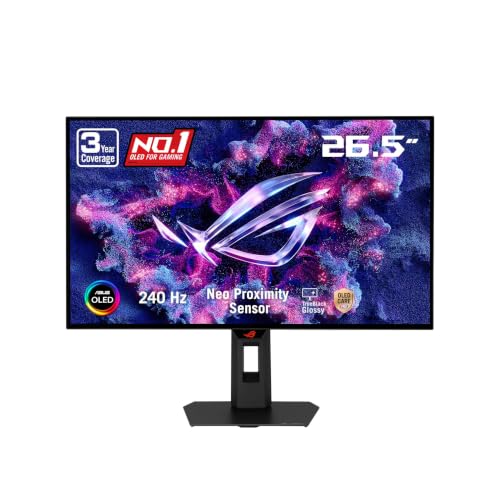
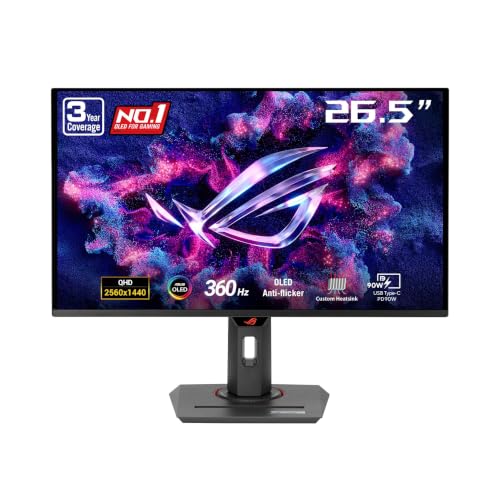
ASUS ROG Strix 26.5” 1440P QD-OLED Gaming Monitor (XG27ACDNG) -QHD (2560x1440), 360Hz, 0.03ms, Custom Heatsink, OLED Care+, G-SYNC Compatible, 99% DCI-P3, DisplayWidget, AI Gaming, 3yr Warranty
Disclosure: We may earn a commission when you buy through links on this page, at no extra cost to you. As an Amazon Associate I earn from qualifying purchases. Learn more
Highlights
- Immersive QHD QD-OLED Display: 26.5-inch QHD (2560 x 1440) QD-OLED gaming monitor with 360 Hz refresh rate and 0.03 ms response time for immersive gaming
- Advanced Cooling and OLED Protection: Highly efficient custom heatsink, advanced airflow design, and ASUS OLED Care+ functions to reduce the risk of burn-in
- ROG-Exclusive Anti-Flicker Technology: ROG-exclusive OLED Anti-flicker technology helps reduce the flicker during refresh-rate fluctuations
- Exceptional HDR and Color Accuracy: VESA DisplayHDR 400 True Black compliance, 99% DCI-P3 gamut, true 10-bit, and Delta E < 2 color difference for astonishing HDR performance
- Convenient Monitor Control Software: DisplayWidget Center software allows users to easily access OLED Care functions and adjust monitor settings using a mouse
- Comprehensive Warranty Coverage: 3 years warranty with ARR and burn-in coverage
- G-SYNC Compatible Technology: Supports G-SYNC Compatible technology for smooth, tear-free gaming experience with reduced input lag and stutter
- AI Gaming Features: Equipped with AI Gaming capabilities to enhance your gaming experience with intelligent optimization and performance enhancements
- Free 3-month Adobe Creative Cloud Subscription: Receive complimentary access with the purchase of this product (offer valid to 8/31/2028)
Why You'll Love It
- A 360Hz refresh rate and 0.03ms response time target gamers who prioritize fast on screen action
- QHD resolution on a 26.5 inch QD OLED display balances detailed visuals with high refresh rate gaming
- A custom heatsink, airflow design, and OLED Care+ functions help manage heat and reduce burn in risk
- G SYNC Compatible support helps reduce tearing and stutter for smoother gameplay
- True 10 bit color, 99% DCI P3 coverage, and Delta E below 2 support color focused work
- The three year warranty includes burn in coverage, and eligible buyers receive a complimentary Adobe Creative Cloud subscription
Pros
- +360Hz refresh rate
- +0.03ms response time
- +QD OLED with true 10 bit color
- +OLED Care+ protection features
- +Three year warranty with burn in coverage
Cons
- -QHD resolution rather than a higher resolution option
- -OLED care features require ongoing attention
- -AI Gaming benefits may depend on individual preferences
Detailed Review
The ASUS ROG Strix XG27ACDNG is a QHD gaming monitor built for players who put a high refresh rate and rapid response at the center of their display priorities. Its 26.5 inch QD OLED panel combines a 2560 x 1440 resolution with a 360Hz refresh rate and a stated 0.03ms response time. That combination gives shoppers a clear reason to consider it for gaming where responsive on screen action matters, while the resolution and color specifications also make it worth considering for visually focused work.
The display's QD OLED technology is paired with several color and HDR specifications. ASUS lists VESA DisplayHDR 400 True Black compliance, true 10 bit color, 99% DCI P3 gamut coverage, and a Delta E value below 2. These details are relevant to buyers who care about color reproduction as well as gaming speed. The wide color gamut and stated color difference specification provide useful selection criteria for people who also work with color focused creative projects. HDR support adds another consideration for shoppers who want compatible content to be part of their display experience.
Heat management and panel care receive particular attention. The monitor uses a custom heatsink and an airflow design, alongside ASUS OLED Care+ functions intended to reduce the risk of burn in. OLED Anti flicker technology is also included to help reduce flicker during refresh rate fluctuations. These features make panel care part of the product's design rather than an afterthought. DisplayWidget Center provides mouse based access to monitor settings and OLED Care functions, giving users a software based way to adjust settings and reach the available care options.
For gaming, G SYNC Compatible support is intended to reduce tearing and stutter while helping keep gameplay smooth. AI Gaming capabilities are also included for intelligent optimization and performance enhancements. These additions may appeal to buyers who want display controls and gaming related features in one package, although their value depends on which functions a person actually uses. The stated specifications describe the available features, not a guarantee that every game or creative application will benefit equally.
The main trade off is that this is a focused gaming display, not a one size fits all choice. Its QHD resolution, 26.5 inch screen, and emphasis on a 360Hz refresh rate will suit some priorities better than others. Buyers who value a higher resolution above refresh rate, or who do not need its gaming oriented features, should compare their priorities before choosing it. Verdict: This QHD gaming monitor is a strong candidate for players who want a fast QD OLED display, substantial color specifications, and dedicated OLED care features. Consider another type of monitor if your main priority is a higher resolution or if you would rather avoid OLED specific care considerations.
Who Should Buy It
A great fit if you:
- You prioritize a high refresh rate and rapid response when choosing a display for your gaming setup.
- You want QHD resolution alongside QD OLED technology, HDR support, and a wide stated color gamut.
- You also handle color focused creative work and value true 10 bit color and a stated Delta E below 2.
- You appreciate having dedicated OLED care functions, mouse accessible monitor settings, and a warranty that includes burn in coverage.
Consider something else if you:
- You would get more value from a higher resolution display than from a 360Hz refresh rate, so compare higher resolution alternatives.
- You prefer a display without OLED specific care considerations, making a non OLED monitor a more suitable alternative to investigate.
Before You Buy
Confirm on the listing:
- Measure your available desk space and check whether a 26.5 inch display suits your preferred viewing arrangement.
- Check that your gaming system and intended games can make useful use of the monitor's QHD resolution and 360Hz refresh rate.
- Confirm that your existing setup supports the connection and G SYNC Compatible functionality you intend to use.
- Review the box contents, applicable warranty terms including burn in coverage, and the conditions for receiving the Adobe Creative Cloud offer.
How to compare your options: Start with the features that affect your everyday use: resolution, refresh rate, response time, panel technology, and color specifications. This model combines QHD resolution with a 360Hz refresh rate, QD OLED technology, and extensive stated color capabilities. Next, compare panel care provisions and the warranty coverage, particularly if OLED protection is important to your decision. If creative work is part of your routine, consider the stated gamut and color accuracy specifications alongside gaming features. Choose according to the tasks you actually perform rather than treating every listed feature as equally important.
Getting the Most From It
Start by reviewing the monitor's setup instructions and adjusting its settings for your intended use. If your gaming system supports the display's QHD resolution and high refresh rate, check the available display settings so the configuration matches your priorities.
Explore DisplayWidget Center to access monitor adjustments with a mouse. Its OLED Care functions provide a convenient place to review the available panel care options, so become familiar with those controls rather than leaving them unexplored.
Make OLED protection part of your regular display routine. The custom heatsink, airflow design, and OLED Care+ functions are intended to help manage heat and reduce burn in risk, but they should not be treated as a reason to ignore the available care guidance. Follow the manufacturer's instructions for the care functions and any recommended display settings.
For gaming, review G SYNC Compatible support and the available gaming settings to determine which options suit your setup. For creative work, pay attention to the color settings and the needs of the application in use. If you claim the included Adobe Creative Cloud offer, confirm its conditions and eligibility before relying on it.
FAQ
What resolution and refresh rate does this monitor offer?
It offers QHD resolution of 2560 x 1440 and a 360Hz refresh rate. Its stated response time is 0.03ms, making these central specifications for shoppers prioritizing responsive gaming.
Does the ASUS XG27ACDNG support G SYNC?
Yes, it supports G SYNC Compatible technology. The feature is intended to reduce tearing and stutter for smoother gaming.
How does this monitor help reduce OLED burn in risk?
It includes a custom heatsink, an airflow design, and ASUS OLED Care+ functions intended to reduce burn in risk. DisplayWidget Center also provides mouse based access to OLED Care functions.
What comes with the monitor?
The listed features do not identify the complete box contents. Check the current product listing for included cables, accessories, and any other items before ordering.
Does the purchase include software or warranty coverage?
Yes, the stated package includes a three year warranty with ARR and burn in coverage, plus a complimentary three month Adobe Creative Cloud subscription offer valid through August 31, 2028. Review the applicable terms and offer conditions before purchase.
Product Details
| Brand | ASUS |
| ASIN | B0D7NSZRJW |