RedThunder K84 Wireless Keyboard and Mouse Combo, Rainbow Backlit Rechargeable Battery, 75% Layout TKL Ultra Compact Gaming Keyboard & Lightweight 3200 DPI Honeycomb Optical Mouse (Black)
Disclosure: We may earn a commission when you buy through links on this page, at no extra cost to you. As an Amazon Associate I earn from qualifying purchases. Learn more
Highlights
- 【High-performance 2.4G Wireless Keyboard and Mouse】Are you looking for a small wireless keyboard and mouse combo that can perfectly balance work and games? RedThunder K84 rechargeable wireless gaming keyboard and mouse combo will be your best choice. 2.4G high-speed and stable transmission, ensure that it can easily deal with even the most intense battles. Note: The keyboard and mouse share only one USB receiver at the bottom of the MOUSE. The keyboard has no 10-key numeric pad.
- 【Rechargeable Wireless Keyboard and Mouse】The keyboard is equipped with a 1850 mAh battery, and the mouse is equipped with an 500 mAh battery. The long battery life allows you to use them continuously for 8 hours with light. The keyboard and mouse are equipped with smart energy-saving functions. If there is no operation within 2 minutes, they will automatically go to sleep, press any key to wake them up. Note: Not fully charged for safe transport. Please use original cable to charge via computer USB for 8 hours before using(Note: The mouse scroll wheel lights up only when charging; it stays off when not charging).
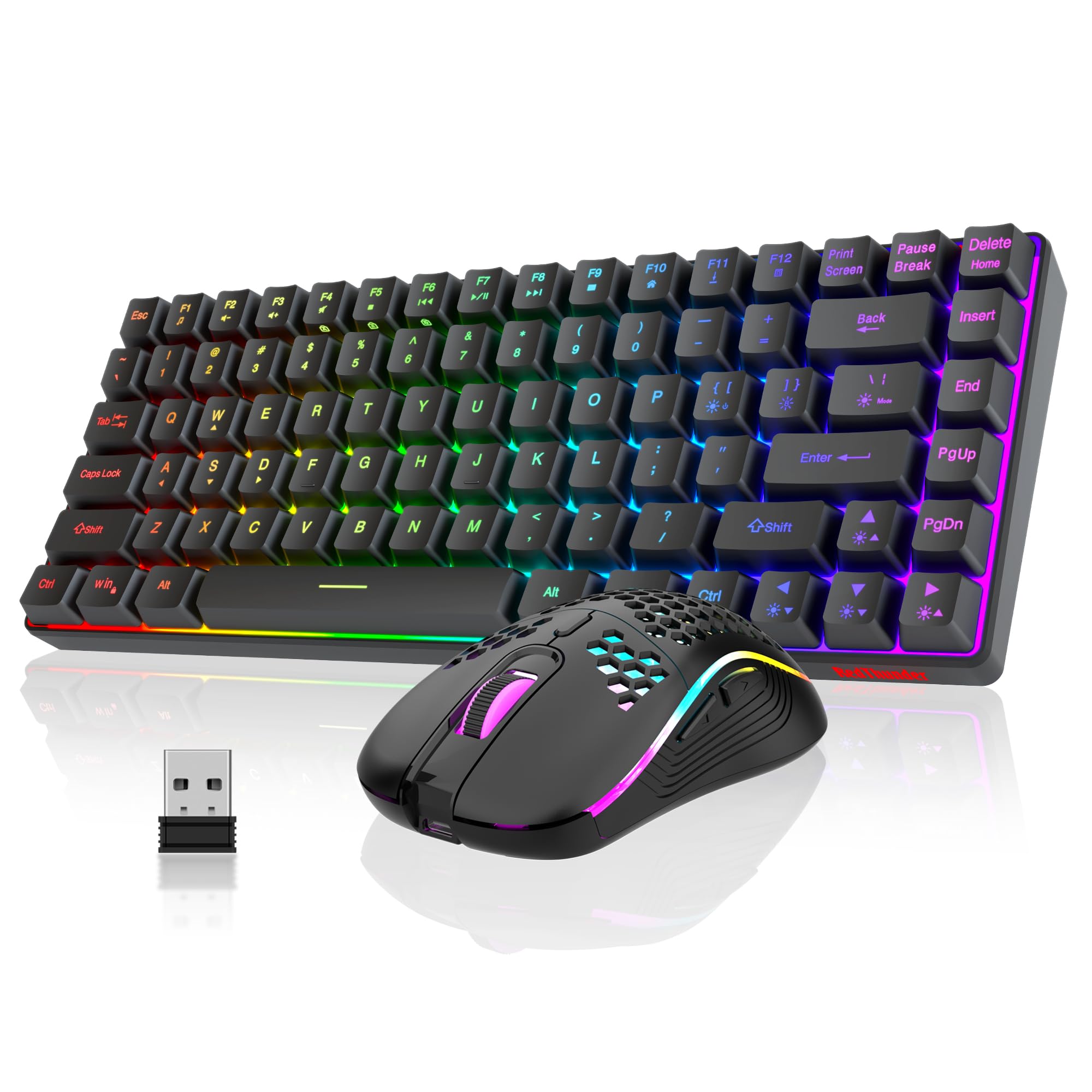
- 【75% Compact Mini Keyboard and Ultra-light Honeycomb Shell Mouse】Removed the 10-key numeric pad. The ultimate tenkeyless keyboard (84-key) that retains dedicated media keys and arrow keys makes it more practical than the 60% keyboard. The well-designed perforated honeycomb shell mouse is ergonomically designed and weighs only 65 (+-5) grams, making it more flexible and comfortable without fatigue.
- 【Light Up Keyboard and Mouse】Switch freely between stunning lighting effects! The K84 features 4 dynamic backlight modes, 7 solid color lights and vibrant RGB rainbow lighting for an immersive ambiance. Green indicator lights on F4, F5 and F6 show the status of Caps Lock, FN+F11 Lock and WIN Lock respectively, keeping key status visible in real time for precise and error-free operation during gaming. The built-in RGB mouse light cycles through 7 colors automatically and cannot be adjusted manually.
- 【Durable Ergonomic Keyboard and Mouse】The keys have a 10 000 000 keystrokes lifetime, so you can hold on to it for the next decade! ABS keycaps adopt two-color injection molding process, the letter of characters never fade. The mouse fits the palm perfectly, and the anti-sweat and non-slip design gives you complete control.
- 【Plug and Play 】The keyboard and mouse share only one USB receiver, and the code has been completed by default. You only need to insert the receiver and turn on the keyboard and mouse to use it. (Note: If the receiver and the keyboard/mouse lose connection and cannot be used for any reason, you only need to reset the code pairing or contact us in time, we will try our best to solve it ASAP)
Why You'll Love It
- Balances work and gaming tasks through a reliable 2.4G high speed wireless transmission
- Offers continuous operation for eight hours with light using built-in rechargeable batteries
- Saves desk space with an ultra compact 75 percent layout featuring dedicated media and arrow keys
- Features a lightweight honeycomb shell mouse designed for flexible and comfortable hand movement
- Enables immediate plug and play operation using a single shared USB receiver
Pros
- +Rechargeable batteries for convenience
- +Compact tenkeyless layout
- +Lightweight honeycomb mouse design
- +Multiple adjustable backlight modes
- +Plug and play wireless setup
Cons
- -Keyboard lacks a numeric pad
- -Mouse RGB light cannot be adjusted manually
- -Requires initial eight hour charge
Detailed Review
Balancing productivity tasks with entertainment setups often requires input devices that save desk space without sacrificing essential controls. The RedThunder K84 wireless keyboard and mouse combo addresses this need by combining a compact layout with high performance wireless transmission. Designed for users who want a tidy desktop and reliable responsiveness, this set uses a single USB receiver to connect both peripherals to your computer without cluttering your workspace with extra cords.
The keyboard adopts a 75 percent tenkeyless layout that removes the traditional numeric pad while retaining dedicated media keys and arrow keys. This design keeps the mouse closer to the typing area, reducing shoulder strain during long working or gaming sessions. Built with ABS keycaps using a two-color injection molding process, the lettering remains clear and resistant to fading over millions of keystrokes. Green indicator keys on the function row display the status of Caps Lock, FN lock, and Windows lock to help maintain accuracy during fast-paced typing or gaming.
Accompanying the keyboard is a honeycomb optical mouse that weighs only sixty five grams. The perforated shell provides an ergonomic grip that fits the palm naturally while the anti-sweat and non-slip surface helps maintain control. For lighting, the keyboard offers four dynamic backlight modes, seven solid color lights, and a rainbow option, while the mouse cycles automatically through seven colors. Both devices feature smart energy-saving functions that automatically enter a sleep mode after two minutes of inactivity and wake up instantly when any key or button is pressed.
Powering the combo are built-in rechargeable batteries with an eighteen hundred fifty milliamp hour capacity for the keyboard and a five hundred milliamp hour capacity for the mouse. This setup supports up to eight hours of continuous use with the lights active. Because the units are not fully shipped at maximum capacity, users need to complete an initial eight hour charge using the original cable connected to a computer USB port before starting regular daily use.
Verdict: This wireless keyboard and mouse combo suits users who need a compact, backlit peripheral set for mixed desk tasks and value a lightweight mouse design. Those who rely heavily on a dedicated numeric pad or prefer manual control over mouse lighting should look toward alternative hardware options.
Who Should Buy It
A great fit if you:
- Need a compact keyboard and mouse combination that frees up desk space while keeping dedicated arrow and media keys.
- Want a lightweight, ergonomic mouse featuring a honeycomb shell design for comfortable daily navigation and gaming.
- Prefer a rechargeable wireless setup that relies on a single shared USB receiver for quick plug and play installation.
Consider something else if you:
- Rely heavily on a dedicated 10-key numeric pad for data entry and spreadsheet work, requiring a full sized layout.
- Demand manual control over mouse illumination colors instead of automatic lighting cycles.
Before You Buy
Confirm on the listing:
- Check whether the dimensions of the 75 percent compact layout fit your specific desk space requirements.
- Verify that your computer has an available USB port to accommodate the shared wireless receiver.
- Confirm the charging cable requirements and make sure you have access to a computer USB port for the initial eight hour charge cycle.
How to compare your options: When evaluating wireless peripheral sets, consider how much desk space you have available and whether you require a separate numeric pad for your daily tasks. Weight and battery capacity are also important factors when choosing between standard mice and lightweight honeycomb designs. This combo focuses on a compact footprint and rechargeable power, making it a strong choice if portability and minimalist desk setups are your main priorities.
Getting the Most From It
To ensure reliable performance from your wireless peripheral set, complete the recommended initial eight hour charge using the original cable connected directly to a computer USB port before regular use.
Take advantage of the built-in smart energy-saving functions by letting the devices automatically enter sleep mode during extended periods of inactivity. Pressing any key or button will wake them up immediately without requiring you to toggle power switches.
Keep the shared USB receiver plugged into a secure port on your computer. If the keyboard and mouse ever lose connection, refer to the included instructions to reset the code pairing so communication between the devices and your computer is restored smoothly.
FAQ
Do the keyboard and mouse share a single receiver?
Yes, both devices share one USB receiver located at the bottom of the mouse, which allows for a simple plug and play setup right out of the box.
How long does the battery last on a single charge?
The rechargeable batteries support up to eight hours of continuous use with the lights active, and the smart energy-saving function automatically enters sleep mode after two minutes of inactivity.
Can I adjust the mouse lighting manually?
No, the built-in RGB mouse light cycles automatically through seven colors and cannot be adjusted manually.
What should I do before using the combo for the first time?
The listing notes that the units are not fully charged for safe transport, so you should use the original cable to charge them via a computer USB port for eight hours before your first use.
Product Details
| ASIN | B0C2HCCTF2 |