
Best 1440p Ips Monitors: Color, Ports and Comfort for Work and Play in 2026
Disclosure: We may earn a commission when you buy through links on this page, at no extra cost to you. As an Amazon Associate I earn from qualifying purchases. Learn more

Clean text and accurate color at 27 inches. Compare the best 1440p ips monitors for work, creative use and gaming.
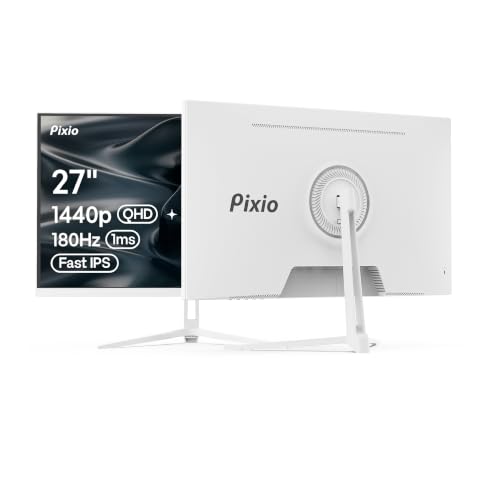
The best 1440p ips monitors are the ones that serve your daily work and play with clean text, accurate color and a stand that fits your posture. At 2560 by 1440 pixels on an IPS panel, a 27 inch screen gives you room for two full windows side by side, which is why this combination is the most common upgrade from a Full HD display.
This guide looks at IPS monitors from the point of view of office, creative and mixed use as much as gaming. It explains color accuracy, connectivity and ergonomics, and what the price differences buy. The product table after the introduction lists in-stock models from about $140 to $600.





Why Pick IPS at 1440p
An IPS panel keeps color and brightness steady from wide angles, so the picture looks the same to you and to a colleague standing beside you. It handles text and spreadsheets cleanly, shows photos with accurate tones and works well for video. At 1440p on 27 inches, text is sharp enough for long reading without scaling to large sizes.
Compared with VA panels, IPS has lower contrast but better viewing angles and color, and compared with OLED it avoids burn in concerns with static windows, which suits office use. If you want a gaming focus, see 1440p IPS gaming monitors, and for the overall field the best 1440p monitors page. A higher resolution option is covered in 4K IPS monitors, and the general guide to IPS panel monitors explains the technology.
Color Accuracy and Creative Work
sRGB and DCI-P3 coverage
Most listings state coverage of sRGB, the standard for web content, or DCI-P3, the wider range used in film. A monitor covering close to 100 percent of sRGB suits photo editing for the web and daily use. For video and print work, look for wider coverage and a factory calibration report.
Professional models
Some monitors in the table are marketed as professional, with calibration reports, a small color error figure and USB-C hubs. They cost more than gaming monitors but suit photographers and designers. Gaming IPS monitors with wide gamut can look vivid, but their color may be oversaturated until calibrated.
Connectivity and Work Features
USB-C with power delivery is the standout feature for laptop users: a single cable carries video, power and data, charges the laptop and cuts desk clutter. A built in USB hub gives extra ports for keyboard, mouse and drives. Check for DisplayPort and HDMI inputs, and for a headphone jack if the monitor has speakers. For multi monitor desks, look for thin bezels and a stand that allows pivot rotation.
Ergonomics and Eye Comfort
A stand with height, tilt and swivel adjustment matters more than a few extra specs. The top edge of the screen should sit at or just below eye level. A VESA mount lets you add a monitor arm and free desk space. For long days, look for flicker free backlights and a low blue light mode, and set the brightness to match the room. A matte coating reduces reflections in bright offices, while glossy panels suit dim rooms and give stronger contrast.
Sizes and Shapes
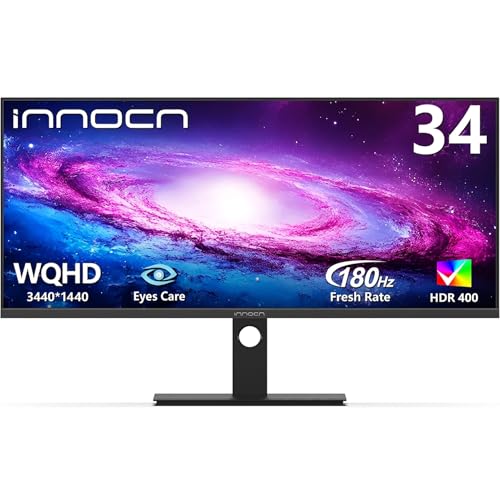
Twenty seven inches is the standard for 1440p. A 32 inch monitor is bigger but a little less sharp, a better match for sitting further back. Thirty four inch ultrawides at 3440 by 1440 act like two screens in one and suit spreadsheets, timelines and coding. Forty inch ultrawides are huge and need a deep desk. Match the size to your desk and your seating distance, not to the biggest number you can afford.
Using Two Monitors or a Monitor With a Laptop
Many people pair a 1440p IPS monitor with a laptop or add a second screen. Match the two screens in size and color as closely as you can, because mismatched brightness and white points are distracting when windows cross between them. Place the monitors so the bezels meet at the point where you look most, and rotate the second one to portrait if you read long documents or code. With a laptop, close the lid and use the monitor as the main display, or leave it open as a secondary screen for chat and reference.
Check the laptop's video output before you buy, because not every USB-C port carries a display signal. If you are shopping for the best 1440p ips monitors for a mixed home office, a model that supports USB-C power delivery and a clear input switch will make that setup much cleaner.
Price Guide
You can find solid 27 inch IPS monitors between $140 and $280, with 32 inch models near $220. Professional models with accurate color start near $270 and can pass $600 for large ultrawides. For most people, a mid priced 27 inch model with USB-C and a good stand offers the best long term value.
Calibration and Setup
Out of the box most monitors are bright and cool. Switch to a standard or sRGB mode, lower the brightness until a white page matches a sheet of paper in the room and adjust the scaling in the operating system so text is comfortable. If color matters, a hardware calibrator gives accurate results, but a quality factory calibrated model avoids the need.
FAQs
Is 1440p enough for work?
Yes. At 27 inches it gives a crisp, roomy desktop without the scaling issues of higher resolutions.
Do I need USB-C?
Only if you use a laptop. It saves cables and charges your laptop at the same time.
IPS or VA for office use?
IPS is better for color and viewing angles, and VA is better for contrast. Most offices prefer IPS.
Should I buy a 32 inch monitor?
If you sit further back or want a larger picture, yes. For a normal desk, 27 inches is sharper.
Final Verdict
The best 1440p ips monitors give you accurate color, a flexible stand and the ports your devices need. Use the product table to compare sizes, USB-C support and calibration claims, and choose a professional model if color accuracy matters.
Prices and availability can change, so check the product page before ordering.


