
The Best Backpacks for Laptops: Buying Guide and Top Picks
Disclosure: We may earn a commission when you buy through links on this page, at no extra cost to you. As an Amazon Associate I earn from qualifying purchases. Learn more

Laptop backpacks compared by protection, comfort and travel features, with three picks for every budget.
A laptop is often the most expensive thing you carry every day, yet many people still haul it around in a thin bag with no padding or support. A good laptop backpack protects your computer from bumps and rain, keeps chargers and cables organized and spreads the weight across both shoulders so your back is not sore by the end of the day. This guide to the best backpacks for laptops explains which features matter, how to size a bag correctly and which styles suit students, commuters, travelers and gamers.
The short answer: most people should choose a padded, suspended laptop compartment that fits their screen size, at least two main compartments for organization and comfortable, padded shoulder straps; frequent flyers should look for TSA friendly lay flat designs and luggage straps, and gamers with heavy 17 or 18 inch laptops need a reinforced, high capacity bag.


Our Top 3 Picks at a Glance
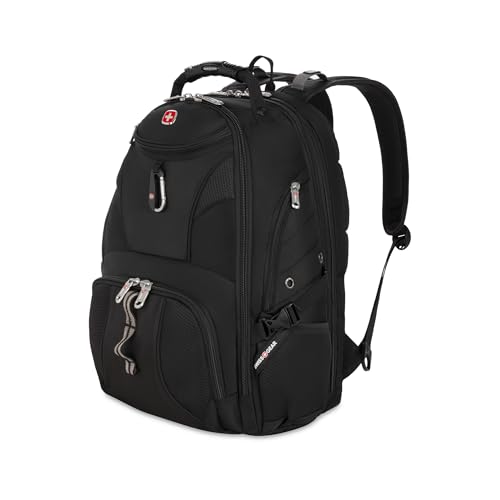
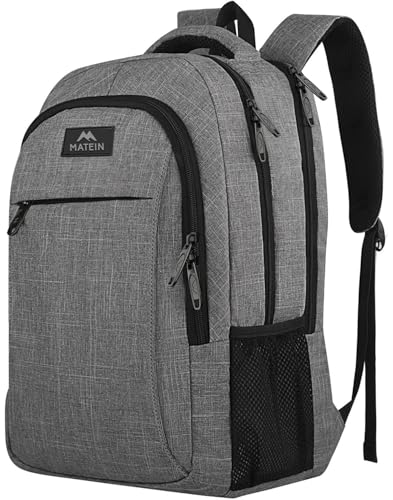
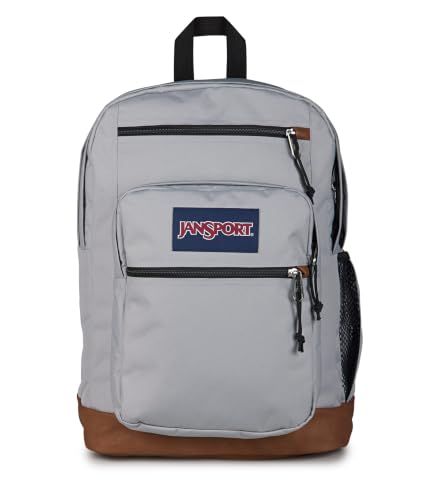
The SwissGear 1900 ScanSmart is our best overall pick, the MATEIN Travel Laptop Backpack is the best value and the JanSport 34L Cool Backpack is the best for students and beginners.
Best Overall: SwissGear 1900 ScanSmart Laptop Backpack
The SwissGear 1900 ScanSmart suits commuters and business travelers with laptops up to 17 inches. At around $59, it combines serious organization with airport friendly features.
Its two standout strengths are a TSA friendly lay flat design that lets you scan your laptop without removing it, and an organized interior with a padded TabletSafe pocket, an accordion file holder and an RFID protected organizer compartment. Contoured shoulder straps, airflow back padding and a trolley strap make long travel days easier. The limitation is its 31 liter size and many pockets, which may feel bulky for people who carry only a small laptop.

Best Value: MATEIN Travel Laptop Backpack
The MATEIN Travel Laptop Backpack suits students and commuters who want a capable bag at a very low price. At around $20, it holds laptops up to 15.6 inches in a separate compartment.
Its strengths are a personal item size of about 18 by 12 by 7.8 inches that fits most airline rules, plus a luggage strap and a hidden anti theft pocket on the back. Water resistant polyester, metal zippers and a ventilated padded back panel add durability and comfort. The limitation is that it is not built for 17 inch laptops or very heavy loads.

Best for Beginners: JanSport 34L Cool Backpack
The JanSport 34L Cool Backpack suits students and everyday users who want a classic, comfortable school style backpack with a laptop sleeve. At around $60, it offers a dedicated sleeve for laptops up to 15 inches.
Its strengths are two main compartments, a front organizer pocket and S curve padded straps, all in a 34 liter bag that weighs only about 1.3 pounds. The body uses 100 percent recycled 600D polyester. The limitation is a simpler sleeve than travel focused bags, with no TSA lay flat feature.

How to Choose the Best Backpacks for Laptops: Buying Guide
These features decide whether a backpack protects your laptop and stays comfortable all day.
Laptop Compartment Size and Protection
Check the laptop compartment's internal dimensions, not just the advertised screen size, since laptops of the same screen size vary in width and thickness. A suspended or false bottom compartment keeps the laptop off the floor when you set the bag down, protecting corners from impacts. Thick foam padding on all sides is essential.
Capacity and Organization
Daily commuters usually need 20 to 30 liters. Students carrying books and travelers carrying clothes may need 30 to 40 liters. Look for a separate tech pocket for chargers and cables, a quick access front pocket and side bottle pockets.
Comfort and Fit
Padded, contoured shoulder straps, a ventilated back panel and a sternum strap spread weight more evenly. Hip belts help with heavy loads. Make sure the torso length suits you; very long bags sit awkwardly on shorter people.
Materials and Weather Resistance
Water resistant polyester or nylon protects against light rain, while a rain cover handles downpours. Higher denier fabrics, such as 600D or more, resist abrasion. Quality zippers are one of the best signs of a long lasting bag.
Travel Features
Frequent flyers benefit from TSA friendly lay flat compartments, luggage pass through straps that slide over suitcase handles and clamshell openings for easy packing.
Security
Hidden back pockets for passports and wallets, lockable zippers and RFID blocking pockets add peace of mind in crowded places.
Weight of the Bag Itself
An empty backpack should not add much to your load. Lightweight bags around 1 to 2 pounds suit daily commuters; heavily padded travel or gaming bags weigh more but protect more.
Laptop Size Guide
| Screen Size | Typical Laptop Width | Suggested Bag |
|---|---|---|
| 13 to 14 inch | about 12 to 13 in | Slim commuter, 18 to 25 L |
| 15 to 16 inch | about 14 to 14.5 in | Everyday or travel, 25 to 32 L |
| 17 inch | about 15.5 to 16 in | Large travel or business, 30 to 40 L |
| 18 inch gaming | about 16 in or more | Gaming backpack, reinforced |
Leave a little room around the laptop so it slides in easily, but not so much that it moves around inside the sleeve. If your laptop sits in a protective case or sleeve, add its thickness to your measurements. Bags advertised for 15.6 inch laptops often fit 16 inch models, but check the compartment dimensions carefully.
What Your Budget Buys
Under about $35, you can find surprisingly capable backpacks with padded laptop compartments, luggage straps and water resistant fabric, though materials and zippers are simpler. Between about $50 and $120, expect sturdier fabrics, better padding, TSA friendly designs, more refined organization and stronger warranties. Above about $150, premium bags add high end materials like ballistic nylon or leather, weatherproof zippers, modular organization and minimalist professional styling. Most people get the best value in the middle tier.
Types of Laptop Backpacks
Laptop backpacks fall into several styles, each designed for a different routine.
Everyday and School Backpacks
Classic two compartment backpacks with a laptop sleeve suit students and casual users. They are comfortable, affordable and flexible, though protection is simpler than in tech focused bags.
Business and Commuter Backpacks
Slim, structured bags with a professional look, dedicated tech organization and padded compartments suit office workers. Many fit under a desk and look smart with a suit.
Travel Backpacks
Travel bags add clamshell openings, luggage straps, TSA friendly laptop compartments and larger capacity for overnight trips while still fitting airline personal item rules.
Gaming Laptop Backpacks
Gaming laptops are heavy and large, often 17 or 18 inches. Gaming backpacks offer reinforced, sometimes hard shell compartments, extra room for chargers and mice and sturdy straps for the extra weight.
Rolling Laptop Backpacks
Wheeled backpacks take weight off your shoulders entirely, useful for people with back problems or long airport walks, though they are heavier and bulkier.
Best Backpacks for Laptops for Specific Needs
Here is how to match a bag to your situation.
Best Backpacks for Laptops for Kids
Kids and teens need a lighter backpack with a padded laptop or tablet sleeve sized for their device, wide padded straps and reflective details. Keep the loaded bag to around 10 to 15 percent of a child's body weight, and choose bright, durable fabric that can handle the school bus and playground.
Best for College Students
College students carry laptops, books, water bottles and chargers across campus all day. A 25 to 35 liter bag with a suspended laptop compartment, a water bottle pocket and padded straps is ideal.
Best for Business Travel
Business travelers should prioritize a TSA friendly compartment, a luggage strap, organized tech pockets and a professional look.
Best for Women
Many brands offer backpacks with narrower shoulder strap spacing, shorter torso lengths and lighter weights, which can feel more comfortable on smaller frames.
Best for Cyclists and Commuters on Foot
Riders and walkers benefit from a bag with a sternum strap, reflective details and a waterproof or roll top design. A ventilated back panel reduces sweat on warm days, and a slimmer profile is more stable on a bike.
Best for Photographers and Creators
Creators carrying a laptop plus cameras should look for hybrid camera and laptop backpacks with padded, customizable dividers for lenses and side access to grab gear quickly without unpacking everything.
Laptop Backpack vs Messenger Bag vs Briefcase
Backpacks spread weight across both shoulders, making them the most comfortable choice for walking, cycling and carrying heavy loads. Messenger bags and briefcases look more formal and are quicker to access, but they put all the weight on one shoulder, which can strain your neck and back on long commutes. If you walk or ride more than a few minutes each day, a backpack is the healthier option.
How to Pack a Laptop Backpack
- Place the laptop in the padded compartment closest to your back for balance and protection.
- Put heavy items such as chargers and books low and close to your back.
- Store cables, mice and power banks in a tech pouch to avoid scratches.
- Keep liquids in a side pocket away from electronics.
- Tighten compression and shoulder straps so the bag sits high and close to your body.
Common Mistakes to Avoid
- Buying by screen size alone without checking compartment dimensions.
- Choosing a sleeve with no bottom padding, so corners hit the ground.
- Wearing the bag on one shoulder, which strains the neck and back.
- Overpacking a large bag because the space is there.
- Ignoring zipper quality, the most common failure point.
Sustainable and Recycled Options
Many brands now use recycled polyester made from plastic bottles, PFC free water repellent coatings and repair programs. A backpack that lasts many years is the most sustainable choice, so prioritize durable materials and warranties, and repair zippers or straps rather than replacing the whole bag when possible.
Setup and Care Tips
Adjust the shoulder straps so the bottom of the bag sits around your lower back, and use the sternum strap to stop straps sliding off. Empty the bag regularly to remove crumbs and receipts, and spot clean with mild soap and water rather than putting it in a washing machine unless the label allows it. Let it air dry fully. Check zippers and seams occasionally, and treat the fabric with a water repellent spray if rain beads stop forming.
FAQs
These are the questions buyers ask most often.
What features matter most in backpacks for laptops?
A padded, correctly sized laptop compartment with a suspended or raised bottom, comfortable shoulder straps, good organization and durable, water resistant materials matter most.
How do I know if my laptop will fit?
Measure your laptop's width, depth and thickness and compare them to the compartment's internal dimensions. Screen size alone can be misleading.
Is a hard shell backpack better for laptops?
Hard shell or semi rigid backpacks resist crushing better, which helps with expensive gaming laptops. Soft bags with thick foam padding protect well for everyday use and are lighter and more flexible.
Are TSA friendly backpacks worth it?
For frequent flyers, yes. A lay flat laptop compartment can make airport security faster, though rules vary and officers may still ask you to remove devices.
Can a laptop backpack be a carry on?
Most laptop backpacks fit airline personal item or carry on rules, but check dimensions against your airline, especially for larger travel bags.
How much weight should I carry?
Try to keep the loaded backpack under about 10 to 15 percent of your body weight for comfort, and use both straps.
Should I buy a laptop sleeve as well?
A slim sleeve adds a second layer of protection and lets you carry the laptop on its own in meetings. It is a good idea if your backpack has only light padding.
How long should a backpack last?
A quality backpack can last many years. Zippers and straps usually fail first, so look for strong hardware and good warranties.
Our Verdict
The three things that matter most are a padded compartment that fits your laptop, comfortable straps and organization that suits your day. Most people will be well served by a structured commuter or travel backpack, budget buyers can get excellent value from simple travel backpacks and students will appreciate a light, classic school style bag. Use this guide to choose the best backpacks for laptops, then check the product table above for current prices. Need a new laptop too? See the best laptops and notebooks.


