
Best Headsets with Good Mics: Budget, Midrange, and Premium Picks
Disclosure: We may earn a commission when you buy through links on this page, at no extra cost to you. As an Amazon Associate I earn from qualifying purchases. Learn more

What budget, midrange and premium headsets offer for mic quality, from Logitech H390 and HyperX Cloud III to Jabra Evolve2 and Arctis Nova Pro.
Nothing derails a meeting or a ranked match faster than a muffled, crackly microphone. Headsets range from $20 office basics to $300 plus gaming flagships, and mic quality does not always rise with price. This guide to the best headsets with good mics explains what each budget tier gets you, which mic features matter and where spending more actually makes you sound better.
The short answer: most people should buy a headset with a flexible boom microphone and noise reduction, which sounds far clearer than built in earcup mics; the Logitech H390 around $21 is the best budget pick for calls, the HyperX Cloud III wired around $70 is the midrange sweet spot for gaming and calls, and the SteelSeries Arctis Nova Pro Wireless around $295 is the premium choice with an AI noise canceling retractable mic, ANC and hot swap batteries.

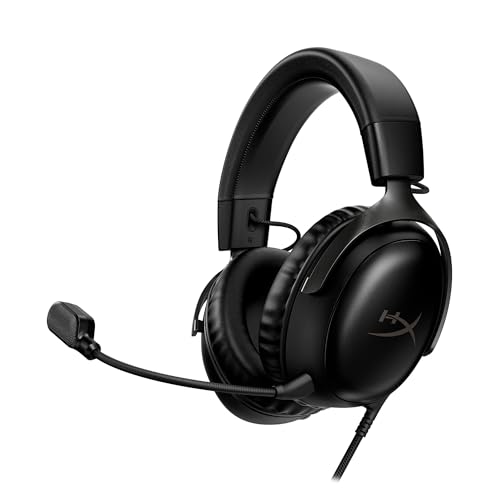


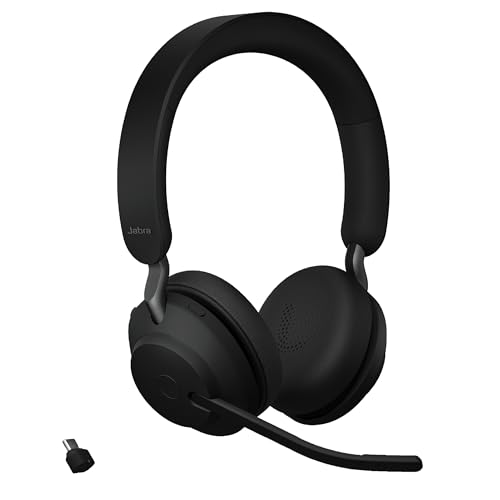


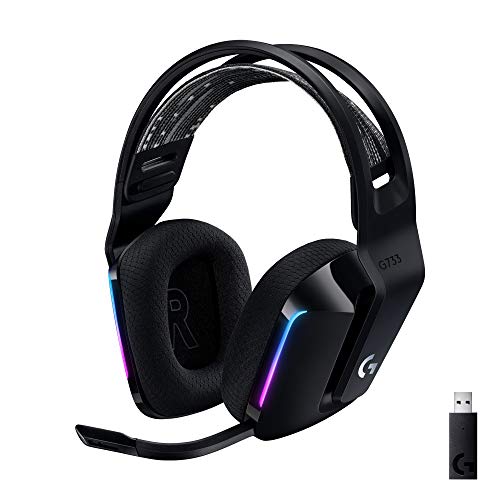
Top 3 Picks by Budget
These three headsets come from the product table above and represent the best value in each tier.


Best Budget Pick
The Logitech H390, around $21, is for students, remote workers and anyone who needs clear calls on a laptop or desktop. Its first strength is a rotating noise canceling boom mic that minimizes background noise and tucks away when not in use. Its second strength is plug and play USB A simplicity with in line volume and mute controls, padded leatherette ear cushions and a long 6.2 foot cable.
The limitation is build quality and sound depth; it is made for voice rather than immersive music or gaming.
Best Midrange Pick
The HyperX Cloud III wired, around $70, suits gamers and hybrid workers who want great comfort and a clear mic. Its first strength is an upgraded 10mm noise canceling microphone with a built in mesh filter that keeps voice chat and calls clear. Its second strength is versatility and comfort: angled 53mm drivers, memory foam, an aluminum frame and USB C, USB A and 3.5mm connections for PC, consoles and phones.
The limitation is the wired connection, which limits movement compared with wireless models.
Best Premium Pick
The SteelSeries Arctis Nova Pro Wireless, around $295, is for serious gamers and streamers who want top tier everything. Its first strength is the ClearCast Gen 2 microphone with AI powered noise cancellation through Sonar software, which fully retracts into the earcup. Its second strength is the feature set: active noise cancellation, hot swappable batteries, an OLED base station that connects two systems and simultaneous 2.4GHz and Bluetooth audio.
The limitation is price and complexity; casual users will not need most of the features.
What Your Money Gets You at Each Price Tier
Budget Tier: What to Expect
Budget headsets cost around $20 to $50. At this level, wired USB models like the Logitech H390 offer surprisingly clear boom mics for calls and video meetings. You get basic noise reduction, in line controls and lightweight designs. The tradeoffs are plastic builds, thinner ear cushions and average sound for music and games. This tier suits students, remote workers and occasional callers.
Midrange Tier: The Sweet Spot for Most Buyers
Midrange headsets cost around $70 to $150 and include the HyperX Cloud III, Jabra Evolve2 30 SE, Poly Blackwire 5220 and Logitech G733. You gain better microphones with multi mic arrays or Blue VO!CE filters, durable frames, memory foam comfort and, on some models, wireless freedom. Business headsets in this tier are certified for Teams and Zoom. For most buyers, this tier delivers professional mic quality without overspending.
Premium Tier: When Spending More Pays Off
Premium headsets cost around $180 to $300 plus and include the Jabra Evolve2 65 MS, Razer BlackShark V3 Pro and SteelSeries Arctis Nova Pro Wireless. They add active noise cancellation, AI noise canceling mics, long battery life, multipoint connections and premium materials. Spending more pays off for streamers, call center professionals and remote workers on calls all day, or gamers who want one headset across PC, console and phone.
Features Worth Paying For (and Ones to Skip)
Why Choose a Headset With Good Mics
A good microphone makes you easier to understand, reduces repeated sentences and keeps background noise from distracting others. Boom microphones sit close to your mouth, capturing more voice and less room sound than mics built into the earcup or cable. Noise canceling mics with multiple microphones, like Jabra's 2 and 3 mic arrays, filter out keyboard clicks, fans and household noise. This is the feature most worth paying for.
Sound Quality and Tuning
Good sound helps you hear colleagues and teammates clearly. Business headsets tune for voice clarity, while gaming headsets add bass and spatial audio for footsteps and explosions. Larger drivers, like the Cloud III's 53mm units, provide fuller sound. If you also listen to music, choose a headset with balanced tuning or EQ controls. Skip paying extra for virtual 7.1 surround if you mainly take calls.
Mic Placement and Room Noise
Mic placement matters as much as mic quality. Position a boom mic about one to two finger widths from the corner of your mouth, slightly to the side to avoid breath pops. In noisy homes, look for unidirectional or cardioid mic patterns and software noise suppression. Foam windscreens reduce plosives. Retractable or flip to mute mics, like on the Arctis Nova Pro and HyperX Cloud III, let you mute quickly.
Ecosystem and App Features
Companion apps unlock mic and sound tuning. SteelSeries Sonar, Logitech G HUB with Blue VO!CE, Razer Synapse and Jabra Sound+ let you adjust EQ, noise reduction and sidetone, which lets you hear your own voice to avoid shouting. These features are worth paying for if you stream or record; skip them if you only need plug and play calls.
Connectivity (Bluetooth Version, Codecs, Wired)
Wired USB headsets deliver consistent mic quality with no battery to charge. Wireless 2.4GHz dongle headsets offer low latency for gaming, while Bluetooth adds phone and tablet support. Note that Bluetooth mic quality can drop because of hands free audio profiles; dongles like the Jabra Link 380c avoid this on computers. Codecs like aptX matter for music listening, not for mic quality.
Best Headsets for Specific Needs
Best Headsets for Mic: Where Your Money Goes
When shopping for the best headsets for mic performance, spend on the microphone design first. Detachable or flip boom mics with noise cancellation outperform earcup mics at every price. Mid priced gaming headsets like the HyperX Cloud III deliver clear voice for Discord and streams, while premium options add AI noise suppression.
Best Headsets with a Mic: Where Your Money Goes
For the best headsets with a mic for everyday use, focus on comfort and simplicity. Budget USB headsets like the Logitech H390 cost around $21 and handle calls well, while midrange business models like the Jabra Evolve2 30 SE add better noise isolation and Teams compatibility.
Best Headsets with Mic for Android
The best headsets with mic for Android connect through USB C, Bluetooth or a 3.5mm jack. Look for USB C support, like the HyperX Cloud III and Poly Blackwire 5220, or a Bluetooth headset with multipoint so you can switch between your phone and laptop easily.
Best Headsets with Mic PC: Where Your Money Goes
For the best headsets with mic PC users can buy, a USB connection or 2.4GHz dongle gives the cleanest mic signal. Spend on software features if you stream: Logitech G733 with Blue VO!CE and Razer BlackShark V3 Pro with a full band HyperClear mic offer professional sounding voice filters.
Best Headsets with Great Mic Quality
The best headsets with great mic quality combine close boom placement with multi mic arrays or AI noise suppression. The SteelSeries Arctis Nova Pro Wireless, Razer BlackShark V3 Pro and Jabra Evolve2 65 MS lead here, each designed to keep your voice clear in noisy environments.
Best Music Headsets with Mic
The best music headsets with mic balance rich sound with clear calls. Look for 40mm or larger drivers, balanced tuning and Bluetooth with long battery life. The Jabra Evolve2 65 MS offers 40mm speakers, 3 mic call technology and up to 37 hours of battery, making it great for music and meetings.
How to Choose the Best Headsets with Good Mics
The best headsets with good mics match your main use. Remote workers should prioritize Teams or Zoom certification, comfortable ear cushions for all day wear and noise canceling multi mic arrays, like the Jabra Evolve2 30 SE and Poly Blackwire 5220. Gamers should look for detachable or flip boom mics, low latency wireless or wired connections and software voice filters, like the HyperX Cloud III and Logitech G733. Streamers benefit from AI noise suppression and broadcast quality capsules, as on the Razer BlackShark V3 Pro and SteelSeries Arctis Nova Pro Wireless.
Next, consider your devices. A USB C and USB A headset works with laptops, desktops and many phones, while multipoint Bluetooth lets you hop between devices. Finally, think about your environment: noisy homes and offices benefit from both mic noise cancellation and ANC for your ears.
Common Mic Mistakes to Avoid
- Placing the mic too close or directly in front of your mouth: this causes pops and breath noise; angle it slightly to the side.
- Using Bluetooth for meetings on a PC: hands free mode lowers both mic and audio quality; use a USB dongle or cable.
- Ignoring software settings: enable noise suppression and set the input level so peaks do not distort.
- Choosing earbuds for long calls: earbud mics sit far from your mouth and pick up more room noise.
- Forgetting sidetone: hearing your own voice prevents shouting during calls.
Long Term Costs to Factor In
Headsets have modest ongoing costs. Replacement ear cushions cost around $10 to $30 and keep comfort fresh. Wireless models lose battery capacity over years; the Arctis Nova Pro's swappable batteries extend its lifespan. Cables and dongles may need replacing if lost or damaged. Warranties typically range from one to two years. Spending more upfront on a durable frame, like the Cloud III's aluminum design, often saves money over time.
Headset Mic vs USB Microphone
A dedicated USB microphone usually sounds richer than any headset mic, which is why many streamers and podcasters use one. However, headset mics stay at a fixed distance from your mouth, pick up less room echo and do not need a separate stand or arm. For meetings, gaming and casual streaming, a quality headset mic is simpler and more consistent.
Headsets: Your Questions Answered
How long does the battery last?
How long does the battery last? Wireless headsets with mics typically last 20 to 70 hours per charge. The Jabra Evolve2 65 MS lasts up to 37 hours, the Razer BlackShark V3 Pro about 70 hours and the Arctis Nova Pro Wireless uses two swappable batteries for nonstop use. Wired headsets need no battery at all.
Wired or wireless: which sounds better?
Wired or wireless: which sounds better? Wired headsets usually deliver slightly more consistent mic and audio quality at the same price, with no latency or charging. Wireless dongle headsets come very close and offer freedom of movement. Bluetooth mic quality is the weakest, so use a dongle on computers when possible.
What IP rating do I need for outdoor use?
What IP rating do I need for outdoor use? Most headsets with boom mics are designed for indoor use and lack IP ratings. For outdoor calls, choose a headset rated IPX4 or higher for sweat and splashes, or a rugged headset like trucker models rated IP54.
Do I need a special codec?
Do I need a special codec? No, codecs mainly affect music quality over Bluetooth, not mic clarity. For the best mic performance on a computer, use a wired USB connection or a dedicated wireless dongle instead of standard Bluetooth.
Is ANC worth the extra cost?
Is ANC worth the extra cost? ANC is worth it if you work or game in noisy spaces, because it reduces distractions and helps you focus. It does not improve how you sound to others; that depends on the mic's noise cancellation. In quiet rooms, skip ANC and spend on mic quality.
Wrapping Up
Choosing a headset for clear calls and chat comes down to three things: a boom microphone with noise reduction, a connection that keeps the mic signal clean and comfort for long sessions. The Logitech H390 delivers outstanding value, the HyperX Cloud III is the best midrange all rounder and the SteelSeries Arctis Nova Pro Wireless leads the premium tier. Compare the best headsets with good mics in the product table above to find the right fit for your calls and games.


