
The Best OLED TVs: Buying Guide and Top Picks
Disclosure: We may earn a commission when you buy through links on this page, at no extra cost to you. As an Amazon Associate I earn from qualifying purchases. Learn more

Three picks and a buying guide for the best OLED TVs.
OLED TVs deliver the picture quality most people picture when they think of a premium TV: perfect blacks, infinite contrast, wide viewing angles and smooth, blur free motion. Each pixel lights itself, so a starfield looks like deep space instead of gray fog, and gaming feels instantly responsive. Prices have dropped enough that 55 inch OLEDs now sit not far above high end LED TVs. The best OLED TVs combine bright, accurate pictures with strong gaming features and smart platforms you enjoy using.
This guide starts with three picks, then explains how OLED works, what to look for in HDR, ports, sound and gaming support, the types of OLED models available and how to care for an OLED screen.
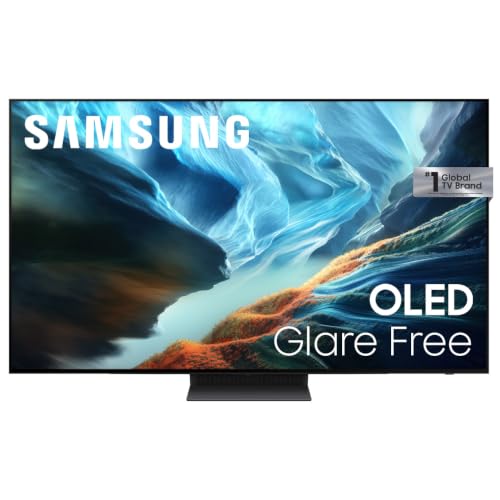

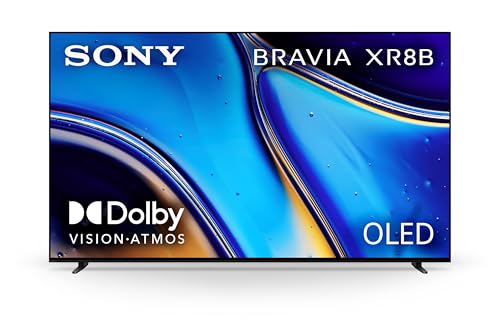
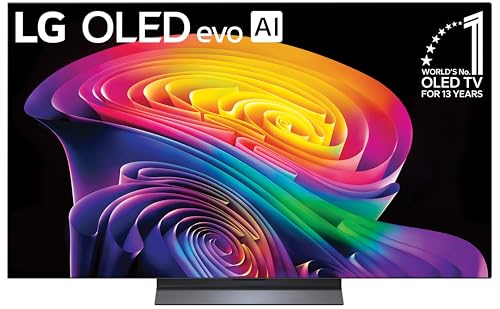


Our Top 3 Picks at a Glance
The Samsung S90H 55 inch is our best overall OLED TV for its glare free screen and strong AI processing, the LG C5 55 inch is the best value OLED with 144Hz gaming and Dolby Vision, and the Sony BRAVIA XR8B 55 inch is the best premium pick for movie lovers and PS5 owners. Check the product table above for current prices.
| Award | Product | Key Spec | Best For |
|---|---|---|---|
| Best Overall | Samsung S90H 55 inch OLED | Glare Free, NQ4 AI Gen3 processor, gaming pack | Bright living rooms |
| Best Value | LG C5 55 inch OLED evo | Up to 144Hz, 0.1ms, Dolby Vision and Atmos | Gamers and movie fans on a budget |
| Best Premium Pick | Sony BRAVIA XR8B 55 inch OLED | XR Processor, studio calibrated modes, PS5 features | Film lovers and PlayStation owners |
Best Overall: Samsung S90H 55 Inch OLED TV
The Samsung S90H 55 inch is the best OLED TV for most people, at around $1,300. It is designed to look great even in rooms with lots of light.
- Why it stands out: OLED HDR+ with Glare Free technology reduces distracting reflections, and the NQ4 AI Gen3 processor uses 128 neural networks to enhance picture and sound and upscale content to 4K.
- Gaming and motion: an Ultimate Gaming Pack delivers smooth, tear free, low latency play, AI Motion Enhancer Pro reduces blur in sports and Auto HDR Remastering makes non HDR content pop.
- Trade off: Samsung TVs do not support Dolby Vision, using HDR10+ instead.
Best for: bright living rooms, sports and mixed viewing. Skip it if Dolby Vision matters to you.

Best Value: LG C5 55 Inch OLED evo
The LG C5 55 inch is the best value OLED TV, at around $1,150. It packs flagship features into a popular midrange model.
- Why it stands out: 8.3 million self lit pixels with Brightness Booster technology, UL verification for Discomfort Glare Free performance and the Alpha 9 AI Processor Gen8 with AI Super Upscaling.
- Gaming and cinema: 0.1ms response time and up to 144Hz refresh with NVIDIA G-Sync and AMD FreeSync support, plus Dolby Vision, Dolby Atmos and Filmmaker Mode; webOS 25 includes Alexa.
- Trade off: peak brightness is lower than premium Mini LED TVs in very sunny rooms.
Best for: gamers and movie fans who want OLED at a lower price. Skip it if your room gets intense direct sun.

Best Premium Pick: Sony BRAVIA XR8B 55 Inch OLED
The Sony BRAVIA XR8B 55 inch is the best premium OLED TV for movies and PlayStation, at around $1,400.
- Why it stands out: over 8 million self lit pixels produce pure black with high brightness, and the XR Processor enhances color, contrast and clarity in real time.
- Movie and PS5 features: studio calibrated picture modes for Netflix and Prime Video, Dolby Vision, Atmos, IMAX Enhanced and DTS:X support, and PS5 exclusives like Auto HDR Tone Mapping and Auto Genre Picture Mode. Google TV, AirPlay 2 and Google Cast are built in.
- Trade off: it costs more than similarly sized LG and Samsung OLEDs.
Best for: cinephiles and PlayStation 5 owners. Skip it if value is your priority.

How to Choose the Best OLED TVs: Buying Guide
Panel Technology: OLED vs Mini LED
OLED pixels emit their own light, delivering perfect blacks and wide viewing angles. Mini LED TVs use backlights with local dimming and can get brighter, but may show blooming. OLED excels in dim rooms and for motion clarity; Mini LED suits very bright rooms. Newer OLEDs with brightness boosting and anti glare coatings narrow the gap.
Connectivity and Ports
Look for at least two HDMI 2.1 ports supporting 4K at 120Hz or higher for consoles and PCs, plus an eARC port for a soundbar. USB and Ethernet ports add flexibility.
HDR and Brightness
OLEDs support HDR10 and HLG; LG and Sony add Dolby Vision, while Samsung uses HDR10+. Brightness boosting technologies help highlights shine, and anti glare screens improve daytime viewing.
Smart Platform and Sound
Samsung uses Tizen, LG uses webOS and Sony uses Google TV. Built in Dolby Atmos support is common, but a soundbar still improves audio.
Resolution and Screen Size
All mainstream OLEDs are 4K. 55 inch suits most living rooms at 5 to 7 feet; 65 inch suits 6 to 8 feet; 77 inch and larger suit big rooms.
Refresh Rate and Response Time
OLEDs offer near instant response times, often 0.1ms, and 120Hz to 165Hz refresh rates for smooth sports and gaming.
Adaptive Sync and Gaming Features
VRR, G-Sync, FreeSync and ALLM reduce tearing and input lag. Game dashboards and low latency modes make OLEDs favorites for console and PC gaming.
Types of OLED TVs
Flagship OLED TVs
Flagship models add the brightest panels, advanced processors and premium designs, at higher prices.
Gaming Focused OLED TVs
Midrange models like the LG C series balance price and gaming features with high refresh rates and multiple HDMI 2.1 ports.
Entry OLED TVs
Entry OLEDs offer the core OLED contrast at lower prices but may have fewer HDMI 2.1 ports, lower brightness or 60Hz panels.
WOLED vs QD-OLED: What Is the Difference?
There are two main OLED panel types. WOLED panels, used in LG's OLED TVs and some Sony models, use white subpixels plus color filters and tend to be very bright with excellent efficiency. QD-OLED panels, used in some Samsung and Sony models, combine blue OLED light with quantum dots for very saturated, bright colors and wide viewing angles. Both deliver perfect blacks and fast response times; differences show mainly in color volume and how they handle room light. In practice, processing, brightness and features matter more than the panel type for most buyers.
Is Burn In Still a Concern?
Burn in happens when static images, such as news tickers, game HUDs or channel logos, stay on screen for many hours and leave faint permanent shadows. Modern OLEDs reduce the risk with pixel shifting, logo dimming, automatic brightness limiting and pixel refresh cycles that run in standby. For typical mixed viewing of movies, shows and games, burn in is uncommon. If you watch the same 24 hour news channel or play one game with a bright static HUD for hours daily, a Mini LED TV may be a safer choice.
Best Picture Settings for an OLED TV
- Choose Filmmaker, Cinema or Movie mode for accurate color.
- Turn off motion smoothing for films to avoid the soap opera effect.
- Enable game mode for consoles and PCs to minimize input lag.
- Set brightness for your room, raising it in daylight and lowering it at night.
- Keep panel care features on, such as logo luminance adjustment and pixel shift.
Pairing an OLED TV With a Soundbar
OLED TVs are thin, which limits speaker size and bass. A soundbar connected through HDMI eARC improves dialogue clarity and adds fuller sound, and Dolby Atmos soundbars pass through height effects from streaming apps and discs. Match the soundbar width roughly to the TV width for a balanced look, and see our best sounding soundbars guide for options.
Common OLED Problems and Fixes
- Screen dims in bright scenes: this is automatic brightness limiting protecting the panel; it is normal.
- Faint image retention: run the manual pixel refresh and vary content; short term retention usually fades.
- Banding in dark gradients: update firmware and try a different picture mode.
- Glare in daytime: choose models with anti glare coatings or reposition lights and curtains.
OLED TVs for Gaming
OLED TVs are among the best screens for console and PC gaming. Near instant response times keep fast motion sharp, perfect blacks make dark games look atmospheric and high refresh rates like the LG C5's 144Hz support smooth frame rates. For PS5 and Xbox Series X, make sure the TV has HDMI 2.1 ports with 4K 120Hz and VRR. Turn on game mode and HGiG, and vary content or use HUD dimming features in games with static elements to protect against burn in. See our best TVs for video games guide for more gaming options.
When to Buy an OLED TV
OLED prices drop significantly after new models launch in spring, with the biggest discounts usually around Black Friday, Cyber Monday and before major football events in late winter. Last year's OLED models often deliver nearly the same picture quality as new ones at hundreds of dollars less, making them excellent value buys.
How Much to Spend on the Best OLED TVs
- Around $1,000 to $1,300: 55 inch midrange OLEDs like the LG C5 and Samsung S90H.
- Around $1,300 to $2,000: 65 inch midrange OLEDs and 55 inch premium models.
- Over $2,000: 77 inch and larger OLEDs and flagship brightness models.
Care and Maintenance Tips
- Prevent burn in: vary content, enable logo luminance adjustment and avoid leaving static images on screen for hours.
- Let pixel refresh run: leave the TV in standby so maintenance cycles can complete.
- Clean gently: use a dry microfiber cloth only.
- Use calibrated modes: Filmmaker or movie modes look natural and reduce panel stress.
- Update firmware: updates improve features and picture processing.
OLED TVs: Your Questions Answered
What size OLED TV should I get for my room?
For viewing distances of about 5 to 7 feet, 55 inches is ideal; 6 to 8 feet suits 65 inches; larger rooms suit 77 inches or more.
How long do OLED TVs last?
Modern OLED TVs typically last many years of normal use, with gradual brightness reduction over time. Pixel care features and varied content help them age well.
Is 4K worth it on an OLED?
Yes. All mainstream OLEDs are 4K, and the extra detail is clearly visible at 55 inches and larger.
Does refresh rate matter for non gamers?
A higher refresh rate makes sports and fast scenes smoother, but movies and shows look great at standard rates. Gamers benefit most.
IPS vs OLED: which is better?
OLED delivers far better contrast, black levels and response times. IPS LCD TVs offer good viewing angles at lower prices but cannot match OLED's blacks.
Are OLED TVs good in bright rooms?
Modern OLEDs with brightness boosting and anti glare coatings, like the Samsung S90H and LG C5, perform well in most living rooms. In very sunny rooms facing large windows, a bright Mini LED TV may still look punchier.
Do OLED TVs use a lot of power?
OLED power use varies with what is on screen: dark scenes use less power, bright scenes more. Overall, a 55 inch OLED uses a similar amount of power to comparable LED TVs.
Can I wall mount an OLED TV?
Yes. OLED TVs are thin and light for their size, making them easy to wall mount with a VESA compatible bracket. Leave space behind for ventilation and cable access, and anchor the mount into studs.
Wrapping Up
Choose an OLED TV by room brightness, HDR format and gaming needs. The Samsung S90H is our all around pick for bright rooms, the LG C5 is the value choice for gamers and movie fans and the Sony BRAVIA XR8B is the premium option for cinephiles and PS5 owners. The best OLED TVs deliver stunning contrast every night, so check the product table above for current prices.


